
Key Takeaways
- The NetSuite Employee Center is a role-based self-service portal built into NetSuite that gives employees and managers direct access to HR tasks, personal records, payroll data, and time-off management without going through the HR team.
- Self-service is the core value proposition. Through the Employee Center, both employees and managers have self-service capabilities to perform common tasks: update addresses, add bank accounts, view time off balances, monitor goal progress, and see copies of paychecks and expense reports.
- The Employee Center is part of SuitePeople, NetSuite’s Human Capital Management module. It is not a standalone product. It is the employee-facing layer of the broader SuitePeople HR platform.
- Manager self-service is as important as employee self-service. Managers can initiate promotions, approve time-off requests, review expense reports, and monitor team goal progress from their own Employee Center dashboard.
- Setup requires a role assignment, not a separate product purchase. The Employee Center role is configured in NetSuite by an administrator and assigned to employee records individually or in bulk.
- The time savings compound across headcount. Each self-service task an employee completes independently removes an HR touchpoint. For a 200-person company, that compounds into hours of administrative time recovered per week.
The NetSuite Employee Center is a self-service portal built into NetSuite that gives employees and managers direct access to their HR records, payroll information, time-off balances, expense reports, and personal data, without routing every request through the HR or finance team.
It is not a module you purchase separately. It is a role within NetSuite’s SuitePeople platform, assigned to employee records by an administrator. Once assigned, an employee logs into NetSuite and sees a simplified, role-scoped interface that shows only what they need: their paycheck, their leave balance, their profile, and their task queue.
This guide covers what the Employee Center includes, what managers can do with it, how it differs from SuitePeople broadly, how to configure it, and what HR teams gain when their organization uses it correctly.
What Is the NetSuite Employee Center?
The NetSuite Employee Center is the self-service layer of NetSuite’s SuitePeople Human Capital Management (HCM) module. It gives employees a secure, role-based portal where they can manage their own HR information and complete common administrative tasks without requiring HR involvement.
All these capabilities are easily accessed via the NetSuite Employee Center, an employee self-service portal available within NetSuite. Employees and managers can enter expense reports and purchase requests, track time by project, manage their employee profile and access HR-related documents, all from a centralized location.
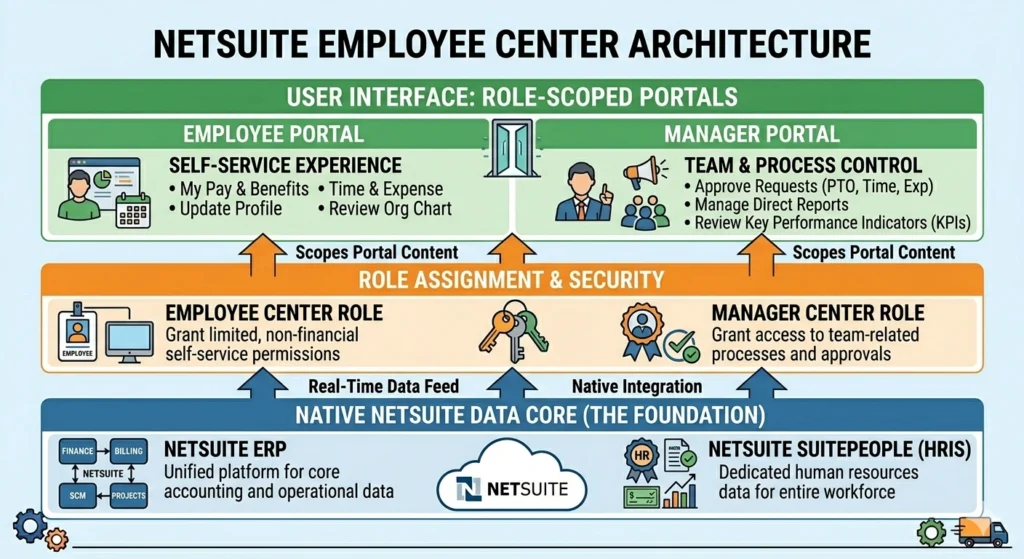
The portal is role-scoped. An employee assigned the Employee Center role sees only their own data. A manager assigned the Manager Center role sees their own data plus a team view. A payroll administrator sees the full SuitePeople platform. Nobody sees data outside their assigned scope.
This role-based architecture is what makes Employee Center secure and scalable. Adding a new employee to the system means assigning the role. Removing an employee means revoking it. No separate licensing, no separate system.
NetSuite Employee Self-Service Features
Below are the employee self-service features you need to know:
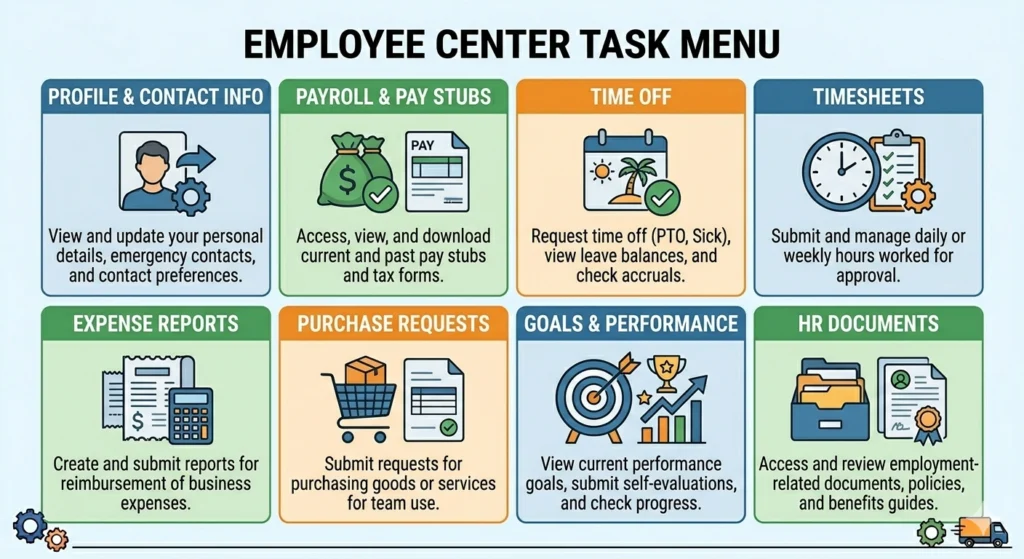
Personal Profile Management
Employees can view and update their own contact information, emergency contacts, banking details for direct deposit, tax withholding forms (W-4), and mailing address directly in the Employee Center. Changes made in the portal update the underlying employee record in real time.
This removes a category of HR requests entirely. Address changes, bank account updates, and emergency contact edits no longer require an employee to email HR and wait for a manual update. The employee does it directly, the record is current, and HR does not spend time on it.
Payroll and Compensation Visibility
Employees can view their pay stubs, payment history, year-to-date earnings, deductions, and compensation summary. For organizations using SuitePeople Payroll, employees access their W-2s and tax documents directly from the portal during tax season.
The pay stub view in the Employee Center matches the payroll records that finance and HR see in SuitePeople. There is no version mismatch and no PDF emailing cycle. The employee sees exactly what was calculated and paid.
Time-Off Management
Employees can view their current leave balances, submit time-off requests, and track the status of pending requests from the Employee Center. Time-off requests route automatically to the assigned manager for approval through built-in workflow logic.
The real-time balance view removes the most common HR time drain: employees asking HR how much leave they have left. Every employee always has a current answer without asking anyone.
Timesheet Entry and Project Tracking
For organizations using NetSuite project management or time billing, employees can enter time against specific projects or tasks from the Employee Center. Submitted timesheets route to the appropriate manager for approval and feed directly into project cost tracking and payroll calculations.
The new capabilities enable employees to track time by project, and enter expense reports and purchase requests, which managers can approve online.
Expense Reporting
Employees can create and submit expense reports from the Employee Center. Each expense report includes line items, amounts, categories, and receipt references. Submitted reports route to the manager approval workflow and, once approved, feed into the accounts payable process for reimbursement.
This closes the gap between when an employee incurs an expense and when it enters the finance system. Expense reports that used to live in email threads or a separate tool are now part of the same financial workflow as everything else.
Purchase Requests
Employees can submit purchase requests directly from the Employee Center. Requests route through approval workflows based on the organization’s configured rules and, when approved, convert to purchase orders in NetSuite’s procurement module.
This is useful for organizations that want to give employees budget ownership for departmental purchases without giving them access to the full procurement module.
Goal Tracking and Performance
Where SuitePeople performance management is configured, employees can view their assigned goals, track progress, and access their performance review history from the Employee Center. This keeps performance visibility in the same system as HR records rather than in a separate performance management tool.
Manager Self-Service Features
The Manager Center is a separate role within the same Employee Center framework. Managers see their own employee data plus a team management view that covers their direct reports.
Team Time-Off Approvals
Managers receive in-system notifications when a direct report submits a time-off request. They can review the request, see the team calendar for conflicts, and approve or reject it from their dashboard. The decision automatically updates the employee’s leave balance and notifies the employee.
Expense and Purchase Approval
Submitted expense reports and purchase requests from direct reports appear in the manager’s approval queue. Managers review each submission, can add notes or rejections, and route approvals downstream to finance or procurement.
The full submission history is visible in the approval screen, which means managers have context for the request without asking the employee to resend details.
Compensation and Promotion Initiation
Managers can initiate compensation changes, title updates, and promotion requests from their Manager Center dashboard. These changes create a record in SuitePeople’s compensation tracking with effective dating, which means the change is logged with a start date and history is preserved.
HR admins and managers gain a visual timeline to see when changes to compensation occurred throughout the employee lifecycle.
Team Goal Monitoring
Where performance management is configured, managers can monitor goal progress across their team from the Manager Center, identify team members behind on objectives, and access review history for each direct report.
Employee Center vs. SuitePeople: What Is the Difference?
This distinction matters for anyone evaluating or configuring the HR stack in NetSuite.
SuitePeople is NetSuite’s complete Human Capital Management (HCM) platform. It covers the full HR lifecycle: employee records, onboarding, compensation management, benefits administration, performance reviews, SuitePeople Payroll (US), and workforce management.
Employee Center is the self-service interface layer within SuitePeople. It is what employees and managers see and interact with. The underlying data, workflows, and records all live in SuitePeople. The Employee Center is the role-scoped portal that surfaces the right data and tasks for each user type.
| Employee Center | SuitePeople | |
|---|---|---|
| What it is | Self-service portal (role) | Full HCM platform (module) |
| Who uses it | All employees and managers | HR administrators, payroll team |
| What it covers | Personal HR tasks and requests | Full HR data, payroll, analytics |
| Access model | Role-based (limited view) | Full administrative access |
| Requires SuitePeople | Yes | Core product |
For a complete breakdown of SuitePeople’s HR and payroll capabilities beyond the Employee Center, our guide on SuitePeople by NetSuite covers the full platform in depth.
What HR Teams Gain When Employees Use the Center
The Employee Center’s value for HR teams is not in what it gives employees. It is in what it removes from HR’s queue.
Every self-service task an employee completes directly is a request HR does not receive, process, and respond to. At scale, these tasks represent a large portion of HR’s administrative workload.
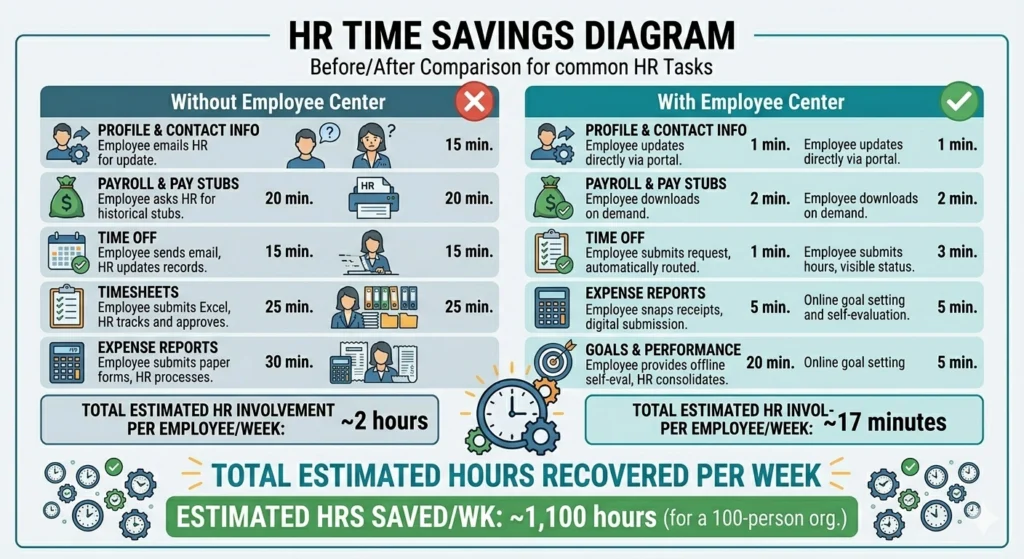
Common HR requests that self-service remove:
- “Can you update my address?” The employee does it directly.
- “How much vacation do I have left?” The employee checks their balance.
- “Can you resend my last pay stub?” The employee downloads it from the portal.
- “I need to update my bank account for direct deposit.” The employee updates it directly.
- “Can you approve my expense report?” The manager handles it in their queue.
- “I need to submit a purchase request.” The employee submits it from the portal.
The employee self-service portal allows your staff to manage various HR-related tasks independently. The portal helps streamline internal HR processes, improving efficiency and accuracy in record-keeping. Because it allows employees to access critical tasks and information without relying on direct HR intervention, it boosts employee satisfaction and reduces the administrative burden on HR teams.
For a broader look at how ERP reduces HR administrative workload across the full range of HR functions, our guide on how ERP can help with HR workload covers the full picture.
How to Set Up the NetSuite Employee Center
The Employee Center is configured through role assignment in NetSuite. Here is the setup process.
Step 1: Enable the Employee Center Feature
Navigate to Setup > Company > Enable Features > Employees tab. Confirm that SuitePeople or the base HR module is enabled. The Employee Center role requires SuitePeople to be active in the account.
Step 2: Assign the Employee Center Role to an Employee
Navigate to Lists > Employees > Employees and open the employee record.
Under the Access subtab:
- Enter an email address if one is not already present
- In the Role dropdown, select Employee Center
- Save the record
The employee will receive an email invitation to set up their NetSuite login credentials. Once they complete this, they can access the Employee Center at the company’s NetSuite URL.
Step 3: Assign the Manager Center Role for Managers
For employees who manage direct reports, assign the Manager Center role instead of (or in addition to) the Employee Center role. The Manager Center role provides both the employee-facing self-service view and the team management capabilities.
Step 4: Configure Approval Workflows
Review the default approval workflows for time-off requests, expense reports, and purchase requests. These workflows route submissions to the employee’s assigned supervisor. Confirm that each employee record has the correct supervisor assigned under the Human Resources subtab.
Step 5: Bulk Role Assignment for Large Teams
For organizations adding Employee Center access to a large number of employees at once, use the CSV import tool (Setup > Import/Export > Import CSV Records) with the employee record type to bulk update the Access subtab role field across multiple records at the same time.
Common Configuration Issues and How to Fix Them
Employee Cannot See the Employee Center Role After Login
The most common cause is that the role was saved on the employee record but the employee has not yet activated their NetSuite login. Check whether the employee has received and completed the invitation email. If not, resend the invite from the employee record’s Access subtab.
Time-Off Requests Not Routing to Manager
Check the employee record’s Human Resources subtab and confirm that a supervisor is assigned. The time-off approval workflow uses the Supervisor field to determine routing. If the field is empty, requests will not route to anyone.
Employee Can See Other Employees’ Data
This indicates the wrong role was assigned. Confirm the employee has the Employee Center role and not a broader role like Employee (Full Access) or Administrator. The Employee Center role is scoped to show only the logged-in employee’s own data.
For how the NetSuite HR module changes HR operations at a deeper functional level, our blog on how the NetSuite HR module transforms human resources covers SuitePeople’s broader capabilities.
How Employee Center Connects to the Broader SuitePeople Platform
The Employee Center does not operate in isolation. Every action an employee or manager takes in the portal connects to the underlying SuitePeople data.
When an employee updates their address, the change posts to the employee record immediately. When a manager approves a time-off request, the leave balance adjusts, and the approved hours appear in the payroll calculation. When an employee submits an expense report, it enters the AP workflow for reimbursement. When a manager initiates a promotion, the compensation record updates with effective dating.
This native data connection is what separates Employee Center from a standalone HR portal. There is no sync, no export, no manual re-entry. Every action in the Employee Center is a transaction in NetSuite.
For how this native integration with payroll and workforce management reduces labor costs and improves payroll accuracy, our blog on how NetSuite helps reduce labor costs covers the workforce management side in detail.
Final Thoughts
The NetSuite Employee Center reduces HR administration by moving routine tasks from HR’s queue to the employee’s own hands. Every address update, leave balance inquiry, pay stub request, and expense submission that employees handle directly is time HR does not spend on it.
The setup is not complex. A role assignment and a supervisor field are the two configuration requirements that unlock the core functionality. From there, employees manage their own data and managers manage their own teams, and HR focuses on the work that requires HR judgment rather than HR data entry.
For organizations already on NetSuite with SuitePeople enabled, the Employee Center is available. If it is not being used, it is a configuration step, not a purchase decision.
If you want to understand how to configure the Employee Center for your specific organization or expand your SuitePeople capabilities, the Folio3 team works with businesses at every stage of this setup. Book a Call!
FAQs
What is the NetSuite Employee Center?
The NetSuite Employee Center is a role-based self-service portal built into NetSuite’s SuitePeople HCM module. It gives employees direct access to their pay stubs, leave balances, personal profile, expense reports, timesheet entry, and HR documents. Managers access a related Manager Center role that adds team management capabilities including time-off approvals and compensation change initiation.
How do I give an employee access to the NetSuite Employee Center?
Navigate to Lists > Employees > Employees, open the employee record, go to the Access subtab, add the employee’s email address if not present, and assign the Employee Center role in the Role field. Save the record. The employee will receive an email to set up their login credentials.
What is the difference between the Employee Center and SuitePeople?
SuitePeople is NetSuite’s full Human Capital Management platform covering HR records, payroll, benefits, and performance management. The Employee Center is the self-service interface layer within SuitePeople, a role-scoped portal that gives employees and managers access to their own data and tasks. SuitePeople is the platform. The Employee Center is the employee-facing view.
What can managers do in the Employee Center?
Managers assigned the Manager Center role can approve time-off requests, review and approve expense reports and purchase requests, initiate promotions and compensation changes, monitor team goal progress, and view team attendance and time records. All of this happens within the same role-scoped portal interface.
Does Employee Center require a separate NetSuite license?
The Employee Center role is available to any NetSuite user with SuitePeople enabled. Employees assigned the Employee Center role are typically counted as named users, which may have licensing implications depending on your NetSuite contract. Confirm with your NetSuite account manager whether your current user count and license type covers the number of employees you plan to give portal access.
What data does the Employee Center give employees access to?
Employees see their own personal profile and contact information, pay stubs and year-to-date compensation, leave balances and time-off request history, submitted and approved expense reports, submitted timesheet records, assigned goals and performance review history, and HR documents shared by the organization. The Employee Center role is scoped so employees cannot see other employees’ data.

