Summary
- NetSuite has three billing automation tools: Billing Schedules, SuiteBilling, and Advanced Revenue Management. Each does a different job, and most businesses need more than one.
- Billing Schedules handle straightforward recurring invoicing on fixed or anniversary cycles.
- SuiteBilling is the subscription-native module that covers proration, usage-based billing, renewals, upgrades, downgrades, and mid-contract modifications.
- Advanced Revenue Management (ARM) handles revenue recognition separately from billing, a requirement for ASC 606 and IFRS 15 compliance.
- Manual invoice processing costs approximately $4 per invoice compared to $2.25 for fully automated invoicing.
- Most SaaS and subscription businesses need all three tools working together, not in isolation.
Introduction
If your finance team is still generating invoices manually each month, or if recurring revenue and revenue recognition sit in two different systems that do not talk to each other, NetSuite has three distinct tools that address this problem. Most businesses are only using one of them.
This guide explains how Billing Schedules, SuiteBilling, and Advanced Revenue Management work, what each one handles, how they connect, and which combination your business model actually needs.
What Are the Three Ways NetSuite Handles Recurring Billing?
How the Three Tools Differ and When to Use Each
NetSuite’s recurring billing capability is not a single module. It is a stack of three tools, each designed for a different layer of the billing and revenue process. Billing Schedules handle the mechanics of when invoices go out. SuiteBilling manages the subscription lifecycle. ARM ensures revenue is recognized in compliance with accounting standards, independent of when invoices are sent.
Understanding where one tool ends and the next begins is the starting point for building a billing operation that does not require manual intervention to stay accurate.
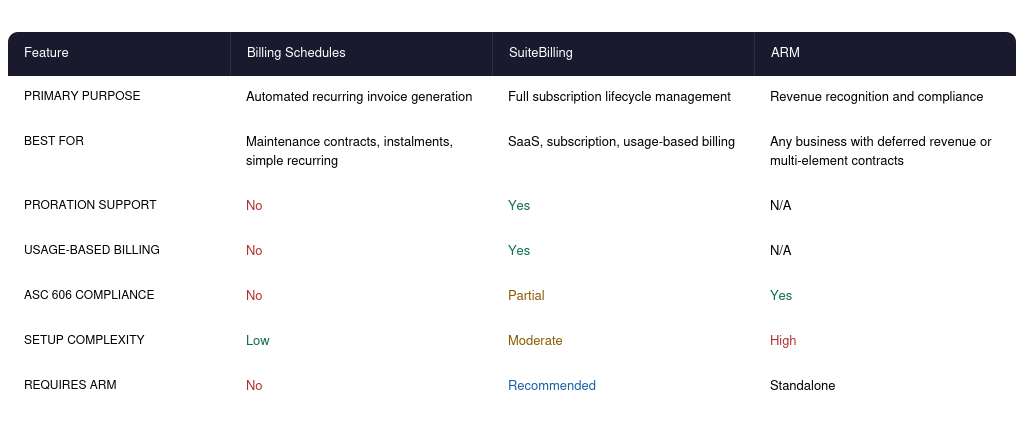
Matching the Tool to Your Billing Model
The right combination depends on your billing model and revenue recognition obligations.
- Simple recurring contracts (annual maintenance, retainer fees, installment payments): Billing Schedules alone are sufficient
- Subscription SaaS or software licenses: SuiteBilling for billing lifecycle, plus ARM for deferred revenue and ASC 606 compliance
- Professional services with milestone billing: Billing Schedules for installment invoicing plus ARM for percentage-of-completion revenue recognition
- Usage-based or metered services: SuiteBilling with charge-based billing accounts plus ARM if revenue recognition rules apply
- Multi-element arrangements (software plus implementation plus support): ARM is required regardless of which billing tool generates the invoices
NetSuite Billing Schedules: How Do They Work?
Setup, Recurrence Patterns and Schedule Management
A NetSuite billing schedule is a record that defines when and how much to invoice a customer over the life of a sales order or contract. It sits on the sales order and tells NetSuite when to generate each invoice, in what amount, and on what date. Once configured, billing schedules run automatically, and finance does not need to create each invoice individually.
Billing schedules are the right tool for predictable, structured billing where the amounts and dates are known at the point of sale: installment plans, maintenance contracts, annual software fees split across quarters, and similar arrangements.
Concrete example: A $1,000 service contract with an upfront payment followed by two monthly installments would be structured as:
- Invoice 1 at contract start: $500 (50% of contract value)
- Invoice 2, one month later: $250 (25% of contract value)
- Invoice 3, one month after Invoice 2: $250 (25% of contract value)
Step-by-Step Setup in NetSuite
NetSuite’s billing schedule setup follows a straightforward path once you know where to find it.
- Go to Lists > Accounting > Billing Schedules > New
- Enter a Name for the schedule. This name appears on the sales order.
- Set the Initial Amount: either a fixed dollar value or a percentage of the total order amount
- Set the Recurrence: weekly, monthly, or quarterly
- Set the Number of Recurrences: how many times the recurring invoice generates after the initial bill
- Save the schedule
Once the schedule is saved, apply it to a sales order either at the header level (applies to the entire order) or at the line-item level (applies to a specific item on the order). To automate the application, assign a default billing schedule to the item record. It then applies automatically whenever that item appears on a sales order.
Public vs Private Billing Schedules
Billing schedules can be marked as either Public or Private.
- Public schedules are reusable across multiple sales orders and customer accounts. They work well for standard contract structures that repeat across your customer base.
- Private schedules are restricted to the specific sales order from which they were created. They are appropriate for one-off arrangements with custom payment terms.
Note: milestone billing schedules cannot be set to Public. They are always private to the transaction.
Fixed Bill Date vs Anniversary Bill Date
Two recurrence patterns exist within billing schedules and charge-based billing accounts.
- Fixed bill date: invoices are generated on a specific calendar date regardless of when the contract started. For example, all customers bill on the 1st of the month. This works well when you want to align all billing cycles to a single date for easier cash flow management.
- Anniversary bill date: invoices are generated on the same day of the month as the contract start date. A contract starting on the 15th always bills on the 15th. This is more appropriate when each customer has individual contract terms that should not be merged into a shared billing cycle.
Managing Active Billing Schedules
Once a billing schedule is active on a sales order, a few operational rules apply.
- To advance the schedule manually, click Next Bill. Any remaining unbilled lines carry forward to the next billing date.
- To remove a line from an active billing schedule, close the line on the sales order rather than deleting it, to preserve the expected billing amounts in the system.
- Editing an active billing schedule requires resaving the associated sales order to apply the changes to existing instances.
- View the full billing schedule from the Schedule subtab on the sales order record.
NetSuite SuiteBilling: The Subscription-Native Module
What SuiteBilling Covers That Billing Schedules Cannot
SuiteBilling is NetSuite’s subscription billing module. Where billing schedules handle the mechanics of invoice generation on a fixed schedule, SuiteBilling manages the full lifecycle of a subscription: creation, pricing, changes, renewals, cancellations, and usage-based charges. It is built specifically for businesses where customer relationships are ongoing, contracts change, and billing needs to reflect those changes accurately without manual intervention.
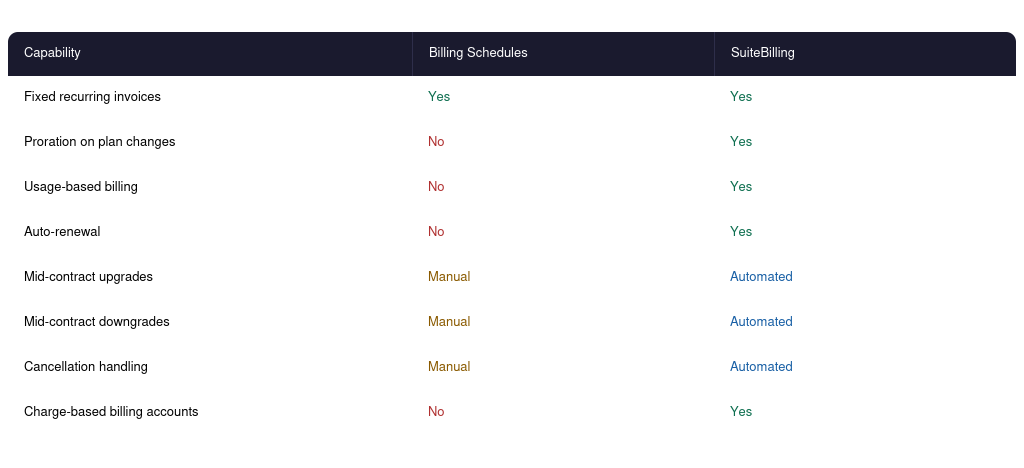
For a deeper look at SuiteBilling’s full feature set, the NetSuite SuiteBilling features guide covers how each capability works within the broader subscription management workflow.
Subscription Terms and Renewal Automation
SuiteBilling manages subscription terms: the start date, end date, pricing tier, and renewal behavior, as a native record rather than a workaround on a sales order.
- Auto-renewal triggers at the end of a defined term based on renewal window configuration
- SuiteFlow workflows can fire renewal alerts 30, 60, or 90 days before a contract expires, giving sales and account management teams time to act before a lapse
- Evergreen subscriptions (month-to-month, no fixed end date) and fixed-term contracts are both supported natively
Proration Logic for Mid-Period Changes
Proration is the calculation of a partial period charge when a subscription changes mid-cycle. Without proration logic in your billing system, every mid-period upgrade or downgrade requires a manual credit memo and a new invoice, which compounds quickly at scale.
Example: A customer on a $600/month plan upgrades to a $900/month plan on day 15 of a 30-day billing cycle. SuiteBilling calculates:
- Credit for unused days on the old plan: $300 (15 days at $20/day)
- Charge for remaining days on the new plan: $450 (15 days at $30/day)
- Net adjustment: $150 billed on the upgrade date
This happens automatically. Finance does not touch it.
Usage-Based and Charge-Based Billing
Charge-based billing accounts in SuiteBilling handle usage or consumption billing. Charges accumulate against the billing account during the period, and a single invoice is generated at the end of the cycle covering all charges.
- Units consumed, hours logged, API calls, data volume: any measurable unit can feed charges into a billing account
- Fixed bill date or anniversary bill date patterns both apply to charge-based billing
- Tiered pricing and overage charges are configurable within the subscription record
- Use cases: metered SaaS platforms, managed services billed by consumption, professional services billed by hours or project units
Mid-Contract Modifications
Mid-contract changes are where manual billing processes break down. SuiteBilling handles four types of modification automatically.
- Upgrades: increase the subscription tier and prorate the difference for the current period
- Downgrades: reduce the tier and generate a credit for the difference
- Cancellations: close the subscription on the requested date, generate the final invoice or credit memo, and mark the contract closed
- End date extensions: push the contract end date forward, extend billing for additional periods, and update the renewal trigger
Each modification is logged against the subscription record with a full audit trail, critical for both internal controls and customer dispute resolution.
NetSuite Advanced Revenue Management: Billing vs Recognition
Why ARM Exists as a Separate Layer from Billing
Billing is when you send an invoice. Revenue recognition is when you record revenue in your financial statements. Under ASC 606 (US GAAP) and IFRS 15 (international), these two events are often not the same date, and the gap between them can be significant for subscription businesses.
ARM automates the full revenue recognition process: forecasting future revenue, allocating contract value across performance obligations, recognizing revenue as obligations are satisfied, reclassifying deferred and unbilled balances, and generating the audit trail that compliance requires. Without ARM, these processes happen in spreadsheets, which introduces errors, delays the month-end close, and creates audit exposure.
ARM automates five processes that finance teams otherwise handle manually:
- Forecasting deferred and recognized revenue positions
- Allocating contract value across performance obligations
- Recognizing revenue as each obligation is satisfied
- Reclassifying balances between Deferred Revenue, Unbilled Revenue, and recognized Revenue
- Auditing every recognition event with a complete transaction log
Revenue Recognition Rules and Configuration
Before ARM can automate recognition, three inputs must be configured for each item or contract type.
- Recognition method: ratable (straight-line over the contract term), event-based (triggered by a milestone), or percentage of completion
- Amount source: what value ARM uses as the recognition base, whether the transaction price, the allocated fair value, or a custom formula
- Start and end date source: where ARM reads the recognition period from, the sales order dates, the item fulfillment date, or a custom field
These configurations are set at the item level and applied automatically when that item appears on a revenue arrangement. Getting them right at setup is the most important step. Incorrect configurations produce incorrect recognition entries that require manual reversals.
Revenue Allocation Across Performance Obligations
When a single contract includes multiple deliverables (software licence, implementation, and ongoing support), the contract price must be allocated across each element in proportion to its standalone selling price (SSP) before recognition begins.
Example: A $12,000 annual contract with three elements:
- Software license SSP $8,000: recognized ratably over 12 months at $667/month
- Implementation SSP $3,000: recognized on completion of the implementation milestone
- Support SSP $1,000: recognized ratably over 12 months at $83/month
ARM handles this allocation automatically using fair value price lists. Finance sets up the SSP for each item, and ARM distributes contract revenue across elements each time a new arrangement is created.
Unbilled Revenue and Contract Assets
It is common for a business to recognize revenue before billing the customer. A 12-month contract where implementation is completed and fully recognized in month 1, but invoiced monthly across 12 months, creates an unbilled revenue position (a Contract Asset on the balance sheet).
NetSuite ARM detects this imbalance automatically at the item level and books the reclassification entry to the Unbilled Revenue GL account. Finance does not need to calculate or post this manually. It happens as part of the recognition run.
Contract Modifications in ARM
When a contract changes, revenue recognition must reflect the new terms.
- End date extensions: ARM takes the remaining deferred revenue balance and spreads it over the new remaining term automatically
- Accelerations: recognition period shortens, remaining balance recognized over fewer periods
- Cancellations: ARM closes the revenue element, recognizes any remaining balance per the applicable method, and marks the arrangement complete
- Price or quantity changes: ARM recalculates the allocated fair value and adjusts the recognition schedule going forward
The most common failure mode is modifying billing in SuiteBilling without updating the corresponding ARM revenue element, or vice versa. When billing and revenue are in sync, contract modifications flow through cleanly. When they are not, the month-end close becomes a reconciliation exercise.
SuiteFlow Automation for Recurring Billing Events
Automating Billing Triggers, Alerts and Renewals
SuiteFlow is NetSuite’s workflow automation engine. In the context of recurring billing, it connects the billing tools to the actions that need to happen when billing events occur, without requiring manual monitoring of each customer account.
- Renewal alerts fire 30, 60, or 90 days before contract expiry, routed to the account owner, sales team, or finance
- Missed payment notifications trigger when an invoice passes its due date without payment
- Auto-invoice generation fires on the billing event date without a user needing to initiate the billing run
- Contract expiry escalations route to management when a renewal window closes without action
- Internal alerts for billing schedule exceptions, such as changes in customer status, billing address mismatches, or suspended accounts
SuiteFlow rules are configured as workflow records tied to the relevant transaction type. Once active, they run in the background across all affected customer accounts without ongoing manual oversight.
NetSuite Recurring Billing by Business Type
The Right Tool Stack for Each Business Model
The right tool combination depends on what your contracts look like, whether your revenue recognition obligations are complex, and how much your billing model varies across customers.
SaaS and Subscription Software
For SaaS businesses, the billing lifecycle is rarely simple. Customers upgrade, downgrade, pause, and cancel throughout the contract term, and each change affects both what gets billed and what gets recognized.
- SuiteBilling for subscription lifecycle: plan creation, upgrades, downgrades, renewals, cancellations, proration
- ARM for ASC 606 compliance: deferred revenue, multi-element allocation if the contract includes implementation or professional services
- SuiteFlow for renewal automation and missed payment alerts
- The most important configuration decision: billing modifications in SuiteBilling must automatically feed the correct inputs to ARM revenue elements
Professional Services and Consulting
Professional services contracts typically bill on milestones rather than calendar dates. The revenue recognition pattern follows project progress, not invoice dates.
- Billing Schedules for milestone and installment billing (50% on engagement start, 25% at project midpoint, 25% on completion)
- ARM for percentage-of-completion revenue recognition if the engagement spans multiple accounting periods
- Finance must confirm that each billing milestone maps to a recognized performance obligation under the engagement contract
Managed Services and Maintenance Contracts
Most managed services billing is straightforward enough for Billing Schedules. SuiteBilling becomes relevant when contracts include variable consumption components.
- Billing Schedules for standard fixed-fee annual or monthly contracts
- SuiteBilling if contracts include usage-based components such as hours consumed, tickets resolved, or data volumes
- SuiteFlow for contract expiry alerts to operations and account management teams
- Anniversary billing date is typically appropriate: each customer contract renews on its own schedule
Manufacturing and Distribution with Service Contracts
Mixed orders (hardware plus annual maintenance) require a line-item level billing schedule application. Applying the schedule at the header level would incorrectly recur the hardware charge.
- Billing Schedules at the line-item level: hardware billed once at shipment, maintenance billed annually on a recurring schedule
- ARM is only required if the maintenance contract creates a deferred revenue obligation under the customer’s accounting standards

Key Takeaways
- NetSuite’s three billing tools work at different layers: Billing Schedules generate invoices on a schedule, SuiteBilling manages the subscription lifecycle, and ARM handles compliant revenue recognition.
- Proration, usage-based billing, and mid-contract modifications require SuiteBilling. Billing Schedules alone cannot handle these scenarios cleanly.
- Revenue recognition under ASC 606 and IFRS 15 is legally separate from billing. ARM automates the recognition process that would otherwise require manual spreadsheet work at every month-end.
- Billing and revenue must stay in sync through contract modifications. The most common failure point is updating one without updating the other.
- SuiteFlow ties the billing tools to automated actions, removing the manual monitoring burden from finance and operations teams.
Frequently Asked Questions
What Is the Difference Between NetSuite Billing Schedules and SuiteBilling?
Billing Schedules generate invoices on a predefined schedule for straightforward recurring contracts. SuiteBilling is a full subscription management module that handles proration, usage-based billing, plan changes, renewals, and cancellations automatically. Billing Schedules work for simple fixed-fee contracts; SuiteBilling is required when subscription terms change during the contract life.
Does NetSuite Handle ASC 606 Revenue Recognition Automatically?
Yes, through Advanced Revenue Management. ARM automates revenue forecasting, allocation across performance obligations, recognition based on configured rules, reclassification of deferred and unbilled balances, and audit logging. It must be configured with the correct recognition rules, amount sources, and date sources for each item type before it operates automatically.
How Do I Set Up a Recurring Billing Schedule in NetSuite?
Navigate to Lists > Accounting > Billing Schedules > New. Set the name, initial amount (fixed or percentage), recurrence frequency (weekly, monthly, quarterly), and number of recurrences. Save and apply the schedule to a sales order at the header or line-item level. Assigning a default billing schedule to an item record automates application on every new sales order containing that item.
What Is Proration in NetSuite SuiteBilling?
Proration is the automatic calculation of a partial-period charge when a subscription changes mid-cycle. If a customer upgrades from a lower to a higher plan on day 15 of a 30-day cycle, SuiteBilling calculates the credit for unused days on the old plan and the charge for remaining days on the new plan. The net amount is billed automatically, with no manual credit memo or new invoice required.
Can NetSuite Handle Usage-Based or Metered Billing?
Yes, through SuiteBilling’s charge-based billing accounts. Charges accumulate against a billing account during the billing period, and a single invoice covers all charges at the end of the cycle. Tiered pricing, overage charges, and multiple usage metrics are configurable within the subscription record.
Do I Need Advanced Revenue Management if I Already Use SuiteBilling?
It depends on your revenue recognition obligations. If your contracts contain a single deliverable with immediate recognition, SuiteBilling alone may be sufficient. If you have multi-element contracts, deferred revenue, or compliance obligations under ASC 606 or IFRS 15, ARM is required. Most B2B SaaS and subscription software businesses need both.
Conclusion
NetSuite’s recurring billing capability is not one module with a single configuration. It is three tools that address different parts of the billing and revenue problem. Billing Schedules handle the mechanics of when invoices go out. SuiteBilling manages what happens to a subscription over its lifetime. ARM ensures that revenue is recognized correctly, regardless of when the invoice was sent.
Businesses that treat these as separate decisions typically end up with either manual workarounds at month-end or compliance exposure they discover during an audit. Getting the configuration right from the start, and keeping billing and revenue in sync through every contract change, is where implementation quality makes a direct difference to the finance team workload and financial reporting accuracy. If you are evaluating NetSuite’s SuiteBilling module or the broader implementation scope for your subscription billing operation, the Folio3 team can scope a configuration that fits your contract model and revenue recognition requirements. Book a call to get started.