
In manufacturing, accurate scheduling is critical to keeping production on track. Oracle NetSuite provides Work Center Calendars to help businesses manage machine availability, labor capacity, and production timelines in one place. Without properly configured calendars, production orders can overlap, resources may be overbooked, and delivery timelines can slip.
Setting up Work Center Calendars in NetSuite allows you to define working hours, shifts, holidays, and downtime for each work center. This ensures your production plans reflect real operational capacity.
In this guide, you will learn how to set up Work Center Calendars step by step, avoid common mistakes, and ensure your scheduling data stays accurate and reliable.
What Are Work Centers in NetSuite and Why They Matter for Manufacturing Scheduling
In Oracle NetSuite, a work center represents a specific location where production tasks are performed. This can be a machine, a group of machines, a production line, or even a team of workers responsible for a particular operation.
Work centers act as the foundation of your manufacturing setup. They define where and how work gets done, making them essential for accurate production planning and execution.
- Work Center X: Operates four days a week for 11 hours
- Work Center Y: Operates five days a week for 9 hours
Production managers can set up a work calendar for every work center that descript the working hours for each. In view of this work center calendar data, you have continuous visibility into overall work scheduling limits, and in addition, efficient assembling steering that computes the preparing time.
To use work center calendars, complete these steps:
- Set up a Work Center Calendar
- Assign a Work Calendar to a Work Center
Why Work Centers Matter
Work centers play a critical role in manufacturing scheduling because they directly impact how production orders are planned and executed. Without properly defined work centers, scheduling becomes inaccurate and inefficient.
They help ensure that your production plan reflects actual capacity and constraints.
- Define where each operation takes place
- Control the machine and labor capacity
- Prevent overbooking of resources
- Improve production visibility and tracking
- Support accurate job scheduling and timelines
How They Support Scheduling
Work centers are closely tied to routing and scheduling in NetSuite. Each operation in a routing is assigned to a specific work center, which helps the system determine when and where tasks should be performed.
This ensures production flows smoothly from one stage to the next.
- Assign operations to specific resources
- Calculate realistic production timelines
- Align schedules with available capacity
- Reduce delays caused by resource conflicts
When combined with work center calendars, they give you a complete picture of your production capacity and availability.
Work Centers vs. Locations in NetSuite
In Oracle NetSuite, work centers and locations serve very different purposes, even though both relate to how your operations are structured. Understanding the difference is important for accurate manufacturing setup and reporting.
What Are Work Centers?
Work centers are used inside the manufacturing process. They represent where actual production work happens, such as machines, assembly lines, or labor teams.
They are focused on operations and scheduling, not storage or inventory.
- Represent production resources (machines, lines, labor)
- Used in routing and manufacturing operations
- Help define capacity and production time
- Linked to work center calendars for scheduling
What Are Locations?
Locations are used for organizing inventory and transactions across your business. They represent physical or logical places where items are stored, sold, or moved.
They are focused on inventory management and tracking.
- Represent warehouses, stores, or distribution centers
- Track inventory quantities and stock movement
- Used in purchasing, sales, and fulfillment
- Support multi-location inventory management
Key Differences
While both are part of your operational structure, they serve completely different roles in NetSuite.
| Feature | Work Centers | Locations |
|---|---|---|
| Purpose | Production execution | Inventory storage and tracking |
| Used In | Manufacturing routing and scheduling | Inventory, sales, and fulfillment |
| Focus | Capacity and operations | Stock and logistics |
| Example | Assembly line, cutting machine | Warehouse, retail store |
Set up a Work Center Calendar In NetSuite
- Go to Lists > Employees > Work Calendars > New
- Enter a name for the work calendar. Using a descriptive name to help define when and what the calendar is for can be helpful to users. Example, “Production Line, Day Shift”
- On the Working Days subtab, define the working hours and days.
- Note: work calendars can’t span more than one day. For example: you can’t setup a work calendar that starts at 8:00pm and goes beyond Midnight
- On the Non-working days subtab, define exceptions to the working days rules.
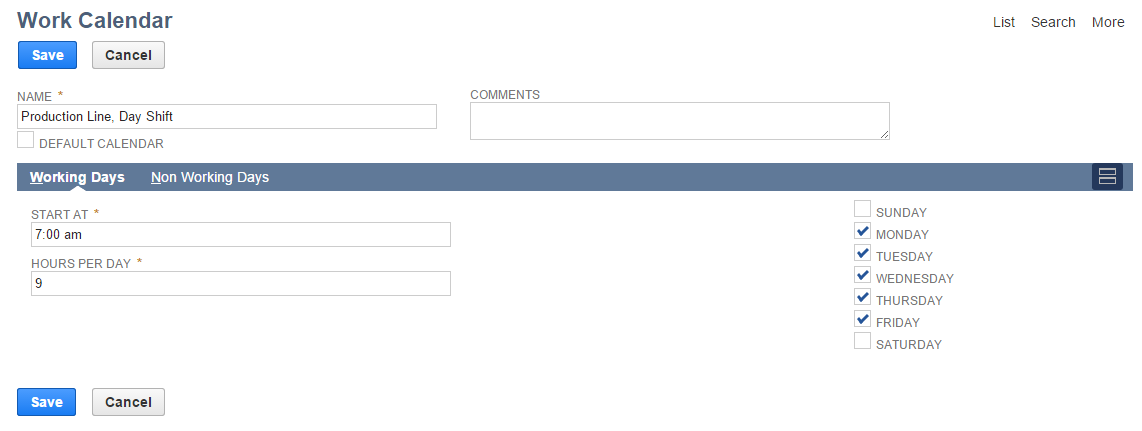
5. Click Save.
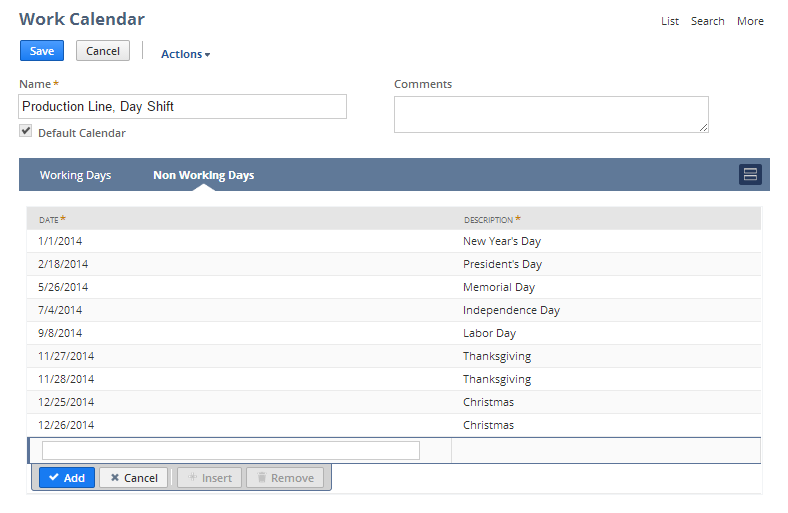
Assign a Work Calendar to a Work Center
- Go to Lists > Relationships > Groups > New.
- Click the Static
- In the members dropdown, select Employee.
- Click Continue.
- Enter a name for the group. Try to use something that makes is easy to identify what manufacturing process and/or step this group applies to. For example: Product A Packaging or Quality Inspection Group
- Check the Manufacturing Work Center checkbox to make the group available as a work center.
- On the Members subtab, add the individual group members.
- On the Manufacturing Work Center Settings subtab:
- Enter the subsidiary (if using One World systems)
- Enter the number of machine resources. This represents the number of machines operated within this work center.
- Enter the number of labor resources. This represents the number of individual resources that operate within this work center.
- Select the Work Center Calendar from the Work Calendar drop down list
- Click Save.
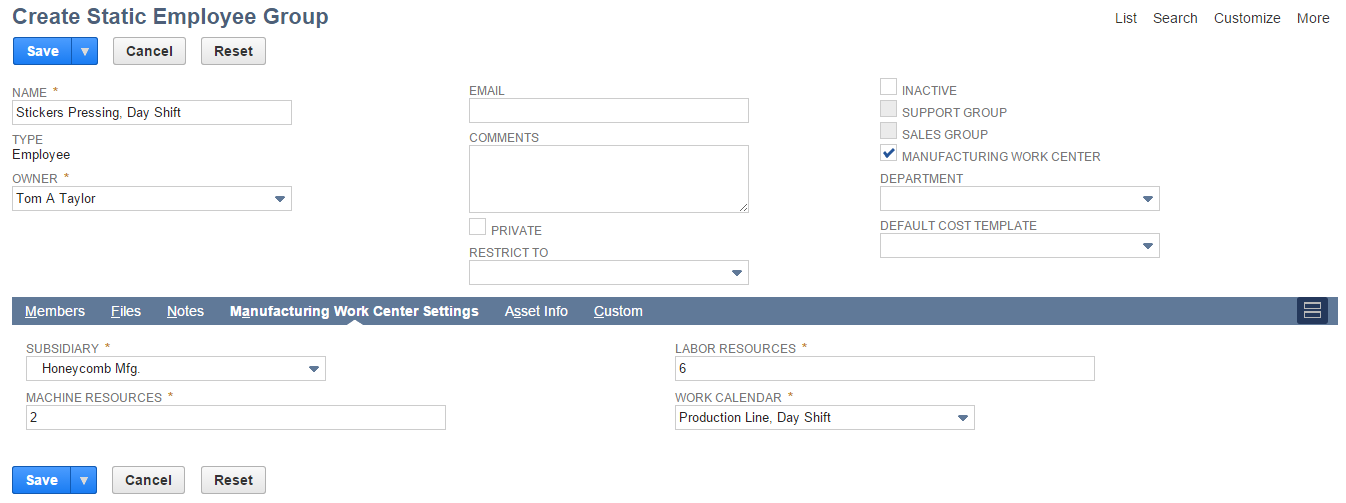
How Work Center Calendars Support Production Management Jobs
Work Center Calendars in Oracle NetSuite are essential for keeping manufacturing schedules realistic and efficient. They define when each work center is available to perform operations, including working hours, shifts, holidays, and planned downtime. Without these calendars, production orders might be scheduled during unavailable times, causing delays and resource conflicts.
How Calendars Support Production Management
Work Center Calendars provide a framework for scheduling and managing production jobs effectively:
- Align Production with Capacity
Calendars ensure jobs are scheduled only when the work center and resources are available. - Prevent Overbooking
Avoid conflicts by blocking unavailable times, reducing the risk of delays. - Incorporate Downtime and Maintenance
Planned maintenance or unexpected downtime is reflected in the schedule automatically. - Optimize Job Sequencing
Proper calendars allow NetSuite to sequence jobs efficiently, improving throughput and reducing idle time. - Improve Delivery Accuracy
By scheduling jobs realistically, you can provide reliable delivery dates to customers.
In short, work center calendars connect operational capacity with production management, ensuring jobs run smoothly, resources are used effectively, and manufacturing timelines stay on track.
Calendar Types in NetSuite Manufacturing
In Oracle NetSuite, calendars are used to manage availability for production resources, and different types of calendars help ensure accurate scheduling and capacity planning. Choosing the right calendar type is critical for smooth manufacturing operations.
1. Standard Calendar
A standard calendar defines general working days and hours for your organization or a work center. It is the most basic type and is used to set recurring schedules.
- Defines regular working hours
- Includes weekdays and weekends
- Can be applied to multiple work centers
2. Holiday Calendar
Holiday calendars specify non-working days such as public holidays, company holidays, or planned shutdowns. These are used in combination with standard calendars to prevent scheduling during off-days.
- Blocks holidays and special non-working days
- Ensures production orders are not scheduled on unavailable dates
- Can be shared across multiple work centers
3. Work Center Calendar
Work center calendars are specific to a particular work center and define its unique operating schedule. This includes shifts, machine availability, maintenance downtime, and other work center-specific constraints.
- Represents specific machine or labor availability
- Incorporates planned downtime and maintenance
- Helps with accurate production scheduling
Why Using Different Calendar Types Matters
Using the right combination of calendars ensures production scheduling is realistic and reflects actual operational capacity.
- Prevents overlapping or impossible schedules
- Aligns resource availability with production orders
- Supports better throughput and delivery accuracy
How Calendars Affect Work Order Scheduling
In Oracle NetSuite, production planning relies heavily on accurate scheduling. Work calendars—whether standard, holiday, or work center-specific—play a central role in determining when and how production orders are executed.
Work order scheduling is not just about assigning tasks to a work center. It involves aligning every operation in a routing with the actual availability of machines, labor, and shifts. Without proper calendars, production orders may be scheduled during downtime, overbook resources, or conflict with holidays, leading to delays and inefficiencies.
Key Impacts of Calendars on Scheduling
- Resource Availability
Calendars define working hours and shifts for each work center. NetSuite uses this data to schedule operations only during available periods, preventing unrealistic assignments. - Downtime and Maintenance
Work center calendars can include planned maintenance or known downtime. NetSuite automatically avoids scheduling jobs during these periods, ensuring machines are not overbooked. - Holiday Considerations
Holiday calendars ensure work orders are not scheduled on non-working days, keeping production timelines accurate and avoiding last-minute conflicts. - Load Balancing
By reflecting capacity constraints through calendars, NetSuite can balance production load across multiple work centers, reducing bottlenecks and idle time. - Operation Sequencing
Proper calendars allow NetSuite to determine the sequence of operations in a routing realistically. This ensures each step starts only when the required resources are available, improving efficiency and throughput. - Accurate Delivery Dates
Scheduling against real work calendars helps provide reliable promised delivery dates. Customers benefit from fewer delays, and production teams can plan material and labor more effectively.
Example
Suppose a work center operates Monday–Friday, 8 AM–4 PM, with maintenance every Wednesday afternoon.
- Without a calendar, a 2-hour operation might be scheduled during Wednesday maintenance or after hours.
- With the work center calendar applied, NetSuite automatically schedules the operation for available time slots on Monday, Tuesday, Thursday, or Friday, ensuring the plan matches actual capacity.
In short, calendars bridge the gap between production scheduling and planning along with real-world constraints, ensuring work orders are feasible, resources are used efficiently, and delivery schedules are realistic.
Maximize Production Efficiency with NetSuite
Stop wasting time on scheduling errors, machine downtime, and resource conflicts. With properly configured work center calendars in Oracle NetSuite, you can increase throughput, reduce delays, and meet delivery targets consistently.
Partner with our experts to implement a system that optimizes your production capacity and ensures every operation runs on time.
FAQs
1. What is a Work Center Calendar in NetSuite?
A work center calendar defines the working hours, shifts, holidays, and downtime for a specific work center in Oracle NetSuite. It ensures production scheduling reflects actual machine and labor availability.
- Used to schedule operations realistically
- Includes planned maintenance and non-working days
- Helps prevent overbooking of resources
2. How do calendars affect work order scheduling?
Calendars directly influence when production jobs can start and finish. NetSuite uses calendar data to align operations with available capacity and prevent conflicts.
- Avoids scheduling during downtime or holidays
- Balances workload across multiple work centers
- Supports accurate promised delivery dates
3. What types of calendars can I create in NetSuite?
NetSuite supports multiple calendar types to manage production effectively:
- Standard Calendar: Defines general working hours
- Holiday Calendar: Marks non-working days and company holidays
- Work Center Calendar: Specifies machine or labor availability, including maintenance
Using the right calendar type ensures production schedules are realistic and resource conflicts are minimized.
4. Can I have different calendars for multiple work centers?
Yes, each work center can have its own calendar to reflect its unique operating schedule. This allows flexibility for different machines, teams, or shifts.
- Assign specific shifts or downtime per work center
- Align production orders with actual capacity
- Improve efficiency and reduce idle time
5. Do I need a separate calendar for maintenance or downtime?
It’s recommended to create work center calendars that include planned maintenance or known downtime. This ensures NetSuite does not schedule operations during unavailable periods.
Helps plan maintenance without affecting operations
Prevents overbooking machines or labor
Keeps production timelines accurate
