
Key Takeaways
- HRIS stands for Human Resource Information System. It is software that centralizes and automates core HR functions like employee data management, payroll, benefits, time tracking, and compliance.
- HRIS saves HR teams up to 2 hours per day on administrative tasks. That time goes back to strategy, hiring, and the work that actually moves the business forward.
- HRIS, HRMS, and HCM are not the same thing. HRIS handles core HR data and processes. HRMS adds performance and talent management. HCM is the broadest category covering workforce strategy.
- For businesses already on NetSuite, HRIS integration is where the real value lives. When your HR system talks to your ERP, payroll data flows automatically into the general ledger. No manual exports. No reconciliation errors.
- The three types of HRIS match different business stages. Operational HRIS for admin, tactical HRIS for recruitment and development, strategic HRIS for workforce planning.
- Choosing an HRIS without a NetSuite integration plan is a common and expensive mistake. Two separate systems that do not share data create exactly the problems you bought the HRIS to solve.
Picture this. Your company just crossed 150 employees. HR is running on a combination of spreadsheets, email threads, and a payroll tool that does not talk to anything else. Every new hire requires updating at least four separate documents. When someone gets a raise, the payroll file, the benefits record, the org chart, and the ERP system all need manual updates. And when someone leaves, you find out three weeks later that their system access was never revoked.
Sound familiar? We see this at the exact point when businesses outgrow spreadsheet-based HR. The volume of employee data gets too high, the compliance requirements get too complex, and the manual work becomes the kind of thing that fills entire Fridays with nothing but data entry.
A Human Resource Information System solves this. It brings all of that scattered employee data into one system, automates the repetitive work, and gives your HR team the time and the visibility to manage people instead of managing paperwork.
This guide explains what an HRIS is, how it works, what it includes, how it differs from HRMS and HCM, and why connecting it to your ERP is the decision that makes all the other ones worthwhile.
What Is an HRIS?
A Human Resource Information System (HRIS) is software that centralizes and automates core HR functions. Think of it as the single source of truth for everything related to your workforce: who works for you, what they earn, what benefits they have, how much leave they have taken, and whether your organization is compliant with employment regulations.
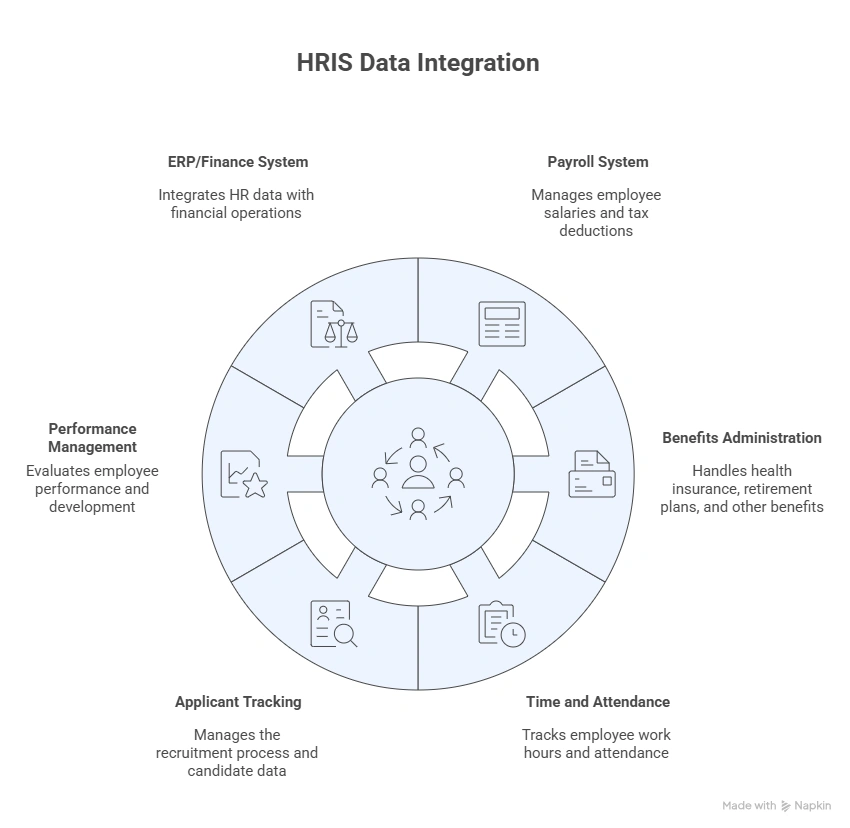
A Human Resource Information System (HRIS) is software that centralizes and automates HR functions like payroll, benefits administration, time tracking, and employee data management.
Before HRIS software became mainstream in the 1980s, HR departments managed everything on paper. Filing cabinets. Typed records. Manual payroll calculations. The administrative load was enormous, and accuracy depended entirely on whoever was entering the data that day. Modern HRIS systems changed that. Today, they automate workflows, integrate with other business systems, and increasingly use AI to surface insights that used to require a data analyst to find.

What Does an HRIS Actually Do?
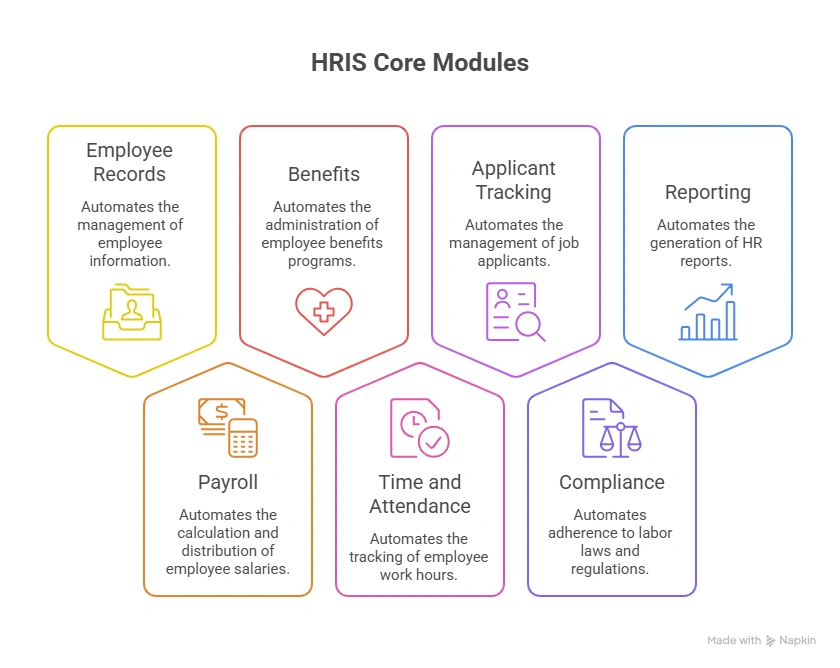
An HRIS is more than a database of employee records. It automates the repetitive, compliance-critical work that previously ate up HR teams’ time. Here is what the core modules handle in practice.
Employee Records Management
Every employee’s data lives in one place: name, address, start date, job title, department, compensation history, visa or work permit status, emergency contacts, and performance history. When something changes, it updates once and reflects everywhere.
The alternative is updating a payroll file, an org chart, a benefits portal, and an ERP system separately. Multiply that by every change that happens across a 200-person workforce in a quarter, and you understand why centralized records matter.
Payroll Processing
The payroll module automates the calculation and disbursement of employee wages. It accounts for hours worked, overtime rules, tax deductions, benefit contributions, and deferred compensation. For businesses operating across multiple states or countries, it applies the correct tax rules for each jurisdiction automatically.
AIHR research shows that HR professionals can save as much as 2 hours of admin time per document by using an HRIS and electronic signatures instead of paper documents. Multiply that across a year of payroll cycles and you start to understand the operational value.
Benefits Administration
The benefits module manages enrollment, eligibility tracking, and plan administration across health insurance, dental, vision, retirement savings, and voluntary benefits. Employees can access and update their own selections through a self-service portal rather than filing forms and waiting for HR to process them manually.
For HR teams that currently manage open enrollment through email threads and paper forms, this is one of the most visible improvements an HRIS delivers.
Time and Attendance
Time tracking in an HRIS communicates directly with payroll to keep records accurate. Shift schedules, overtime rules, paid time off balances, and leave requests are all managed in one place. When an employee submits a leave request, the system routes it to their manager, applies the approval, adjusts the balance, and notifies payroll automatically.
Applicant Tracking
Most HRIS platforms include an applicant tracking system (ATS) that manages the full recruitment workflow: job postings, candidate applications, resume screening, interview scheduling, and offer management. When a candidate is hired, their record converts to an employee profile without manual re-entry.
Compliance Management
Employment law changes constantly. Minimum wage updates, FMLA requirements, ACA reporting, GDPR data protection, visa expiry tracking. An HRIS with compliance management monitors these requirements and alerts HR teams to deadlines, changes, and required actions.
Juggling various regional and national employment regulations like the Affordable Care Act, Family Medical Leave Act, and Fair Labour Standards Act becomes exponentially easier with a robust HRIS. Automated alerts and notifications around compliance deadlines, along with an auditable system of record storage, significantly reduce regulatory risk.
Reporting and Analytics
A centralized HRIS gives HR teams access to workforce data they previously had to compile manually. Headcount by department. Turnover rates by team. Average time-to-hire. Compensation benchmarking. Absence patterns. This data helps HR move from administrative reports to strategic conversations about workforce planning.
HRIS vs HRMS vs HCM: What Is the Difference?
These three terms are used all the time interchangeably. They are not the same thing. Here is the practical distinction.
1. HRIS (Human Resource Information System)
It covers the core administrative HR processes: employee data management, payroll, benefits, time and attendance, and basic reporting. This is the foundation. Most mid-market businesses start here.
2. HRMS (Human Resource Management System)
Adds performance management, talent development, learning management, and more advanced analytics to the HRIS foundation. An HRMS is for organizations that want to manage not just employee records, but employee development and performance in a structured way.
3. HCM (Human Capital Management)
The broadest category. HCM covers everything HRIS and HRMS do, plus workforce planning, succession planning, organizational design, and long-term strategic workforce management. HCM treats people as a strategic asset that requires the same planning rigor as capital or technology.
| HRIS | HRMS | HCM | |
|---|---|---|---|
| Employee records | Yes | Yes | Yes |
| Payroll and benefits | Yes | Yes | Yes |
| Performance management | Sometimes | Yes | Yes |
| Learning and development | Rarely | Yes | Yes |
| Workforce planning | No | Sometimes | Yes |
| Strategic analytics | Basic | Advanced | Full |
| Best for | Growing mid-market | Mid-to-large | Enterprise |
The right choice depends on where your business is. A 200-person company that needs to get HR data under control should start with a solid HRIS. A 1,000-person company managing performance reviews, succession plans, and global workforce data probably needs HCM.
To understand more about the full scope of HRIS solutions available and how the market is changing, our detailed overview of HRIS software, the present market, and future scope covers the landscape in depth.
The Three Types of HRIS Systems
Beyond the HRIS vs HRMS vs HCM distinction, HRIS systems themselves fall into three operational types. Understanding which type fits your business stage helps you avoid buying more or less than you actually need.
a. Operational HRIS
Focuses on day-to-day administrative functions: employee data storage, payroll processing, benefits administration, time tracking. This is the right starting point for businesses that currently run on spreadsheets and want to get the basics automated and centralized.
b. Tactical HRIS
Adds recruitment, training management, and employee development to the operational foundation. A tactical HRIS is for businesses that want to manage not just who works for them but how they hire, develop, and retain their people.
c. Strategic HRIS
Provides data analytics and modeling for long-term workforce planning. A strategic HRIS supports decisions about headcount growth, skills gap analysis, succession planning, and organizational design. This is for larger organizations with a dedicated HR analytics function.
Most growing mid-market businesses start with an operational HRIS and add tactical capabilities as headcount and complexity grow. The mistake is buying a strategic HRIS on day one and spending the first year trying to configure capabilities the business is not ready to use.
Why HRIS Integration With NetSuite Matters
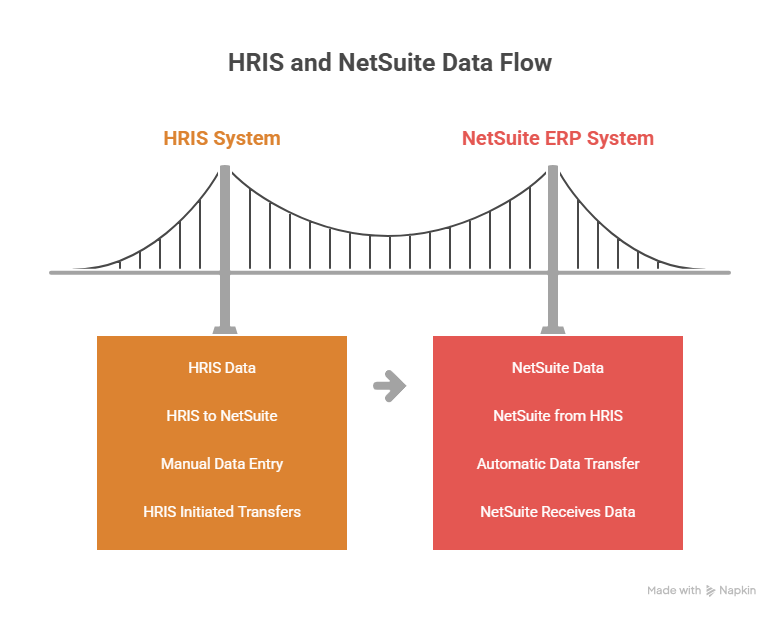
If your business runs on NetSuite, an HRIS that does not connect to it creates exactly the problems you bought the HRIS to solve.
Here is what disconnected HR and ERP systems look like in practice:
- An employee gets a salary increase. HR updates the HRIS. Finance still has the old number in NetSuite. The variance shows up at month-end, and someone spends three hours tracing it.
- A new hire joins. HR sets them up in the HRIS. Finance manually enters their cost center allocation in NetSuite. Two weeks in, their expenses hit the wrong department and the correction takes the accounting team a week to unwind.
- Payroll runs. The HRIS calculates the right amounts. Finance manually re-enters the payroll summary into NetSuite for journal entries. If anything was keyed differently, the general ledger does not match payroll.
These are not edge cases. They happen every pay period in businesses where HRIS and ERP are separate systems.
When HRIS integrates with NetSuite, payroll data flows directly into the general ledger. New hire records create cost center allocations automatically. Headcount changes update budget models in real time. The data exists once, not twice.
For businesses already on NetSuite and evaluating HRIS options, the integration capability should be a primary evaluation criterion, not an afterthought. To understand how NetSuite HCM integration works at a technical and operational level, our complete guide on NetSuite HCM integration covers the setup, data flows, and what to expect.
How to Choose an HRIS: Four Questions to Ask Before You Evaluate
Most HRIS evaluations spend too much time comparing feature lists and too little time on the questions that actually determine whether the system will work for the business.
1. Does it integrate with NetSuite natively or via a connector?
Native integration means the HRIS vendor has built a direct connection to NetSuite that is maintained and updated by the vendor. Connector-based integration means a third-party middleware tool (Celigo, Boomi, or a custom build) handles the connection. Both work, but native integrations typically require less maintenance and fewer custom configurations.
2. What are the implementation costs and timeline?
An HRIS that takes 6 months to implement is not the right choice for a business that needs to get payroll centralized in 8 weeks. Ask vendors for realistic implementation timelines from businesses similar in size and complexity to yours.
3. What does employee self-service cover?
Employee self-service is one of the highest-value features in any HRIS because it reduces HR team workload directly. An employee who can update their own address, check their own leave balance, and enroll in their own benefits without emailing HR represents hours of saved time per week across the organization. Confirm what self-service covers before selecting a platform.
4. How does compliance management work?
Ask specifically: how does the system handle multi-state payroll tax? How does it notify HR teams of regulation changes? How does it manage visa and work permit expiry for international employees? The answers reveal whether the compliance module is functional or a checkbox feature.
What HRIS Means for Employees, Not Just HR
It is easy to think of HRIS as an HR department tool. In practice, it changes the experience of every employee in the organization.
Before HRIS, an employee who wanted to check their leave balance emailed HR and waited. Who wanted to update their address filled out a form and handed it to someone. Who needed their pay stub called payroll or printed something from a shared drive.
HRIS tools allow employees to directly access their personal information, produce reports, and issue requests, all without the inconvenience and time it takes to go through the HR department.
A self-service HRIS portal gives every employee direct access to their profile, their pay history, their leave balance, their benefits, and their development plans. They manage their own data. They submit their own requests. HR spends less time fielding routine questions and more time on work that actually moves the organization forward.

How Many Employees Can an HRIS Handle?
It truly greatly depends on the system itself that you choose, since not all organizations are equal. Some HRIS providers purchase a one-size-fits-all strategy that doesn’t fit anybody more often than not. These sellers claim their maximum number of users is almost limitless. The method usually works well for a company with about 25-500 workers.
HRIS Examples
Applicant Tracking
Most HRIS systems provide applicant tracking, where all curricula may be collected and stored by name and location in one spot. You can also filter abstracts using tools like automated rankings and keyword searches and assist to discover the perfect applicant for your position.
ADP WORKFORCE NOW
ADP Workforce Now is an all-in-one platform designed for mid-size companies to manage wages, talent, benefits, time, people, analytics and more.
How to Choose an HRIS: Four Questions to Ask Before You Evaluate
Most HRIS evaluations spend too much time comparing feature lists and too little time on the questions that actually determine whether the system will work for the business.
1. Does it integrate with NetSuite natively or via a connector?
Native integration means the HRIS vendor has built a direct connection to NetSuite that is maintained and updated by the vendor. Connector-based integration means a third-party middleware tool (Celigo, Boomi, or a custom build) handles the connection. Both work, but native integrations typically require less maintenance and fewer custom configurations.
2. What are the implementation costs and timeline?
An HRIS that takes 6 months to implement is not the right choice for a business that needs to get payroll centralized in 8 weeks. Ask vendors for realistic implementation timelines from businesses similar in size and complexity to yours.
3. What does employee self-service cover?
Employee self-service is one of the highest-value features in any HRIS because it reduces HR team workload directly. An employee who can update their own address, check their own leave balance, and enroll in their own benefits without emailing HR represents hours of saved time per week across the organization. Confirm what self-service covers before selecting a platform.
4. How does compliance management work?
Ask specifically: how does the system handle multi-state payroll tax? How does it notify HR teams of regulation changes? How does it manage visa and work permit expiry for international employees? The answers reveal whether the compliance module is functional or a checkbox feature.
What HRIS Means for Employees, Not Just HR
It is easy to think of HRIS as an HR department tool. In practice, it changes the experience of every employee in the organization.
Before HRIS, an employee who wanted to check their leave balance emailed HR and waited. Who wanted to update their address filled out a form and handed it to someone. Who needed their pay stub called payroll or printed something from a shared drive.
HRIS tools allow employees to directly access their personal information, produce reports, and issue requests, all without the inconvenience and time it takes to go through the HR department.
A self-service HRIS portal gives every employee direct access to their profile, their pay history, their leave balance, their benefits, and their development plans. They manage their own data. They submit their own requests. HR spends less time fielding routine questions and more time on work that actually moves the organization forward.
For businesses on NetSuite, that last question is the most important one. An HRIS that integrates cleanly with NetSuite removes the duplicate data entry, the reconciliation errors, and the manual journal entries that drain finance and HR teams every pay cycle.
If you want to understand how an HRIS integration with NetSuite works for your specific setup, the Folio3 team has connected NetSuite to the major HRIS platforms for businesses across manufacturing, distribution, retail, and professional services. Reach out for a straight answer on what the right integration model looks like.
Frequently Asked Questions
What does HRIS stand for?
HRIS stands for Human Resource Information System. It is software that centralizes and automates core HR functions including employee data management, payroll, benefits administration, time and attendance, applicant tracking, and compliance management.
What is the difference between HRIS, HRMS, and HCM?
HRIS covers core administrative HR processes: employee records, payroll, and benefits. HRMS adds performance management and talent development. HCM is the broadest category, covering workforce strategy, succession planning, and long-term organizational planning. Most mid-market businesses start with an HRIS and add HRMS or HCM capabilities as the organization grows.
What are the main features of an HRIS?
The core features are employee records management, payroll processing, benefits administration, time and attendance tracking, applicant tracking, compliance management, and HR reporting and analytics. More advanced systems add performance management, learning management, and workforce planning.
How does an HRIS save time?
An HRIS automates repetitive administrative tasks: payroll calculations, benefits enrollment processing, leave request routing, compliance deadline alerts, and employee data updates. Research from AIHR shows HR professionals can save up to 2 hours per day on administrative tasks by using an HRIS instead of paper-based or spreadsheet processes.
Should my HRIS integrate with NetSuite?
Yes, if your business runs on NetSuite. When HRIS and NetSuite are separate, unconnected systems, payroll data requires manual re-entry into the general ledger, new hire cost center allocations need manual setup in NetSuite, and compensation changes create reconciliation discrepancies between systems. Integration removes all of these manual touchpoints.
