
Key Takeaways
- An EBOM starts in a CAD or PLM system rather than in the ERP and carries a release status, for instance, work in progress, under review, or released.
- For configurable products, engineering often maintains a superset EBOM that covers every valid option rather than just one buildable configuration. That gets resolved later.
- Whether a part is manufactured in-house or purchased is usually flagged on the EBOM, well before procurement or production ever see it.
- A design change moves through an ECR and ECO instead of a direct edit. Skip that process and revision history stops meaning anything.
- Before changing or discontinuing a part, engineering needs to know every assembly that references it.
- NetSuite isn’t a PLM system. It holds the released EBOM as an item record, not the design process that produced it.
An engineering Bill of Materials (EBOM) starts life inside a CAD or PLM system instead of inside an ERP. A design engineer builds an assembly, the CAD tool generates a parts list automatically, and that list carries a status of work in progress, under review, or released. Nothing downstream- procurement, costing, production- is supposed to touch it until it clears that last gate.
That release gate is what actually separates an EBOM from just the parts list in your CAD software. It’s the approved record of what a product is that is tied to a specific design revision, before anyone has decided how it will be built. Our guide to manufacturing BOMs covers what happens after production turns a released EBOM into an MBOM.
This guide stays on the engineering side, including where EBOM data actually lives, how it handles products with options and variants, how a design change moves through it, and what breaks when none of that has real structure behind it.
Where Does an Engineering BOM Come From?
An EBOM is generated as a byproduct of the design process itself. As an engineer assembles a product in CAD, tying parts and subassemblies together, the software builds a structured list automatically. That list only becomes an EBOM in the formal sense once it enters a release workflow, managed in a PLM tool or a PDM system layered on top of the CAD environment, with a small number of defined states. A part sitting in “work in progress” can change six times in a day. A released part cannot change at all without going through formal review.
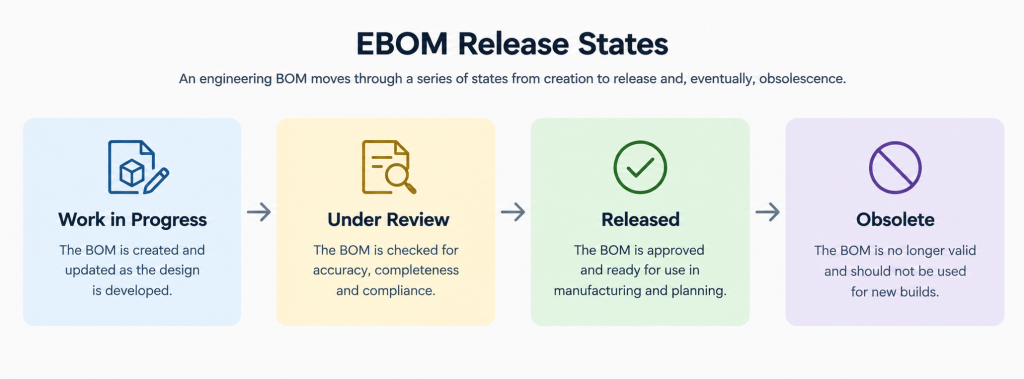
This matters because it sets a hard boundary. Procurement shouldn’t be sourcing a component that’s still in review. Costing shouldn’t be building estimates off a design that hasn’t cleared release. NetSuite, when the EBOM eventually reaches it, should only ever be seeing the released version and not the churn that happened to get there.
What’s a 150% BOM, and Why Does Engineering Need One?
Everything covered so far assumes a product has exactly one design, one released structure, one set of parts, and one true version at a given revision. That holds for plenty of products. But it stops holding the moment a product ships in more than one configuration, which describes most products with a real product line behind them rather than a single fixed SKU.
Take a product that ships in two display options and three enclosure colors. The naive approach is six separate EBOMs, one per combination, but that multiplies every future change by six and guarantees some of those six drift out of sync with each other over time.
Engineering doesn’t do that. It maintains one superset structure that includes every part valid for any configuration at once, such as both display options, all three enclosure colors, every optional bracket or accessory the product line supports.
That structure has a name of a 150% BOM. Nobody builds a unit straight from it since it’s just a design reference. A specific order or work order later resolves it down to a real, buildable 100% BOM by picking exactly one option from each variant group.
This is a genuinely different kind of complexity than anything an MBOM has to solve, since an MBOM only ever represents one thing actually being built. An EBOM sometimes has to represent every legitimate thing a product could become, which is why option groups and mandatory-versus-optional flags show up on the EBOM long before manufacturing gets involved.
What Data Lives on an EBOM Record?
Whether an EBOM represents one fixed design or a full 150% structure with a dozen option groups, every individual record in it still runs on the same core set of fields. Those fields reflect design intent and design governance, not production logistics.
- Item or part number: the permanent identifier for every part and assembly, purchased or engineered.
- Revision: which iteration of the design this record reflects. Nothing else on the EBOM means anything without this field being accurate.
- Release status: work in progress, under review, released, or obsolete, controlling who’s even allowed to reference the part yet.
- Drawing or CAD file reference: a direct pointer to the design file the part number represents, not a description of it.
- Material specification and critical tolerances: captured at the design stage, not decided later on the floor.
- Make/buy flag: whether engineering intends the part to be manufactured in-house or purchased from a supplier. This decision starts here, even though procurement and production execute on it later.
- Option or variant group: for a 150% BOM, which configuration group a component belongs to, and whether it’s mandatory or optional within that group.
Product mix changes what actually needs to be on this list. Matbock, a military gear manufacturer, and its sister company Cardomax, which makes liquid-based supplements, run as one business but need almost none of the same engineering data.
A tactical gear component’s EBOM record needs material spec and tolerance data that means nothing for a supplement formulation, and a formulation’s record needs ingredient and batch data that a gear component never touches. Their Folio3’s NetSuite implementation kept each business’s item structure distinct instead of forcing one generic field set across both.
How Does an Engineering Change Order Move Through an EBOM?
One field from that list does more work than it looks like it should, and that field is the release status. It’s the gate that decides whether a change can even happen, and how that gate actually gets opened is a formal process of its own.
A released EBOM doesn’t get edited directly. In fact, it gets changed through that process, and it’s where most of the real discipline in engineering data management actually lives.
It starts as an Engineering Change Request, or ECR: someone in engineering or quality, a customer complaint, or a supplier substitution flags that something about the released design needs to change. The ECR doesn’t authorize anything by itself. It’s a proposal.
From there, the request goes through a review. Depending on how regulated the product is, this may be handled by a single engineer or a formal change control board.
The reviewer decides whether to reject the request or move it forward as an Engineering Change Order (ECO). The ECO is the formal authorization to make the change.
Once an ECO is approved, the EBOM gets a new revision. The old revision doesn’t disappear. It stays on record as exactly what shipped before the change, which matters enormously if a warranty claim or a field failure ever needs to be traced back to a specific build.
Regulated products feel the weight of this process hardest. Rugged Suppressors, a manufacturer of firearm suppressors, previously ran on QuickBooks, which had no real change control behind it at all, no centralized way to tie a design change to what was actually shipped, no procurement visibility, no audit trail worth the name.
Moving to NetSuite’s manufacturing functionality gave them a system where a change and its approval could actually be tied to a record, which is close to a baseline requirement for a product in their category.
What Does Where-Used Analysis Tell Engineering Before a Change Ships?
Before anyone approves an ECO, one question has to get answered first: what else does this touch?
A BOM explosion answers what the assembly contains. Where-used analysis answers the opposite question: which assemblies contain this specific part. That distinction matters enormously the moment a supplier discontinues a fastener, or a material gets flagged for a compliance issue.
Without a reliable where-used query, engineering finds out a part is used in 12 different products the hard way, after the change has already shipped and someone downstream has a build that no longer matches its released EBOM.
This is also where a real EBOM structure pays for itself in a way that’s easy to underestimate. A part number reused correctly across every assembly that legitimately shares it means one where-used query catches everything. A part duplicated under three different numbers because nobody checked whether it already existed means the query misses two-thirds of the actual impact.
What Does a Configurable EBOM Look Like in Practice?
Release states, option groups, make/buy flags, an approved ECO behind every revision bump: all of this is easier to see in a real record than in the abstract. Here’s a simplified 150% BOM for a control panel that ships in two configurations. One is a basic version, and the other is a premium version with a larger display.
Sample EBOM: Control Panel, 150% Structure
This is an example of how EBOM 150% structure works.
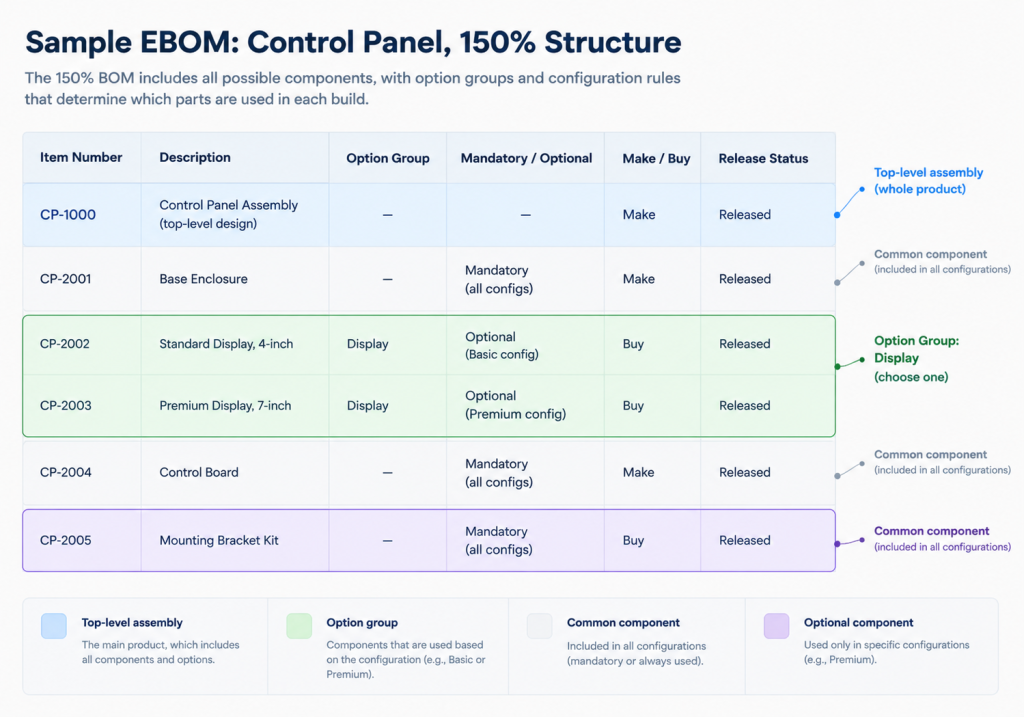
Notice that CP-2002 and CP-2003 both sit under the same “Display” option group, and neither one is mandatory on its own. Exactly one has to be selected. That’s what makes this a design reference instead of a build plan. Nobody’s work order calls for both displays. A specific sales order or work order resolves the Display group down to one part before it ever becomes a real MBOM, which is a decision this table deliberately doesn’t make.
How Does an EBOM Move Into NetSuite When Manufacturing Takes Over?
That Display option group in the table above has to get resolved by something before a unit ever gets built. For most manufacturers, that something is the ERP, once the released, resolved design lands there as an item.
NetSuite is an ERP and not a PLM system, and that distinction decides what actually shows up there.
Most companies keep the design process itself, from CAD authoring and revision checkout to ECR and ECO routing, in a dedicated PLM tool or a PDM layer on top of CAD.
What lands in NetSuite is the outcome, such as a released item record carrying part number, revision, and whatever custom fields the company uses for material spec, make/buy, or a link back to the drawing file. Once a configurable EBOM resolves down to a specific configuration, that item record becomes the starting point from which manufacturing builds an MBOM.
Companies with heavy in-house engineering feel the weight of getting this handoff right. Skydio, an American drone manufacturer that designs and builds its autonomous flight systems in-house, needed engineering data structured cleanly enough to flow into NetSuite’s manufacturing environment without engineering and production working from two different versions of the same aircraft.
Fast Radius, a provider of additive manufacturing solutions, sits at almost the opposite extreme. Since the product is 3D printed directly from a digital design file, there’s barely a gap between the released design and the part that comes off the printer. Even there, Folio3’s NetSuite Manufacturing implementation still had to tie that design-driven output to inventory and financials in one system rather than managing it in parallel spreadsheets.
What Happens When Engineering Data Never Gets Structured This Way?
Not every company gets that handoff right, and the cost of getting it wrong rarely announces itself as one incident. Most of the damage isn’t dramatic. In fact, it’s a slow accumulation of small mismatches that eventually cost real time to untangle.
Sprinturf, a U.S. manufacturer of synthetic turf systems, ran three disconnected legacy systems before consolidating onto NetSuite, and none of them agreed with each other about a product’s data.
The company was losing 3,650 staff hours a year to manual plant-floor data capture alone, on top of duplicate entry across the other systems. None of that started as one dramatic failure. It was years of engineering, production, and finance each keeping their own version of the same underlying product, because nothing forced those versions to reconcile.
Folio3’s NetSuite implementation consolidated that into one system and cut month-end close from eight hours to one, largely by removing the reconciliation work in the first place.
The pattern behind that story shows up in smaller ways constantly. It takes the form ofa released EBOM with no enforced revision field, so nobody can say with confidence which version a given unit was actually built to.
A make/buy decision that lives in someone’s email instead of the item record, so procurement finds out a part needs to be sourced only when production asks where it is. A where-used query that has to be done by hand because part numbers were never deduplicated.
None of these show up as a single incident. They show up as a company that’s slower than it should be, for reasons nobody can point to directly.
Managing EBOM in NetSuite: Talk to our Consultants
An EBOM is a governed design record and not just a parts list. It lives under release control, sometimes represents more than one possible product at once, and only changes through a formal ECR and ECO process, with where-used analysis checking the blast radius before anything ships. None of that is optional complexity. It’s what keeps a released design meaning what it says it means, months or years after an engineer last touched it.
Once that design resolves and releases, manufacturing takes over and builds the MBOM that actually drives production. If your team is still figuring out where the line between engineering’s data and manufacturing’s data should sit inside NetSuite, that’s a conversation Folio3’s NetSuite manufacturing consultants have with clients regularly. Talk to us before the two versions start drifting apart.
FAQs
Is an EBOM the same thing as a BOM?
No. BOM is a general term for several types of parts lists. An EBOM specifically refers to the released design record engineering produces, before manufacturing translates it into anything buildable.
What’s a 150% BOM?
A superset engineering BOM covering every valid option and variant for a configurable product, rather than one specific buildable configuration. A real order or work order later resolves it down to a 100% BOM by selecting one option from each group.
What’s the difference between an ECR and an ECO?
An Engineering Change Request (ECR) is a proposal to change a released design. An Engineering Change Order (ECO) is the approved authorization to actually make that change. A design shouldn’t change without both steps happening in order.
Why does a make/buy flag start on the EBOM instead of in procurement?
Because engineering, not procurement, knows whether a part’s design intent assumes an in-house process or a purchased component. Procurement executes that decision. It doesn’t usually make it from scratch.
Does NetSuite manage the EBOM itself?
Not usually. NetSuite is an ERP, not a PLM system, so the design process, CAD authoring, revision checkout, ECR and ECO routing, typically happens upstream. NetSuite holds the released outcome as an item record.
How does a released EBOM become an MBOM?
Once a configuration resolves to a specific, buildable set of parts, manufacturing adds what the EBOM never carried: routing, labor and machine time, and production-specific quantities. Folio3’s guide to manufacturing BOMs covers that translation in full.

