
Key Takeaways
Accurate time tracking affects far more than payroll. It impacts project profitability, workforce productivity, labor costing, and resource planning. NetSuite Timesheets helps businesses capture employee time in a centralized system and connect it directly to projects, payroll processes, and operational reporting.
- NetSuite Timesheets centralizes employee, project, and labor tracking within a single platform.
- Businesses use it to improve payroll accuracy, project costing, and workforce visibility.
- Time tracking is particularly valuable for professional services firms, manufacturers, field service teams, and project-based organizations.
- Employees can submit time through structured timesheets, while managers can review and approve entries through automated workflows.
- Time data flows into project management, resource planning, and financial reporting processes.
- A well-configured time tracking system helps reduce payroll discrepancies, manual administration, and reporting delays.
- Organizations gain better insight into labor utilization, billable hours, and overall operational efficiency.
What Is NetSuite Time Tracking?
NetSuite Time Tracking is a built-in timesheet management solution that allows employees to log hours, managers to approve time entries, and businesses to connect labor data directly to payroll, projects, billing, and financial reporting.
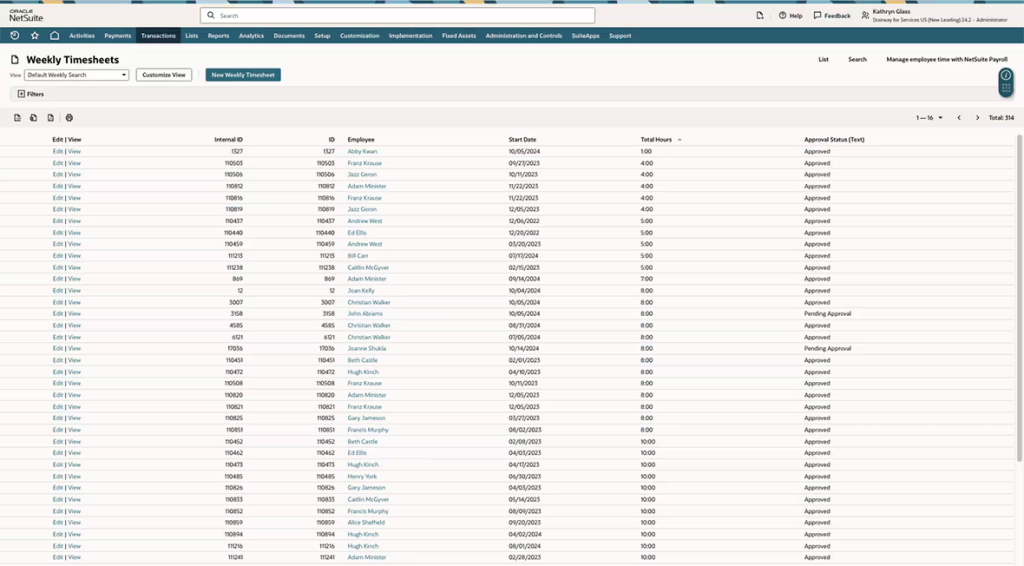
While that sounds straightforward, the real value is what happens after the time is recorded. Instead of hours sitting in a spreadsheet or a disconnected tracking tool, they become part of your operational and financial data. This gives teams a clearer view of labor costs, project profitability, resource utilization, and workforce productivity.
Why Time Tracking Becomes a Challenge as Businesses Grow
Many businesses start with spreadsheets, paper timesheets, or standalone tracking tools. That approach works when there are only a few employees, projects, or locations to manage.
As the business grows, things become more complicated.
- Employees forget to submit time on schedule
- Managers spend hours chasing approvals
- Payroll teams manually verify timesheets
- Project managers struggle to track billable hours
- Finance teams lack visibility into actual labor costs
We’ve seen this firsthand while helping organizations implement NetSuite. In one project-based business, employee hours were tracked in a separate application while project costing lived elsewhere. By the time finance received the data, reporting was often delayed and project profitability was difficult to measure accurately. Moving time tracking into NetSuite gave the team a single source of truth and eliminated much of the manual reconciliation effort.
How NetSuite Time Tracking Works
The process is designed to keep time data connected to the rest of the business.
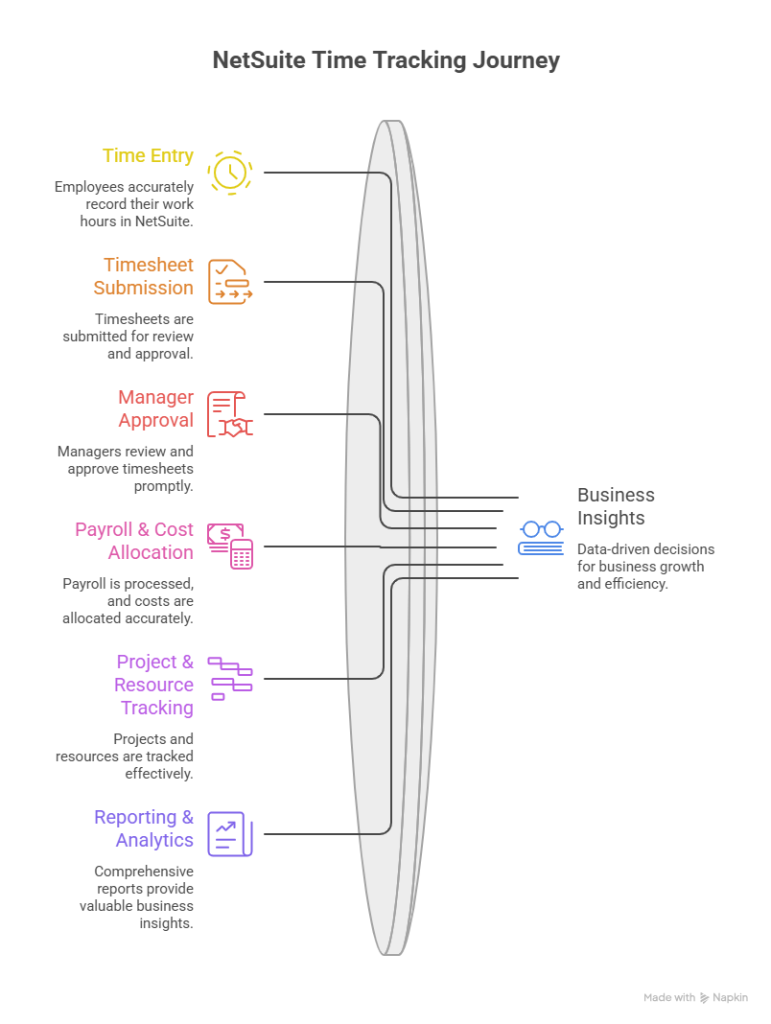
Step 1: Employees enter their time
- Log hours against projects, tasks, customers, or activities
- Submit daily or weekly timesheets
- Record both billable and non-billable work
Step 2: Managers review and approve
- Timesheets follow predefined approval workflows
- Managers can review entries before payroll or billing
- Automated approvals help reduce administrative effort
Step 3: Time data flows into business processes
- Payroll teams use approved hours for compensation
- Project managers monitor budgets and resource utilization
- Finance teams gain visibility into labor costs
Step 4: Reporting happens automatically
- Track employee utilization
- Monitor project profitability
- Analyze labor costs across departments
- Build dashboards for operational decision-making
What Makes NetSuite Different From Standalone Time Tracking Tools?
Most time tracking applications answer one question: How many hours did someone work?
NetSuite helps answer much bigger questions.
Connected to Projects
When time tracking is linked to your projects, project managers can see exactly where time is being spent, whether budgets are being consumed as planned, and which projects are generating the best returns.
- Track time against specific projects, tasks, or activities
- Compare actual hours worked against project budgets
- Identify resource bottlenecks before they impact delivery
- Measure project profitability with greater accuracy
- Improve forecasting for future projects
Connected to Payroll
If employee time flows directly into payroll processes, finance and HR teams spend less time chasing timesheets and correcting errors. Approved hours can be used to support payroll calculations, helping businesses improve accuracy while reducing administrative effort.
- Reduce manual payroll calculations and data entry
- Improve accuracy for overtime and labor reporting
- Streamline timesheet approval processes
- Minimize payroll discrepancies and corrections
- Give payroll teams access to approved, up-to-date labor data
Connected to Financials
When time tracking is connected to financial data, businesses gain a clearer understanding of where labor costs are occurring and how they impact profitability.
- Allocate labor costs to the right projects, departments, or customers
- Improve job costing and profitability reporting
- Support more accurate budgeting and forecasting
- Gain deeper insight into operational expenses
- Make better decisions using real-time financial data
Connected to Your ERP
When time tracking is connected to your ERP, the time employees submit can be used across payroll, project costing, resource planning, and financial reporting without requiring teams to move data between systems manually.
- Create a single source of truth for labor data
- Reduce manual work and reporting errors
- Improve visibility into labor costs and project performance
- Give managers real-time access to workforce data
- Connect operational activities directly to financial outcomes
For many growing organizations, the biggest benefit is gaining visibility into how labor impacts profitability, project performance, and overall business operations. When time data is connected to the rest of the ERP, it becomes a strategic planning tool rather than an administrative task.
Why Businesses Struggle With Manual Time Tracking
For many organizations, time tracking starts with spreadsheets, email approvals, or standalone applications. While these methods may seem manageable initially, they often create challenges as the business grows. What starts as a simple process can eventually impact payroll accuracy, project profitability, reporting, and compliance.
Spreadsheet-Based Timesheets Become Difficult to Manage
Spreadsheets are often the first time-tracking tool businesses adopt because they are easy and inexpensive. However, as employee counts and projects increase, maintaining accurate records becomes more difficult. Teams often deal with outdated files, missing entries, and version control issues, making it harder to trust the data being reported.
Payroll Errors and Delays Increase
When time entries must be manually reviewed, verified, and transferred between systems, the risk of payroll discrepancies grows. Even small mistakes can result in incorrect payments, delayed payroll processing, and additional administrative work for HR and finance teams.
In many NetSuite implementations, we’ve found that payroll issues are often caused by disconnected approval processes rather than inaccurate employee time entries themselves.
Missing Billable Hours Impact Revenue
For consulting firms, agencies, and other project-based organizations, unrecorded time can directly affect profitability. If employees forget to log hours or assign them to the wrong project, businesses may end up underbilling clients and losing revenue that should have been captured.
Without reliable time tracking, it also becomes more difficult to understand which projects are delivering the strongest returns.
Limited Visibility Into Project Performance
When time data is stored separately from project information, managers struggle to see how resources are being utilized. This makes it harder to compare planned versus actual effort, identify bottlenecks, and keep projects on budget.
We’ve seen organizations discover significant differences between estimated and actual labor costs only after implementing centralized time tracking and reporting.
Compliance Risks Become Harder to Control
Businesses with hourly employees or overtime requirements need accurate and accessible time records. Manual tracking processes increase the likelihood of missing information, inconsistent reporting, and audit challenges.
As organizations grow, maintaining compliance becomes much easier when time records, approvals, and reporting are managed within a structured system.
The Real Problem Is Disconnected Data
The biggest challenge with manual time tracking is not entering hours. It’s what happens afterward. Payroll teams need the data for compensation, project managers need it for costing and resource planning, and finance teams need it for reporting.
When those processes rely on separate systems and manual handoffs, errors and delays become inevitable. Connecting time tracking to payroll, projects, and financials helps create a single source of truth that improves accuracy, visibility, and decision-making across the business.
Core Features of NetSuite Time Tracking
NetSuite Time Tracking is more than a digital timesheet tool. It connects employee time with projects, payroll, resource planning, billing, and reporting, allowing businesses to use labor data across multiple operational processes. Instead of manually moving timesheet information between systems, teams can manage everything within a centralized platform.
Employee Time Entry
One of the biggest reasons businesses adopt NetSuite Time Tracking is to simplify how employees submit their hours. Employees can enter time daily or weekly, log hours against projects or tasks, and submit timesheets through a structured process that is easier to manage than spreadsheets or email-based tracking.
In many implementations, improving employee adoption becomes just as important as the software itself. If time entry is difficult or time-consuming, employees are far more likely to submit incomplete or delayed timesheets. NetSuite helps reduce that friction by providing a more streamlined experience across desktop and mobile devices.
Employees can:
- Submit daily or weekly timesheets
- Record time against multiple projects and tasks
- Track billable and non-billable work
- Enter time from mobile devices when working remotely or in the field
Approval Workflows
Collecting employee hours is only part of the process. Businesses also need a reliable way to review, approve, and validate timesheets before payroll, billing, or project reporting takes place.
NetSuite supports configurable approval workflows that allow managers to review submitted hours before they move into downstream processes. This helps improve accuracy while reducing manual follow-up between employees, managers, and finance teams.
We’ve worked with organizations where delayed approvals created larger payroll issues than missing time entries themselves. Establishing clear approval routing often has a direct impact on payroll accuracy and reporting reliability.
Approval workflows can support:
- Manager approvals
- Project-level approvals
- Multi-level approval processes
- Automated reminders and notifications
- Rejected and resubmitted timesheets
Payroll Integration
For many businesses, one of the biggest advantages of NetSuite Time Tracking is its connection to payroll processes. Once time entries are approved, labor data can be used to support payroll calculations, overtime reporting, and workforce cost analysis.
Without integrated time tracking, payroll teams often spend hours validating employee records and correcting discrepancies. Connecting approved timesheets to payroll workflows helps reduce manual effort and improves confidence in labor reporting.
Organizations use payroll integration to:
- Track labor costs more accurately
- Improve payroll processing efficiency
- Monitor overtime and workforce trends
- Reduce payroll errors caused by manual data entry
Project Time Tracking
For project-based organizations, time data directly affects profitability. NetSuite allows businesses to track employee hours against specific projects, customers, tasks, or activities, creating better visibility into resource utilization and project performance.
One common challenge we see is businesses relying on estimated labor costs because actual employee time is not being tracked consistently. Once project time tracking is implemented properly, managers often gain a much clearer understanding of which projects are consuming resources and which are generating the strongest returns.
Project tracking capabilities support:
- Billable and non-billable hour tracking
- Client project visibility
- Resource allocation monitoring
- Project profitability analysis
- Budget versus actual labor comparisons
Reporting and Analytics
Time tracking becomes significantly more valuable when businesses can use the data for reporting and decision-making. NetSuite provides reporting tools that help organizations analyze workforce productivity, labor costs, project performance, and employee utilization.
Rather than simply reviewing submitted hours, leadership teams can use time data to identify trends, improve planning, and make better operational decisions.
Reporting capabilities help businesses:
- Monitor labor utilization
- Track timesheet compliance
- Analyze labor costs across departments
- Measure project performance
- Improve workforce planning and forecasting
When implemented correctly, time tracking shifts from being an administrative requirement to becoming a source of operational insight. That’s where most businesses begin to see the long-term value of connecting employee time directly to projects, payroll, and financial reporting.
NetSuite Time Tracking vs SuitePeople Time Clock
While both solutions help businesses capture employee time, they are designed for different purposes. NetSuite Timesheets focuses on project-based time tracking, resource management, and labor costing, whereas SuitePeople Time Clock is designed for attendance tracking, shift management, and hourly workforce management.
| Function | NetSuite Timesheets | SuitePeople Time Clock |
|---|---|---|
| Project Time Tracking | ✅ Strong | ⚠️ Limited |
| Billable vs Non-Billable Hours | ✅ Yes | ❌ No |
| Project Costing | ✅ Yes | ❌ No |
| Resource Allocation | ✅ Yes | ❌ No |
| Payroll Hours Tracking | ✅ Yes | ✅ Yes |
| Employee Attendance | ⚠️ Basic | ✅ Strong |
| Clock In / Clock Out | ⚠️ Limited | ✅ Native |
| Shift Tracking | ⚠️ Basic | ✅ Strong |
| Overtime Monitoring | ✅ Yes | ✅ Yes |
| Manufacturing Floor Tracking | ⚠️ Limited | ✅ Better Fit |
| Mobile Time Entry | ✅ Yes | ✅ Yes |
| Workforce Compliance Tracking | ⚠️ Basic | ✅ Strong |
When NetSuite Timesheets Is the Better Choice
NetSuite Timesheets is ideal for businesses that need to understand where employee time is being spent and how it impacts project profitability. It is commonly used by consulting firms, agencies, professional services organizations, and project-driven businesses that need visibility into billable hours, resource utilization, and labor costs.
For example, if your team works across multiple client projects and you need to track time against specific tasks or budgets, Timesheets provides the structure and reporting needed to manage those activities effectively.
When SuitePeople Time Clock Is the Better Choice
SuitePeople Time Clock is a better fit for organizations with hourly employees, shift-based schedules, or attendance management requirements. Manufacturing companies, warehouses, retail businesses, and field service organizations often use Time Clock to monitor employee attendance, overtime, and shift compliance.
Instead of tracking project work, the focus is on accurately recording when employees start and end their shifts.
When Businesses Need Both
Many growing organizations use both solutions together because they solve different business problems.
We’ve seen this approach work particularly well for manufacturers and field service organizations. Shop floor employees use SuitePeople Time Clock to record attendance and shift hours, while supervisors, project managers, engineers, and office staff use NetSuite Timesheets to track project work, labor allocation, and billable activities.
Using both systems together allows businesses to:
- Track attendance and payroll hours accurately
- Monitor project costs and labor utilization
- Improve workforce visibility across departments
- Support both operational and financial reporting
- Create a more complete view of employee productivity
The decision ultimately comes down to what you’re trying to measure. If you need to know what employees worked on, NetSuite Timesheets is typically the better option. If you need to know when employees worked, SuitePeople Time Clock is often the stronger fit. Many organizations benefit from combining both to gain a complete view of workforce activity.
How Folio3 Helps Implement NetSuite Time Tracking
Implementing NetSuite Time Tracking is about more than enabling timesheets. To get meaningful value from the system, businesses need workflows, approvals, reporting structures, and integrations that align with how their teams actually operate.
At Folio3, we help organizations design and configure NetSuite Time Tracking around their business processes, ensuring that employee time data supports payroll accuracy, project visibility, labor costing, and operational reporting from day one.
Workflow Design and Process Optimization
Every business tracks time differently. Some organizations need project-based timesheets, while others require department-level tracking, client billing, or resource utilization reporting.
Our team works closely with stakeholders to design time tracking workflows that fit existing operations while eliminating manual processes that slow teams down.
Payroll Integration
Time tracking data is only valuable if it flows smoothly into payroll processes. We help businesses connect approved timesheets with payroll workflows to improve accuracy, reduce administrative effort, and provide better visibility into labor costs.
This ensures payroll teams spend less time validating records and more time focusing on strategic workforce planning.
Custom Approval Workflows
Approval bottlenecks are one of the most common causes of payroll delays and reporting issues. Folio3 configures approval workflows based on organizational structure, ensuring timesheets are routed to the right managers and stakeholders automatically.
Whether you need manager approvals, project-based approvals, or multi-level review processes, we can tailor workflows to your requirements.
Manufacturing Labor Tracking
For manufacturers, employee time is closely tied to production costs and operational efficiency. Our team helps businesses configure NetSuite to capture labor data in ways that support job costing, workforce utilization analysis, and production reporting.
This gives manufacturers greater visibility into how labor impacts profitability across operations.
Reporting and Dashboard Development
One of the biggest advantages of NetSuite Time Tracking is the ability to turn time data into actionable insights. We build custom reports and dashboards that help leadership teams monitor labor utilization, project performance, payroll trends, and workforce productivity.
Rather than simply collecting timesheets, businesses gain the visibility needed to make more informed operational decisions.
By combining NetSuite expertise with real-world implementation experience, Folio3 helps organizations create a time tracking system that supports payroll, projects, operations, and financial reporting within a single platform.
Conclusion
Time tracking is no longer just a payroll function. It plays a critical role in project profitability, labor cost management, resource planning, and operational visibility.
When employee time is tracked through disconnected spreadsheets or standalone tools, businesses often struggle with reporting delays, payroll inaccuracies, and limited insight into workforce performance. NetSuite Time Tracking addresses these challenges by connecting labor data directly to projects, payroll, financials, and business operations.
Throughout our NetSuite implementations, we’ve found that the biggest gains often come from improved visibility rather than simply automating timesheets. Once businesses can accurately track where time is being spent, they gain a clearer understanding of project costs, employee utilization, and operational efficiency.
The software itself is only part of the equation. A well-planned implementation, supported by the right workflows, approvals, integrations, and reporting structures, is what ultimately determines long-term success.
For organizations looking to improve workforce visibility, streamline payroll processes, and make better use of labor data, NetSuite Time Tracking provides a strong foundation for growth.
FAQs
What is NetSuite Time Tracking?
NetSuite Time Tracking is a built-in timesheet management solution that allows businesses to record employee hours, track project time, monitor labor costs, and support payroll processing within the NetSuite ERP platform. Because it is connected to projects, payroll, and financial reporting, businesses can use time data for much more than attendance tracking.
Does NetSuite Have Employee Timesheets?
Yes. NetSuite includes employee timesheets that allow users to submit daily or weekly hours against projects, tasks, customers, or activities. Managers can review and approve submitted timesheets through configurable approval workflows before the data is used for payroll, billing, or reporting.
Can NetSuite Track Billable and Non-Billable Hours?
Yes. NetSuite allows organizations to distinguish between billable and non-billable work, making it easier to monitor project profitability and resource utilization. This is particularly useful for consulting firms, agencies, professional services companies, and any business that bills clients based on employee time.
Is NetSuite Time Tracking Integrated With Payroll?
Yes. Approved time entries can be used to support payroll processes, labor cost reporting, and workforce analysis. By connecting timesheets with payroll workflows, businesses can reduce manual data entry, improve payroll accuracy, and gain better visibility into labor expenses.
What Is the Difference Between NetSuite Timesheets and Time Clock Software?
NetSuite Timesheets focuses on tracking how employee time is spent across projects, tasks, and business activities. Time clock software focuses on attendance management by recording when employees start and end their shifts.
Many organizations use timesheets for project costing and resource planning, while time clock solutions are used for hourly workforce management, attendance tracking, and shift monitoring.
Can Manufacturers Use NetSuite for Labor Tracking?
Yes. Manufacturers often use NetSuite Time Tracking to monitor labor costs, workforce utilization, and job-related activities. When integrated with production and financial processes, labor data can help businesses better understand operational costs, improve job costing accuracy, and gain visibility into workforce performance.
How Much Does NetSuite Time Tracking Cost?
NetSuite Time Tracking is typically available as part of broader NetSuite solutions such as SuiteProjects, Professional Services Automation (PSA), or workforce management capabilities. Pricing depends on factors such as user count, modules purchased, implementation scope, and business requirements.
Because NetSuite pricing is customized, businesses should work with a NetSuite partner to receive an accurate estimate based on their specific needs and use cases.
