

Exporting data from NetSuite is a common requirement, whether you’re sharing reports, analyzing data externally, or integrating with other systems. One of the easiest ways to do this is by creating a CSV file from a saved search.
This guide walks you through how to export saved search results into a CSV file in NetSuite, along with best practices to keep your data clean and usable.
Ever thought about CSV export buttons present in NetSuite UI near saved searches?
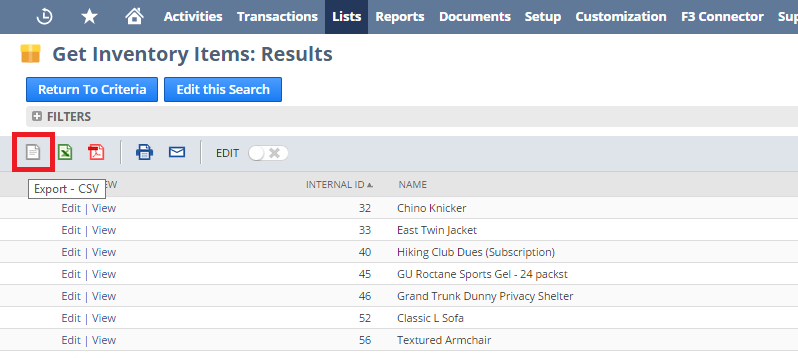
Why Export Saved Search Results as CSV?
Saved searches in NetSuite are powerful, but sometimes you need the data outside the system.
Common use cases include:
- Sharing reports with teams or stakeholders
- Performing advanced analysis in Excel
- Importing data into another system
- Creating backups of filtered data
CSV format is lightweight, easy to use, and supported across tools.
Steps to Create a CSV File from a Saved Search Result in NetSuite
What about exporting a saved search result to a CSV file through your code (SuiteScript)? Actually, this is very simple. The following are the steps that you will need to take:
- Execute Saved Search
- Iterate through saved search results
- Get the value for each column
- Concatenate the values of each column, separating them by a new line
Let’s see it in action!
[code lang=”js”]
/**
* Saved Search results to CSV
* @type {{convertToCSV}}
*/
var SavedSearchResultConverter = (function () {
return {
/**
* Executes given saved search and converts its result to your separator separated values
* @param searchId The search to execute
* @param includeHeader true / false to tell if headers should be included or not
* @returns {*}
*/
convertToCSV: function (searchId, includeHeader) {
var contents = ”;
var searchResult = nlapiSearchRecord(null, searchId, null, null);
if (!searchResult || searchResult.length <= 0) {
throw new Error(‘No result returned after executing search.’);
}
// Creating some array’s that will be populated from the saved search results
var content = [];
var temp = [];
var x = 0;
if (includeHeader === true) {
var firstResult = searchResult[0];
// Returns an array of column internal Ids
var basicColumns = firstResult.getAllColumns();
for (var c = 0; c < basicColumns.length; c++) {
temp[c] = basicColumns[c].getName();
}
content[x] = temp;
x++;
}
temp = [];
// Looping through the search Results
for (var i = 0; i < 10; i++) {
var resultSet = searchResult[i];
// Returns an array of column internal Ids
var columns = resultSet.getAllColumns();
// Looping through each column and assign it to the temp array
for (var y = 0; y < columns.length; y++) {
temp[y] = (!!resultSet.getValue(columns[y]) ? resultSet.getValue(columns[y]) : resultSet.getText(columns[y]));
}
// Taking the content of the temp array and assigning it to the Content Array.
content[x] = temp;
x++;
}
// Looping through the content array and assigning it to the contents string variable.
for (var z = 0; z < content.length; z++) {
contents += content[z].toString() + ‘n’;
}
return contents;
}
};
})();
[/code]
Best Practices for CSV Exports in NetSuite
- Always validate your saved search before exporting
- Use clear column labels for better readability
- Avoid exporting unnecessary fields
- Schedule exports for recurring reports
- Maintain data consistency for easier analysis
When to Use CSV Export vs Integration
CSV exports are ideal when:
- You need a one-time or periodic data extraction
- Manual review or analysis is required
However, if you need real-time or frequent data transfer, consider integrations instead of manual exports.
Final Thoughts
Creating a CSV file from saved search results in NetSuite is simple, but the real value comes from how you structure your data before exporting. A well-designed saved search ensures your CSV file is clean, accurate, and ready to use.
Whether you’re sharing reports or integrating systems, mastering this process helps you get more value from your NetSuite data.
Stuck on a Step?
If your CSV export isn’t working as expected, the issue is often related to saved search configuration, missing fields, or incorrect filters. Even small setup gaps can affect the final output.
Review your search setup carefully or get expert help to ensure accurate and reliable exports.
NetSuite Alliance Partner
Working with a NetSuite Alliance Partner can simplify reporting and data management.
An experienced partner can:
- Build optimized saved searches for accurate reporting
- Automate CSV exports and reporting workflows
- Integrate NetSuite with external systems
- Ensure clean and consistent data structure
With the right support, you can move beyond manual exports and build efficient, scalable reporting processes. Get in touch with us today!
FAQs
What is NetSuite search export functionality?
The NetSuite search export feature helps users to extract specific data based on accertain criteria from their NetSuite account. This can be very useful for analyzing data externally or sharing information with partners who do not have access to NetSuite.
How can I perform a NetSuite search export?
To perform a NetSuite search export, you would have to navigate to the relevant section within your NetSuite account, set the search criteria to filter the data, and then select the ‘Export’ option. Choose the desired file format for the export and then follow the prompts to complete the process.
What types of data can be exported using NetSuite search export?
Virtually any data that is stored in NetSuite can be exported using the search export feature, including but not limited to data like sales transactions, customer data, financial records, and inventory information.