

Key Takeaways
- How you structure entities in NetSuite determines whether consolidation, intercompany eliminations, and statutory reporting work automatically or pile up as manual work every single close cycle.
- Multi-entity accounting is an architectural decision, not a setting. The subsidiary structure, COA alignment, and intercompany rules you configure at implementation follow you for years.
- The most expensive multi-entity mistakes happen during setup. Fixing a class-based pseudo-subsidiary structure on a live instance costs significantly more in time and disruption than getting it right before go-live.
Introduction
Think back to the last time your team produced a consolidated board pack. How many systems did those numbers come from? How long did the controller spend reconciling intercompany balances that should have canceled each other out?
If the answer is more than a few hours, that is a structural problem rather than a workload problem.
According to Gartner, leading digital transformation in the finance function is now the top priority for CFOs, and the single biggest barrier they report is the inability to consolidate accurate data across entities in real time. Most finance teams are not struggling because NetSuite cannot handle their complexity. They are struggling because their NetSuite multi-entity accounting structure was not designed to match how their business actually operates.
This guide covers every structural decision your team needs to get right, from the subsidiary vs. class distinction that trips up most implementations, to how intercompany transactions post automatically, to what a clean multi-entity period close looks like in practice. If you want the broader financial module context first, our overview of NetSuite finance modules covers where multi-entity capabilities sit within the full financial management stack.
What Is Multi-Entity Accounting in NetSuite?
Multi-entity accounting in NetSuite means managing multiple legal entities within a single instance. Each entity gets its own:
- Chart of accounts
- Base currency and fiscal calendar
- Statutory reporting obligations
- Period close sequence
- User access scope
The module that powers all of this is NetSuite OneWorld. Without it, NetSuite handles standard accounting well for a single company but cannot manage separate legal entities with independent currencies, intercompany relationships, or statutory requirements.
Companies frequently outgrow their initial NetSuite setup without realizing it. They start as a single entity, add a subsidiary in another country, and start building manual workarounds instead of upgrading the underlying structure. By the time someone notices, those workarounds are embedded in the close process and expensive to remove.
For a full walkthrough of how NetSuite approaches accounting at the organizational level, our NetSuite for Accounting page covers the financial management framework from the ground up.
Subsidiary vs. Class vs. Division: The Decision That Defines Everything Else
When you set up multiple entities in NetSuite, the most consequential question is not how many entities you have. It is how you classify them.
Syed Abdul Nasir, our Head of NetSuite Practice, says this comes up in almost every multi-entity engagement Folio3 runs. The answer defines the entire implementation.
What each structure actually means
Subsidiary:
- A separate legal entity
- Has its own base currency, tax registration, and statutory financial statements
- Required for intercompany eliminations, FX revaluation, and consolidated reporting to work correctly
- If the entity files its own tax return or holds its own bank account, it should be a subsidiary
Class:
- A reporting dimension within a single legal entity
- No legal standing, no separate currency, no independent statutory P&L
- Right for business segments, product lines, or internal cost centers within one company
Division:
- An operational grouping, not a legal one
- Handled via Department or Class in NetSuite, not as a separate entity
What happens when you get this wrong
Using Class to simulate a subsidiary is the most common setup mistake Folio3 encounters in rescue engagements. Here is what it produces:
- Consolidated revenue appears inflated because intercompany sales were never eliminated
- No foreign currency revaluation at the entity level because classes do not carry a base currency
- No subsidiary-level statutory financials for local audit or tax filing
- Intercompany reconciliation becomes a manual, spreadsheet-based process every month
Switching from a class-based structure to a proper subsidiary structure after go-live is a significant remediation project. Getting this right during implementation costs nothing beyond the time spent making the decision.
The practical rule: If the entity files its own tax return, holds its own bank account, or operates under a different legal jurisdiction, it is a subsidiary. Everything else is a class or a department.
How NetSuite Handles Intercompany Transactions Automatically
Did you know that most finance teams spend more time on intercompany reconciliation than on any other part of the month-end close? Entity A invoices Entity B. Entity B pays Entity C. Each transaction needs to be recorded on both sides and then eliminated from consolidated financials. Doing this manually is slow, and the errors compound.
NetSuite automates intercompany posting at the transaction level:
- When Entity A creates an invoice to Entity B, NetSuite records the receivable in Entity A and the corresponding payable in Entity B simultaneously
- You do not enter the second side of the transaction manually
- When consolidation runs, the system identifies all intercompany balances and posts elimination entries automatically
This is also a control, not just a convenience. Every intercompany transaction has a matching record in both entities, which means the reconciliation step before period close becomes a system verification rather than a manual exercise.
We conducted an in-depth survey with our clients on what changed after implementing NetSuite multi-entity accounting correctly. A UK land management group operating across 22 separate entities reported:
- 66% reduction in invoice processing time per transaction
- 10 working days shaved off their month-end close by eliminating manual intercompany reconciliation
For a deeper look at how consolidation works mechanically, our NetSuite consolidation guide covers the full process, including elimination rules and reporting structure.
Multi-Currency Management Across Entities
The moment your business operates in more than one currency, multi-entity accounting becomes an FX management problem as well.
Exchange rates move daily. A sale in euros recorded in a US parent’s books needs to reflect the transaction-date rate, get revalued at period end, and translate at the correct rate for consolidated reporting.
Doing any of that manually introduces errors that are difficult to catch and harder to explain to auditors.
NetSuite’s multi-currency capabilities handle this at the transaction level:
- Every transaction records in both local currency and group base currency simultaneously
- Daily exchange rate updates can be automated
- Unrealized FX gains and losses on open balances are calculated and posted at period end automatically
- Consolidated reporting applies the correct translation method: average rate for income statement accounts, closing rate for balance sheet accounts, and translation difference posted to equity
This is not a custom script or a workaround. It is built into how OneWorld handles consolidation.
Our client, an outdoor apparel company running US and Canadian operations on NetSuite, using the OneWorld module, reported that the multi-subsidiary structure enabled expansion into the Canadian market, growing to 5 to 7% of total volume with a target of 10 to 12%, while handling complex international pricing automatically and without adding administrative headcount.
Multi-Entity Period Close: Who Controls What and When
When did you last run a month-end close that did not involve someone chasing down a missing intercompany entry? If you have multiple subsidiaries, the close process is where governance questions become very practical.
Here is how period close works across entities in NetSuite:
The close sequence per entity
Each subsidiary runs its own period lock independently:
- AR lock prevents new invoices, cash receipts, and credit memos from posting once AR is reconciled
- AP lock prevents new bills, payments, and vendor credits after AP cutoff
- Full close finalizes the period; only users with Override Period Restrictions can touch it after this
What this means in practice
- A subsidiary controller in London can close their entity without waiting for the New York entity to finish
- The parent consolidated view reflects only properly locked subsidiary periods
- You can stagger close schedules across time zones and still produce an accurate consolidated balance sheet the moment the last subsidiary closes
The permission question
Override Period Restrictions should belong to a maximum of two to three named individuals per entity, never a general accounting role. When this permission is too broad, closed periods are functionally open, and comparative reporting loses reliability.
We surveyed clients on close cycle improvements after restructuring their multi-entity setup, an education company, reduced their month-end close from 60 days to 15 days after migrating to NetSuite OneWorld and redesigning their consolidation structure. That 75% reduction came from removing the manual reconciliation and period misalignment that had been built into every close, not from the team working faster.
Role-Based Access Across Entities
When multiple entities run through a single NetSuite instance, who sees what is a compliance question, not just a preference. A finance manager at Subsidiary A should not have visibility into Subsidiary B’s financial data unless their role specifically requires it. Getting this wrong is a consistent audit finding.
NetSuite controls data access through subsidiary-level role scoping:
- An entity-level controller sees only their entity’s transactions
- A group consolidation analyst sees all entities
- A shared services team gets cross-entity visibility for specific processes, such as intercompany billing or treasury, without access to unrelated operational data
The design question here is organizational rather than technical. You need to map every finance role to the entities they genuinely need to access, then configure the role permissions to match. Many organizations also conduct a business entity check during implementation to validate entity ownership structures, compliance requirements, and access boundaries before configuring subsidiaries. Doing this during implementation means you are not spending the first year tightening permissions after an audit observation.
How Folio3 Structures Multi-Entity NetSuite Implementations
Every multi-entity implementation Folio3 runs starts with an entity structure design session before any configuration begins. That session covers:
- Which entities should be subsidiaries vs. classes or departments
- How the COA hierarchy maps from local to group level
- Which intercompany relationships exist, and how they should be automated
- What the period close governance framework looks like across entities
- How role-based access should be scoped per entity
For real estate clients, Folio3 has built multi-property subsidiary structures that produce consolidated NOI reporting across entire portfolios. Such as for fund management clients in the UAE, the structure enabled growth from managing one fund to five continuous funds over three years, with the financial infrastructure already in place to support that expansion without a system rebuild.
If you are planning a multi-entity implementation or have an existing instance producing consolidation friction, Folio3’s NetSuite implementation services include an entity structure design workshop as a standard deliverable. For companies that already exist and need structure remediation, NetSuite consulting services cover multi-entity optimization as a focused engagement.
Getting Multi-Entity Accounting Right the First Time
The structure decisions you make at the start of a multi-entity NetSuite deployment follow your finance team for years. Companies that design the structure correctly before go-live close faster, report more accurately, and audit more cleanly than those that discover structural problems after the system is live.
If you want to discuss your specific entity structure before building it, or need a second opinion on an existing setup producing friction, talk to Folio3’s team about where to start.
People Also Ask
What is multi-entity accounting in NetSuite?
Multi-entity accounting in NetSuite means managing multiple legal entities, each with its own chart of accounts, base currency, fiscal calendar, and statutory reporting requirements, within a single NetSuite instance. The OneWorld module powers this capability, enabling real-time consolidated reporting, automated intercompany transaction management, and entity-level period close across all subsidiaries.
What is the difference between a subsidiary and a class in NetSuite?
A subsidiary is a separate legal entity with its own currency, tax registration, chart of accounts, and statutory financial obligations. A class is a reporting dimension within a single legal entity, used for product lines, business segments, or cost centers. Using a class to simulate a separate legal entity prevents intercompany eliminations, FX revaluation, and subsidiary-level statutory reporting from working correctly.
When do I need NetSuite OneWorld?
You need NetSuite OneWorld when your organization operates in more than one country, maintains separate legal entities with independent tax filings, transacts in multiple currencies, or needs consolidated financial statements that eliminate intercompany balances automatically. Base NetSuite handles standard accounting for a single legal entity. OneWorld is required for multi-subsidiary management.
How does NetSuite handle intercompany transactions?
When one subsidiary invoices another, NetSuite records both sides of the transaction automatically. The receivable posts in the selling entity and the payable posts in the buying entity are posted simultaneously. When consolidation runs, NetSuite identifies the matching intercompany balances and posts elimination entries without manual intervention.
Can NetSuite consolidate financials across multiple currencies?
Yes. Each subsidiary records transactions in its local currency and the group base currency simultaneously. At period end, NetSuite revalues open balances and calculates unrealized FX gains and losses automatically. Consolidated reporting applies the correct translation method for each account type, with the translation adjustment posted to equity.
How does multi-entity period close work in NetSuite?
Each subsidiary runs its own period lock sequence independently. AR locks first, then AP, then the full close. Subsidiaries in different time zones can close on their own schedule without blocking the group consolidated view. The group controller sees consolidated data reflecting only properly closed subsidiary periods.
What are the most common NetSuite multi-entity setup mistakes?
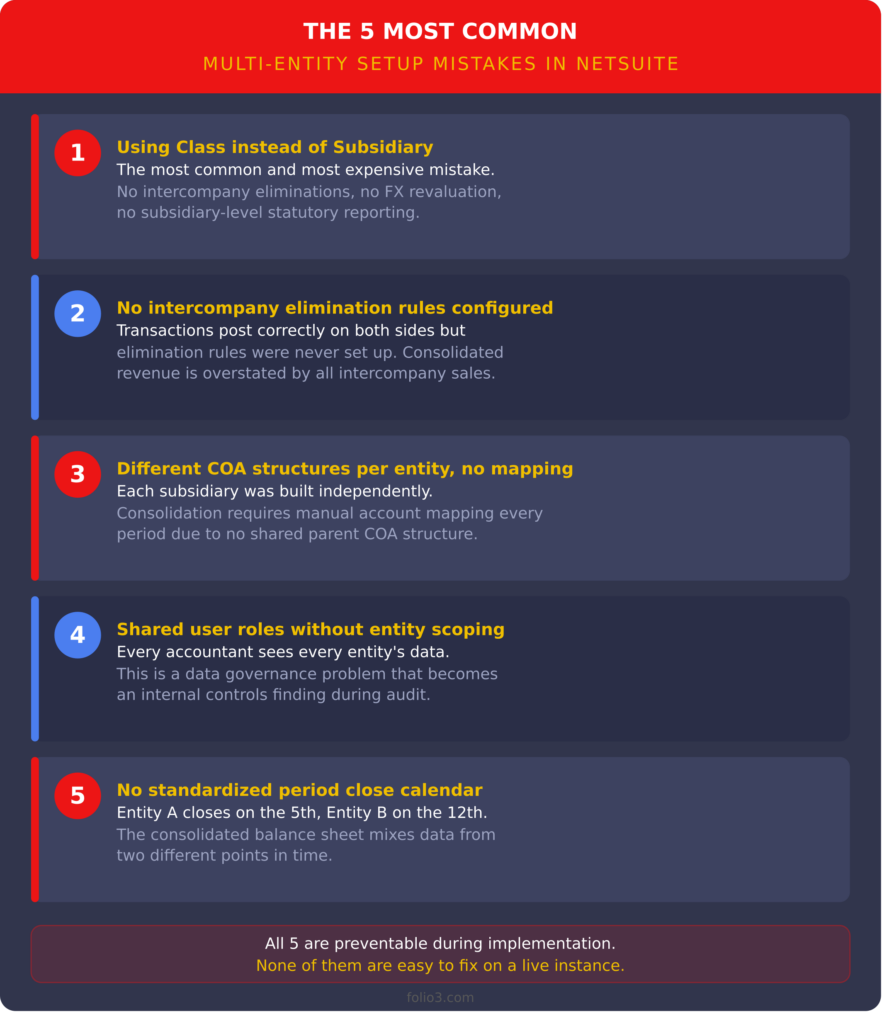
The five most common are: using Class instead of Subsidiary for separate legal entities, failing to configure intercompany elimination rules, building different COA structures per entity without a group mapping, assigning shared user roles without entity-level scoping, and running misaligned period close calendars across entities. All five are significantly easier to prevent during implementation than to fix on a live instance.
How does Folio3 approach multi-entity NetSuite implementations?
Folio3 runs an entity structure design session before any configuration begins. This covers subsidiary vs. class decisions, COA hierarchy mapping, intercompany automation rules, period close governance, and role-based access scoping. For companies already living with structural issues, Folio3 offers multi-entity optimization as a focused consulting engagement.