Key Takeaways
- NetSuite Order Management automates the complete order-to-cash lifecycle from the moment a customer places an order through fulfillment, invoicing, and payment collection. Every step runs in the same system as your inventory, financials, and CRM.
- The native order management flow covers most mid-market needs. Sales Order, Item Fulfillment, Invoice, Payment. Four transactions. One connected workflow.
- Advanced Order Management (AOM) adds intelligent routing for businesses with complex fulfillment needs. Multi-location inventory, multi-channel order sources, drop ship, store pickup, and priority allocation rules.
- Organizations report 50% reduction in order processing time with automated workflows versus manual processes. The automation extends to credit checking, approval routing, inventory allocation, and billing.
- Pricing and promotions are managed centrally in NetSuite. Multiple price levels, customer-specific pricing, and promotions across all channels are updated in one place and apply automatically on every order.
- Returns management is built into the same workflow. Return merchandise authorizations (RMAs) are created from the original sales order, maintaining full traceability without manual re-entry.
We work with a lot of businesses that went live on NetSuite and are still manually checking inventory in one screen while processing orders in another. Their eCommerce orders come in through Shopify. Their wholesale orders come in through EDI. Their sales team enters direct orders manually. By the time a fulfillment center gets the pick list, three things have changed: the inventory allocation, the shipping address, and the customer’s credit status.
NetSuite order management solves it by putting order capture, inventory allocation, fulfillment routing, invoicing, and payment in the same system. When a customer places an order, everything that needs to happen happens automatically. When something goes wrong, it is visible to everyone who needs to know.
This guide covers how NetSuite order management works at the operational level: the document flow, the fulfillment options, the pricing engine, the returns process, and when the Advanced Order Management module is the right call.
What Is NetSuite Order Management?
NetSuite Order Management is the native order-to-cash process built into the NetSuite ERP platform.
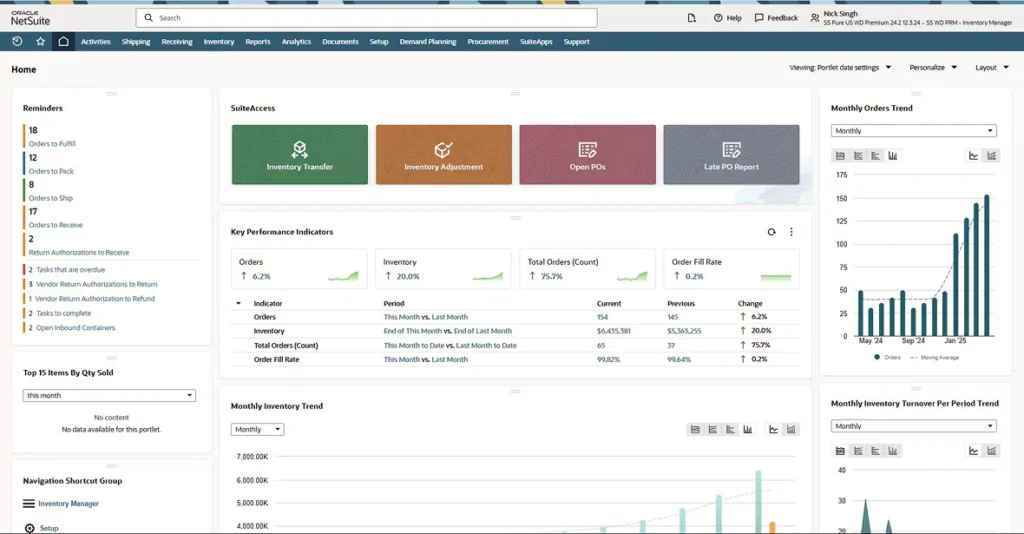
It automates and manages the full lifecycle of an order: from the moment a customer places an order through delivery to post-sales service. It covers order capture and validation, order release, fulfillment assignment, shipment confirmation, customer communication, invoicing, and payment settlement.
NetSuite Order Management automates and manages the life cycle of an order from the moment a customer places an order to delivery to post-sales service. It ensures accurate recordkeeping, covering order capture and validation, order release, shipment confirmation, customer communication, and settlement.
Unlike standalone order management systems, NetSuite does not require middleware to connect orders to inventory, invoices, or customer records. It is all one system. The same customer record that lives in NetSuite CRM connects to every order that the customer has ever placed, every invoice they owe, and every support case they have opened.
How the NetSuite Order-to-Cash Workflow Works
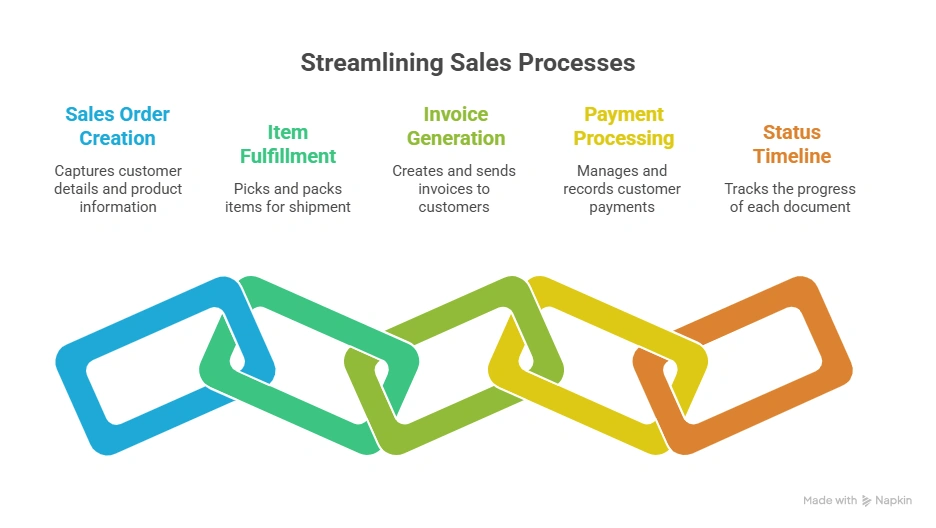
NetSuite’s native order management follows a four-document flow that covers the full order lifecycle.
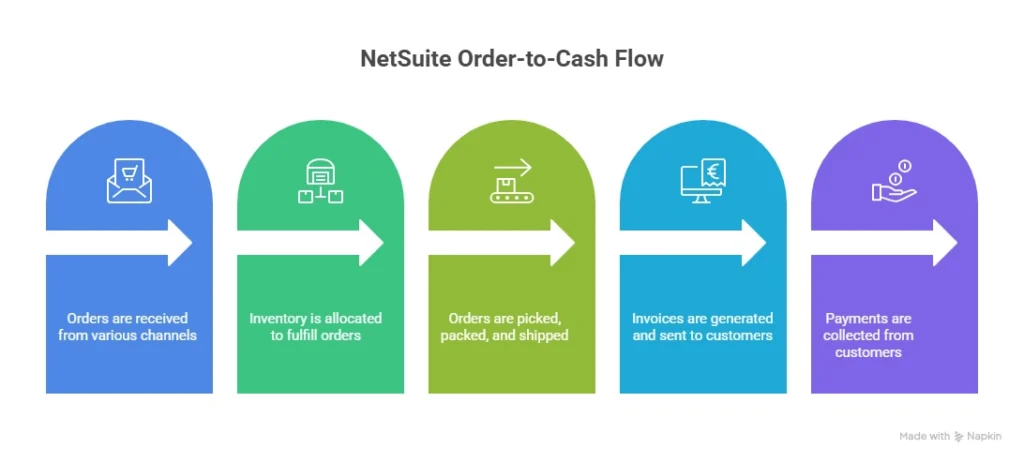
Stage 1: Sales Order
The sales order is the master record. It captures everything about the transaction: line items, quantities, pricing, shipping address, payment terms, and requested delivery date.
Sales orders can be created in multiple ways:
- Manually by a sales rep inside NetSuite
- Automatically from a quote or opportunity in NetSuite CRM
- Imported from an eCommerce platform (Shopify, Magento, BigCommerce)
- Generated from EDI transactions
- Entered through a customer self-service portal
Pricing applies automatically at the sales order stage based on the customer’s price level, quantity discounts, and any active promotions. Customer credit limits are validated automatically before the order is confirmed. If the order exceeds the credit limit, it routes to a defined approver.
Approval workflows based on order value, customer type, or other criteria route orders to the right person before they are released to fulfillment.
Stage 2: Item Fulfillment
Once the sales order is approved and released, the Item Fulfillment record is created. This is the instruction to the warehouse.
The Item Fulfillment record drives:
- Pick list generation for warehouse staff
- Inventory deduction from the correct location
- Packing instructions
- Carrier selection and tracking number assignment
- Shipment confirmation back to the customer
For businesses with multiple fulfillment locations, NetSuite assigns fulfillment based on inventory availability at each location. The Advanced Order Management module adds intelligent routing rules to this process.
Split shipments are handled natively. If not all items in an order are available at the same location, NetSuite creates multiple Item Fulfillment records and tracks each partial shipment separately.
Stage 3: Invoice
Invoices are generated from Item Fulfillment records. NetSuite bills what was shipped, not what was ordered.
This matters for backordered items. When a partial shipment goes out, the invoice covers only the shipped items. The remaining items stay on the sales order and invoice when they ship.
Billing schedules handle more complex invoice timing: monthly recurring billing, milestone billing for projects, and percentage-of-completion billing for services.
Stage 4: Customer Payment
Customer payments apply against open invoices. For straightforward transactions, payment arrives and applies to the matching invoice. For customers with multiple open invoices, payment application rules determine the sequence: oldest first, specific invoice match, or manual application.
Payment is where the order-to-cash cycle closes, and cash flow is realized.
What Problems Does NetSuite Order Management Solve?
The businesses that get the most from NetSuite order management are the ones that had a specific, painful problem before implementation. Here are the most common ones.
Orders Coming From Multiple Channels Without a Unified System
eCommerce, EDI, direct sales, phone orders, marketplaces: each channel generates orders in a different format with different data. Without a unified order management system, every channel needs its own process and its own reconciliation step.
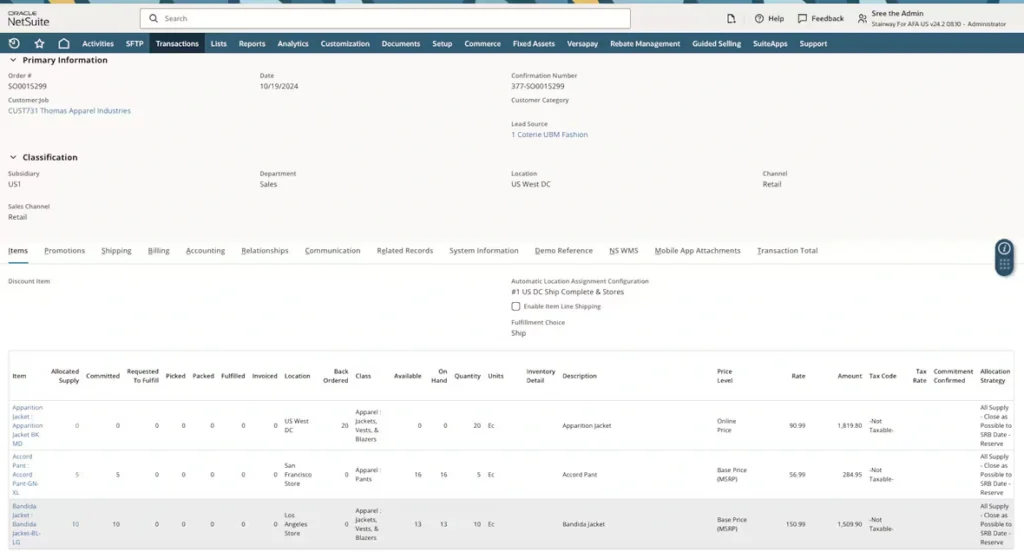
NetSuite multichannel order management provides a single source of information across all channels for inventory, pricing, order, payment and returns, ensuring customers and employees get consistent answers and enjoy a superior experience.
When all order sources flow into the same NetSuite system, the fulfillment process is the same regardless of where the order originated. Inventory updates in real time. Customer records reflect every transaction across every channel.
Inventory Mismatches Between Sales and Fulfillment
When order management and inventory management live in separate systems, the lag between what a salesperson sees and what is actually available in the warehouse creates overselling, incorrect promised delivery dates, and customer service problems.
NetSuite’s real-time inventory visibility across all locations means sales orders draw from the same inventory record the warehouse uses. Available-to-promise (ATP) inventory accounts for what is on hand, what is committed to existing orders, and what is due in from purchase orders.
Manual Order Processing That Slows Down Cash Flow
Every manual step in an order process is a potential delay and a potential error. Manual credit checks. Manual approval routing. Manual picking list printing. Manual invoice creation.
NetSuite automates each of these. Credit checks run at order entry. Approvals route digitally based on configured rules. Fulfillment instructions generate from the sales order without manual re-entry. Invoices create from shipment confirmations.
Organizations report 50% reduction in order processing time with automated workflows versus manual processes. The cash flow impact of that speed difference compounds over months.
Returns That Fall Outside the Main Process
Returns that require manual re-entry, separate spreadsheet tracking, or an undocumented process create errors in inventory, inaccuracies in financial reporting, and customer service gaps.
NetSuite’s Return Merchandise Authorization (RMA) process is part of the same workflow. RMAs create from the original sales order, pulling item and pricing details automatically. Returns flow back into inventory with full traceability.
NetSuite Multichannel Order Management
For businesses selling across eCommerce, marketplace, wholesale, and retail channels simultaneously, the order management challenge is not just processing orders. It is processing orders from different sources with different data formats, different pricing rules, and different fulfillment requirements, all without creating chaos in the same warehouse.
NetSuite handles this through omnichannel order management: a single operational model that normalizes orders from all sources before they reach the fulfillment pipeline.
What multichannel order management in NetSuite covers:
- eCommerce orders from Shopify, Magento, and BigCommerce import automatically via integration connectors
- Amazon and marketplace orders import with marketplace-specific handling rules
- EDI orders from wholesale partners process automatically with business rule validation
- Phone and manual orders enter through the native sales order interface
- All order sources draw from the same inventory pool with real-time availability
Inventory visibility spans all locations: warehouses, stores, 3PL partners, and drop-ship suppliers. When inventory is limited, allocation rules determine which orders get priority: high-value customers, time-sensitive orders, or specific channels, rather than whoever submits first.
Pricing and Promotions Management in NetSuite Order Management
Pricing is a core part of order management that most guides cover too briefly. NetSuite’s pricing engine connects directly to the sales order, which means pricing errors at order entry prevent the downstream problems they usually cause.
What NetSuite’s pricing engine covers:
- Multiple price levels: List price, wholesale price, VIP price, and custom levels apply automatically based on the customer’s assigned price group
- Customer-specific pricing: Contract pricing for specific customers that overrides standard price levels
- Quantity discounts: Tiered pricing based on order volume applies automatically at the line level
- Currency-specific pricing: For international orders, pricing applies in the customer’s currency based on configured exchange rates
- Promotions: Discount codes, percentage discounts, buy-one-get-one logic, and promotional pricing apply across all sales channels from a single configuration
Centrally manage, control and update pricing to maximize profits. Establish multiple price levels and customer- and currency-specific pricing. Easily create promotions for all sales channels: store, online, contact centers and sales orders.
The practical advantage: when a promotion is created in NetSuite, it applies correctly across every channel automatically. There is no need to update Shopify, update the EDI price feed, and update the sales team’s reference document separately.
Returns and Exchanges Management
Returns management in NetSuite follows the same transactional logic as the forward order flow. It is not a separate process. It connects back to the original order, which means the data stays clean and inventory adjustments are accurate.
The RMA process in NetSuite:
- Customer requests a return. The service team creates an RMA from the original sales order, pulling item details, quantities, and pricing automatically.
- The RMA documents what is being returned, why, and what the resolution is: refund, replacement, or credit.
- The customer ships the item back. The RMA tracks the incoming return.
- When the item is received, the system updates inventory, records the return transaction, and triggers the resolution: credit memo, replacement order, or refund.
Returns from any channel: NetSuite supports returns from all sales channels. An item purchased online can be returned in a store. A wholesale order return processes through the same RMA workflow as a direct customer return.
This matters for omnichannel businesses where customers expect to return anywhere. NetSuite’s returns management handles the cross-channel credit and inventory logic that manual processes cannot.
When Do You Need the Advanced Order Management (AOM) Module?
NetSuite’s native order management handles most mid-market order scenarios well. AOM is the right call when the business has specific operational requirements that go beyond the standard workflow.
NetSuite’s Advanced Order Management (AOM) module adds capabilities for companies with complex multi-channel fulfillment requirements. AOM routes orders to the optimal fulfillment location based on configurable rules.
Signals you need AOM:
- You have 3 or more fulfillment locations and need intelligent routing rather than manual assignment
- You sell through multiple channels and need different fulfillment rules per channel
- You need store pickup (BOPIS) or curbside pickup as a fulfillment option
- Your drop-ship program has grown to the point where manual management creates errors
- You need priority-based allocation rules when inventory is limited
- You need to decouple order release from fulfillment assignment
What AOM adds to native order management:
| Capability | Native Order Management | With AOM |
|---|---|---|
| Fulfillment assignment | Manual or basic rules | Intelligent routing by rules |
| Multi-location routing | Basic availability check | Priority-based, cost-optimized routing |
| Store pickup (BOPIS) | Not available | Native support |
| Drop ship automation | Manual management | Automated end-to-end |
| Allocation priority rules | Not available | Configurable by channel, customer, order value |
| Fulfillment request transaction | Not available | Available (decouples release from execution) |
| Order wave processing | Not available | Available |
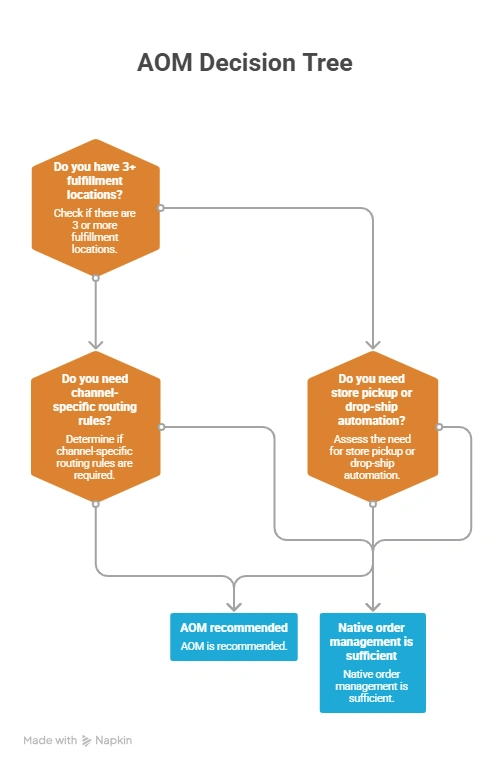
For a detailed breakdown of how AOM configuration works and what the Automatic Location Assignment feature covers, our blog on configuring NetSuite Advanced Order Management covers the setup process in detail.
How Order Management Connects to NetSuite CRM
One of the most operationally useful advantages of running order management inside NetSuite is the direct connection to the CRM module.
Every order a customer places creates a transaction record linked to their CRM record. Sales teams can see order status, payment history, and fulfillment status without leaving the CRM. Customer service teams can see every order, every return, and every communication in one place.
This connection changes what is possible in how you serve customers:
- A customer service rep can check order status, initiate a return, and create a follow-up case from the same screen
- A sales rep can see that a customer’s last three orders were all backordered before calling to propose new pricing terms
- Marketing can build segments based on order frequency, average order value, and product category preference from real transaction data
For a full breakdown of how the CRM module connects to order management and the other operational modules, our blog on NetSuite CRM modules covers how customer data flows across the system.
How NetSuite Order Management Compares to Standalone OMS Tools
Some businesses evaluate standalone order management systems alongside NetSuite. The comparison helps clarify what the integration advantage is actually worth.
| Factor | Standalone OMS | NetSuite Order Management |
|---|---|---|
| Integration with inventory | Via API or middleware | Native, same database |
| Integration with financials | Via API or middleware | Native, same database |
| CRM visibility | Separate system | Same record |
| Real-time inventory ATP | Depends on sync frequency | Real-time |
| Returns process | Often separate workflow | Connected to original order |
| Implementation complexity | Medium (requires integration build) | Lower (native to platform) |
| Data consistency | Risk of sync errors | Single source of truth |
| Total cost | OMS license plus integration maintenance | Included in NetSuite |
The core tradeoff: a standalone OMS can offer more specialized functionality for specific industries or extreme fulfillment complexity. NetSuite offers native integration that removes the sync problems, data inconsistencies, and middleware maintenance costs that come with connecting separate systems.
For businesses considering what NetSuite modules to prioritize when evaluating the platform, our review of Oracle NetSuite modules features benefits and real user feedback, covering the most commonly evaluated modules with an honest assessment.
How Folio3 Configures NetSuite Order Management
Getting NetSuite order management configured correctly requires planning before the first sales order goes through. The decisions made during configuration: fulfillment routing rules, approval thresholds, inventory allocation logic, and channel-specific pricing determine how the system behaves in production.
Folio3 has configured NetSuite order management for businesses across distribution, manufacturing, retail, and eCommerce. Our Advanced Order Management practice covers AOM configuration, channel integration, fulfillment rule design, and post-go-live optimization.
For the full scope of what NetSuite Advanced Order Management implementation covers and how Folio3 approaches it, our Advanced Order Management services page covers the implementation approach and what to expect.
Final Thoughts
NetSuite order management is not a module you configure once and forget. It is the operational core of how your business processes revenue. The businesses that get the most out of it are the ones that think carefully about their order flows before implementation: how orders arrive, how inventory is allocated, what fulfillment options exist, and where the bottlenecks currently live.
The native order management workflow covers most mid-market business needs well. When the business grows to multiple locations, multiple channels, or complex fulfillment options, AOM is the right extension.
If you want to understand which configuration is right for your specific operation, the Folio3 team works with businesses at every stage of this evaluation. Reach out for a straight answer on what fits.
Ready to configure NetSuite order management for your business? Book a 20-Minute Call
FAQs
How does NetSuite order management work?
NetSuite order management follows a four-document workflow: Sales Order, Item Fulfillment, Invoice, and Customer Payment. Each document triggers the next automatically. The sales order captures the customer’s request, inventory is allocated and released to fulfillment, an invoice generates from the fulfilled shipment, and payment applies against the open invoice. All four stages run in the same system as NetSuite’s inventory, financials, and CRM.
What is the difference between native NetSuite order management and AOM?
Native order management handles the standard order-to-cash workflow for single or few-location businesses. Advanced Order Management (AOM) adds intelligent fulfillment routing for businesses with 3+ locations, multi-channel order sources, drop-ship programs, store pickup requirements, or priority-based allocation needs. AOM also introduces the Fulfillment Request transaction, which decouples order release from fulfillment execution.
How does NetSuite handle multi-channel orders?
Orders from eCommerce, EDI, marketplaces, phone, and manual entry all flow into the same NetSuite fulfillment pipeline. All channels draw from the same inventory pool with real-time availability. Channel-specific pricing and fulfillment rules can be configured so that each channel follows the appropriate process without separate workflows.
Does NetSuite support drop shipping?
Yes. NetSuite supports drop shipping natively through the order management workflow. The Advanced Order Management module provides automated end-to-end drop-ship management, including vendor assignment, purchase order generation, vendor shipping confirmation, and customer notification. Drop ship programs that have grown to significant volume typically benefit from AOM configuration.
Q: How does NetSuite handle returns and exchanges?
NetSuite processes returns through Return Merchandise Authorizations (RMAs) that create from the original sales order. The RMA pulls item details, quantities, and pricing automatically, documents the return reason and expected resolution (refund, replacement, or credit), and tracks the return through inventory receipt. Returns from any channel are supported, including in-store returns for items purchased online.
Q: When should I use the Advanced Order Management module?
AOM is the right choice when you have 3 or more fulfillment locations that need intelligent routing, multiple order channels with different fulfillment rules, store pickup requirements, a drop-ship program that needs automation, or priority-based allocation needs when inventory is limited. For single-location businesses with straightforward order flows, native order management typically covers all requirements.