
Key Takeaways
- The order-to-cash (O2C) process is the revenue backbone of every product and service business. In NetSuite, it runs as a connected workflow across sales, operations, and finance, all in one system.
- O2C has seven core stages in NetSuite. Customer setup, order capture, credit and approval, fulfillment, invoicing, accounts receivable, and cash application. Each stage feeds the next automatically when configured correctly.
- A fast and efficient O2C cycle is critical for maintaining healthy cash flow because it reduces the time between receiving orders and getting paid. Every manual step in the process adds lag. Every lag costs money.
- Revenue recognition in NetSuite ties directly to the fulfillment event. For simple product transactions, revenue recognizes when the item ships. For complex billing models, NetSuite Advanced Revenue Management handles the timing.
- Days sales outstanding (DSO) is the most important financial metric in the O2C cycle. NetSuite tracks it in real time and gives AR teams the tools to reduce it systematically.
- The most common O2C failures are not system problems. They are configuration problems: poorly defined approval workflows, missing credit controls, invoice timing errors, and a disconnected payment application.
A CFO once described their pre-NetSuite order-to-cash process to us as “a game of telephone.” Sales entered an order. Operations had not seen the credit status. Finance created an invoice three days after the order shipped. Collections worked from a spreadsheet that was always slightly out of date. The order would be delivered, the customer would be satisfied, and then the invoice would arrive late, sit unpaid for 45 days, and generate a collections call that nobody on the team could explain because the history was scattered across five systems.
That is what NetSuite’s order-to-cash process is built to solve. When every stage runs in the same system, from the moment a customer is created to the moment cash is applied to their account, the handoffs that cause delays, errors, and revenue leakage stop happening.
This guide covers every stage of the NetSuite O2C process, what automation is available at each step, where most businesses get stuck, and how to connect the O2C workflow to NetSuite’s accounting and financial reporting capabilities.
What Is the Order-to-Cash Process?
Order-to-cash, abbreviated O2C or OTC, refers to all the steps involved in processing customer orders from the moment a customer places an order to when payment is received and applied to accounts receivable.
Steps in the order-to-cash cycle include order management, order fulfillment, billing, payment processing, and reporting. A fast and efficient O2C cycle is critical for maintaining healthy cash flow because it reduces the time between receiving orders and getting paid.
In NetSuite, it is the natural workflow of the ERP itself. The same platform that manages your customer records, your inventory, your warehouse operations, and your general ledger runs the O2C process. There is no middleware. There is no sync dependency between systems. Everything that happens in the O2C cycle updates the same database.
Order-to-cash vs. quote-to-cash
These terms are related but different. Order-to-cash begins when a confirmed order is placed. Quote-to-cash begins earlier, when a prospect receives a pricing quote. For businesses with a quoting or proposal stage, configurable products, project-based services, or contract pricing, the quote-to-cash process extends O2C backward into the CRM and pricing workflow.
For how NetSuite CRM manages the customer and prospect data that feeds into the O2C process, our blog on NetSuite CRM modules explains how customer data flows from first contact through the order workflow.
The Seven Stages of the NetSuite Order-to-Cash Process
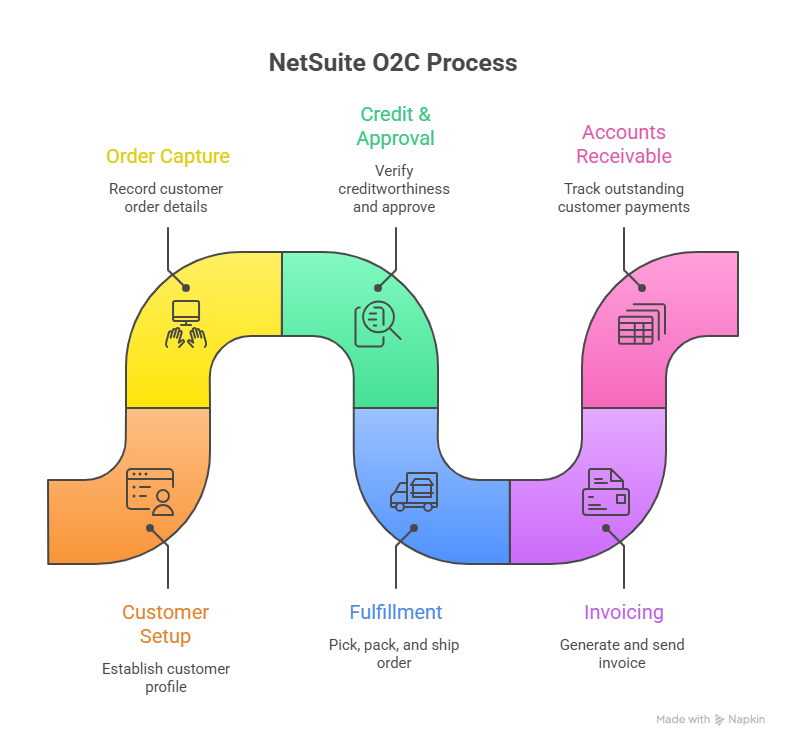
Stage 1: Customer Record Setup
The O2C process begins before any order is placed. It begins when the customer record is created in NetSuite.
A complete customer record is the foundation that all downstream O2C automation depends on:
- Payment terms: Net 30, Net 60, due on receipt, applied automatically to every invoice for this customer
- Credit limit: The ceiling beyond which orders require approval or are blocked
- Pricing group: Which price level applies to this customer’s orders
- Tax settings: Tax codes and nexus applied automatically to transactions
- Billing address: Default billing details that carry through to every invoice
When the customer record is set up correctly, every subsequent transaction is clean. When it is not, every subsequent transaction requires manual correction.
Stage 2: Order Capture
The order enters NetSuite as a Sales Order. This is the master record for the transaction.
Sales orders can originate from:
- Manual entry by a sales rep
- Conversion from a quote or opportunity in NetSuite CRM
- Import from an eCommerce platform (Shopify, Magento, BigCommerce) via integration connector
- EDI transaction from a wholesale partner
- Customer self-service portal
At the sales order stage, NetSuite validates:
- Item availability against current inventory
- Customer credit status against the configured credit limit
- Pricing rules for the customer’s price group and any active promotions
- Shipping address and tax calculation
This validation happens before the order is accepted, not after it has already caused a problem downstream.
Stage 3: Credit Check and Approval Routing
NetSuite’s credit management runs automatically at the sales order stage.
If an order would put a customer over their configured credit limit, NetSuite can:
- Block the order until approved by a designated manager
- Place the order on credit hold and alert the AR team
- Apply a different payment term (require payment upfront)
Approval workflows handle orders that need review based on value thresholds, customer type, margin, or other criteria. A sales order above $50,000, or an order for a customer whose account is past due, routes automatically to the right approver without manual escalation.
This is where many businesses find the most immediate O2C improvement. Orders that previously waited for manual credit checks now clear automatically for good-standing customers and are routed for review only when it is actually needed.
Stage 4: Fulfillment
Once the sales order is approved and released, fulfillment begins. NetSuite creates an Item Fulfillment record that instructs the warehouse:
- What to pick and from which bin location
- How to pack the items
- Which carrier to use
- What tracking information to record
NetSuite updates inventory in real time as items are picked. When the shipment is confirmed, the fulfillment record closes and the invoice process begins automatically.
For businesses with multiple fulfillment locations, or with complex fulfillment scenarios like drop ship, store pickup, or third-party logistics, the Advanced Order Management (AOM) module adds intelligent routing and allocation rules to this stage.
For a full breakdown of how AOM handles complex multi-location fulfillment scenarios, our blog on configuring NetSuite Advanced Order Management covers the setup in detail. For an overview of the AOM module and implementation scope, our Advanced Order Management services page covers the full approach.
Stage 5: Invoicing
In NetSuite, invoices are generated from Item Fulfillment records. The system bills what was shipped, not what was ordered.
This distinction matters for backordered and partially fulfilled orders. When only part of an order ships, NetSuite invoices only the shipped portion. The remaining items stay on the sales order and invoice when they ship. No manual reconciliation. No double-billing risk.
Billing schedules handle more complex invoice timing:
- Monthly recurring billing for subscription products or services
- Milestone billing for projects that invoice at defined deliverables
- Percentage-of-completion billing for long-term service engagements
Invoice delivery can be automated via email directly from NetSuite, with PDF format and payment portal links included based on configured templates.
Stage 6: Accounts Receivable
Once an invoice is sent, it sits in accounts receivable until payment arrives. This is where cash flow risk accumulates.
NetSuite’s AR management covers:
- AR aging dashboard: Real-time view of all outstanding invoices bucketed by days past due (current, 1-30, 31-60, 61-90, 90+)
- Collections queues: Automated reminders and dunning notifications at configured intervals (7 days past due, 30 days past due, 60 days past due)
- Customer credit hold: Automatic credit holds trigger when a customer’s AR balance exceeds their credit limit or when invoices reach a defined age
- AR forecasting: Expected payment timing based on customer payment patterns
Days sales outstanding (DSO) is the primary metric for AR efficiency. NetSuite calculates DSO in real time. For businesses with high DSO, NetSuite’s automated collections sequences reduce it by confirming no invoice goes unnoticed.
For businesses using NetSuite to manage the full accounting function, including AR, AP, general ledger, and financial reporting, our NetSuite for accounting covers how the accounting capabilities connect to the O2C workflow.
Stage 7: Cash Application and Revenue Recognition
When payment arrives, it applies against the open invoice in NetSuite. Cash application rules determine the sequence when a customer has multiple open invoices.
Cash application in NetSuite:
- Automatic matching of payments to invoices by amount, invoice number, or customer reference
- Partial payment handling with remainder left on the invoice
- Customer deposit application against future invoices
- Credit memo application against open balances
Revenue recognition: Revenue recognition is where the O2C cycle closes from an accounting perspective. In NetSuite, when and how revenue is recognized depends on the business model:
- Simple product sales: Revenue recognizes when the item ships. The invoice records Accounts Receivable as the debit and Revenue as the credit at the point of fulfillment.
- Subscription and SaaS models: Revenue spreads over the subscription period using NetSuite’s amortization rules. Invoicing and revenue recognition are decoupled.
- Complex multi-element arrangements (ASC 606): NetSuite Advanced Revenue Management (ARM) handles arrangements where a single sale has multiple performance obligations, for example, a product plus a multi-year support contract.
Revenue recognition is about timing and valuation, recording income when it is earned rather than when cash is received. In NetSuite, configuring revenue recognition correctly for your business model is one of the most consequential decisions in the O2C setup.
What O2C Automation Looks Like in NetSuite
The O2C process in NetSuite can be almost entirely automated. Here is what that looks like in practice when each stage is configured correctly.
| O2C Stage | Manual Process | Automated in NetSuite |
|---|---|---|
| Customer setup | Entered by account manager, checked by credit team | Template-driven, credit terms assigned automatically by customer segment |
| Order capture | Manual data entry from email or fax | eCommerce, EDI, and CRM orders import automatically |
| Credit check | AR team reviews manually before releasing | Credit limit validation at order entry, routing to approval if needed |
| Fulfillment assignment | Operations manager assigns manually | Inventory allocation and location assignment automatic based on rules |
| Invoice creation | Finance creates invoice days after shipment | Invoice auto-generates from shipment confirmation |
| Invoice delivery | Finance emails PDF manually | Invoice auto-sent via email with payment portal link |
| Collections follow-up | AR team manually checks aging and sends emails | Automated dunning sequences at configured intervals |
| Cash application | AR team matches payments to invoices manually | Auto-match by amount, invoice number, or reference |
| Revenue recognition | Accountant calculates and journals manually | Automated by revenue recognition rules and amortization schedules |
NetSuite automates the entire order-to-cash process, eliminating manual bottlenecks, minimizing data errors, and improving the flow of information from order entry to fulfillment to invoicing. The practical result is that finance teams spend less time on transaction processing and more time on analysis.
Where O2C Breaks and How to Fix It
Understanding the failure points helps you know where to focus configuration effort.
Bottleneck 1: Credit Checks Slowing Order Approval
Symptom: Orders sit in a queue for hours or days while someone manually checks credit. Fix: Configure credit limits on every customer record. Set up automated credit hold rules. Route only the exceptions, orders above threshold or customers with past-due invoices, to human review.
Bottleneck 2: Invoices Generated Days After Shipment
Symptom: Fulfillment completes on a Monday. The invoice goes out on Thursday. Cash arrives a week later than it should. Fix: Configure automatic invoice generation from the Item Fulfillment record. The invoice should go out the same day the shipment is confirmed.
Bottleneck 3: AR Team Working From Static Aging Reports
Symptom: AR aging is reviewed weekly or monthly. Collections effort focuses on whoever sent the most emails last, not on the highest-risk accounts. Fix: Use NetSuite’s AR aging dashboard in real time. Build automated dunning sequences that trigger at 7, 30, and 60 days past due without manual intervention.
Bottleneck 4: Revenue Recognition Done Manually Outside NetSuite
Symptom: Finance exports to spreadsheets to calculate deferred revenue, amortization, and multi-period recognition. Month-end close takes two weeks. Fix: Configure NetSuite’s revenue recognition rules for each item or item group. For subscription and multi-element arrangements, implement NetSuite Advanced Revenue Management. Revenue recognition should happen automatically when the triggering event occurs.
Bottleneck 5: Cash Application Errors From Manual Matching
Symptom: Payments are applied to the wrong invoice, or sit unapplied, creating false AR balance discrepancies. Fix: Configure auto-match rules. Use remittance advice on incoming payments. Set up a customer portal where customers pay against specific invoices.
Key O2C Metrics NetSuite Tracks in Real Time
| Metric | What It Measures | Where to Find It in NetSuite |
|---|---|---|
| Days Sales Outstanding (DSO) | Average time from invoice to payment | AR aging dashboard, saved searches |
| Order Cycle Time | Time from order placed to order fulfilled | Operations KPI dashboards |
| Invoice Accuracy Rate | Percentage of invoices requiring correction | AR transaction reports |
| Fill Rate | Percentage of orders fulfilled in full on first shipment | Fulfillment KPI dashboards |
| Cash Collection Efficiency | Percentage of invoices paid on time | Collections reports |
| Deferred Revenue Balance | Revenue invoiced but not yet earned | Revenue Recognition dashboard |
These metrics are available in NetSuite without exporting to a spreadsheet. Setting up dashboards for the CFO, the AR manager, and the operations team puts the right numbers in front of the right people in real time.
O2C and NetSuite Accounting: The Financial Layer
The O2C process is not just an operational workflow. It is an accounting workflow. Every transaction in the O2C cycle creates an accounting entry in the general ledger.
Understanding those entries clarifies why the O2C configuration decisions matter so much for financial reporting.
- Sales Order: No accounting impact. It is a commitment record, not a financial transaction.
- Item Fulfillment: In cost accounting, inventory is relieved and COGS records. (Debit: COGS, Credit: Inventory)
- Invoice: Revenue is recognized (for cash sales) or deferred. (Debit: Accounts Receivable, Credit: Revenue or Deferred Revenue)
- Cash Receipt: Payment is recorded. (Debit: Cash/Bank, Credit: Accounts Receivable)
- Revenue Recognition Event: Deferred revenue is released to earned revenue. (Debit: Deferred Revenue, Credit: Revenue)
When these accounting entries run automatically through the O2C workflow, the general ledger is current in real time. Finance teams can see actual revenue, outstanding AR, and cash position without waiting for a manual close process.
For businesses running NetSuite as their complete accounting platform, general ledger, AR, AP, financial statements, and period close, our NetSuite for accounting covers how the accounting capabilities connect across the full financial management function.
Final Thoughts
The order-to-cash process is where revenue either flows or stalls. In most businesses, the stall points are not mysterious. They are predictable: manual credit checks, late invoice generation, reactive collections, and spreadsheet-based revenue recognition.
NetSuite gives you the configuration tools to remove every one of those stall points. The work is in setting up the automation correctly, credit limits, approval workflows, invoice timing, collections sequences, and revenue recognition rules, so the system does what it should from the first order through the last payment.
If you want to understand how to configure NetSuite’s O2C workflow for your specific business model, or how to connect it correctly to your accounting function, our expert team of developers provides a guided answer to help you set up from scratch.
Want to talk through your specific O2C setup? Book a 20-minute call. Book a Call
FAQs
What is the order-to-cash process in NetSuite?
The order-to-cash (O2C) process in NetSuite is the end-to-end workflow from when a customer order is captured to when payment is received and applied to accounts receivable. It runs natively across seven stages: customer setup, order capture, credit and approval, fulfillment, invoicing, accounts receivable management, and cash application with revenue recognition. All seven stages run in the same NetSuite system without middleware.
What are the steps in the NetSuite order-to-cash cycle?
The seven steps are: customer record setup with payment terms and credit limit, sales order capture from any channel, credit validation and approval routing, item fulfillment with inventory allocation and shipment, invoice generation from the fulfillment record, accounts receivable management with collections automation, and cash application and revenue recognition.
How does NetSuite automate the order-to-cash process?
NetSuite automates credit checks at order entry, approval routing based on configured rules, invoice generation from shipment confirmation, invoice delivery via email, collections dunning sequences at defined intervals, payment matching to open invoices, and revenue recognition based on fulfillment events or billing schedules. Each automation reduces manual steps and the lag time they create.
What is the difference between order-to-cash and quote-to-cash in NetSuite?
Order-to-cash begins when a confirmed order is placed. Quote-to-cash begins earlier, when a pricing quote is generated for a prospect. For businesses with a quoting stage, NetSuite CRM handles the quote-to-cash workflow from opportunity through quote approval, with a single click converting an approved quote to a sales order that flows into the O2C cycle.
How does NetSuite handle revenue recognition in the O2C process?
For simple product sales, revenue recognizes automatically when the item ships and the invoice is created. For subscription, SaaS, or multi-element arrangements, NetSuite’s revenue recognition rules and Advanced Revenue Management module handle deferred revenue, amortization, and ASC 606-compliant recognition. Revenue recognition entries post automatically to the general ledger based on configured rules.
How do I reduce days sales outstanding using NetSuite?
Configure automated dunning sequences to send payment reminders at 7, 30, and 60 days past due. Set credit hold rules to stop new orders for customers with overdue balances. Use the AR aging dashboard to focus collections effort on the highest-value past-due accounts. Automate invoice delivery on the same day fulfillment is confirmed. Each of these reduces the lag between shipping and cash receipt that drives up DSO.

