
Suppose an operations team has thousands of sales orders to review. One order carries a 65 percent discount, another combines items that this customer has never purchased together, and a third is simply large because it was placed at quarter end. A saved search can catch a rule the team already knows. It is less useful when the unusual pattern comes from several fields interacting at once.
This guide addresses one narrow problem: ranking sales orders that deserve a second look. An autoencoder learns the common shape of historical transactions and assigns a reconstruction error to each new record. A higher error moves the record up the review queue. It does not declare the order fraudulent or incorrect.
The implementation starts with one row per sales order. It extracts and prepares the fields, trains a small model outside NetSuite, and returns a compact result for review. The same workflow also shows when simpler methods, such as feature selection and Principal Component Analysis, may be a better choice.
Feature extraction remains the technical foundation of this workflow. The autoencoder’s latent layer creates a smaller set of learned features, while reconstruction error turns that learned representation into a practical signal for transaction review.
Choose the right starting point
Before building a custom model, check whether NetSuite Exception Management already covers the accounting problem. Oracle describes it as a machine-learning capability that learns from an organization’s transaction history to identify incorrect amounts or accounts, vendor information changes, and missing or expected transactions. Oracle also notes that the feature is not available to every customer and depends on sufficient data volume and model readiness. Evaluate it before custom development when its supported exception types match the requirement.
| Approach | Best fit | Main constraint |
|---|---|---|
| Saved searches and rules | Known conditions, such as fixed limits, duplicate values, or missing approvals | Cannot discover every unfamiliar multivariable pattern |
| NetSuite Exception Management | Supported accounting exceptions with a native review workflow | Availability, data readiness, and supported exception scope vary |
| Custom autoencoder pipeline | Custom fields, transaction types, or workflows that need a tailored score | Requires external engineering, validation, monitoring, and ownership |
Where a custom model fits in NetSuite
NetSuite’s artificial intelligence (AI) capabilities already extend beyond anomaly detection. Oracle’s current NetSuite AI documentation includes Exception Management, Prompt Studio, the SuiteScript N/llm module for large language model services, payment-date prediction, narrative features, the NetSuite AI Connector Service, Model Context Protocol (MCP) tools, and other machine-learning features. These native capabilities should be assessed before a team commits to a custom model.
In NetSuite Next, Ask Oracle and NetSuite agents can retrieve information, analyze data, and guide supported workflows within the user’s role permissions. Oracle is making NetSuite Next available to customers in phases. A custom anomaly workflow can expose an approved score and supporting fields through an AI Connector tool, allowing an assistant to summarize the evidence for review. The model remains responsible for a reproducible score, and the reviewer remains responsible for the decision.
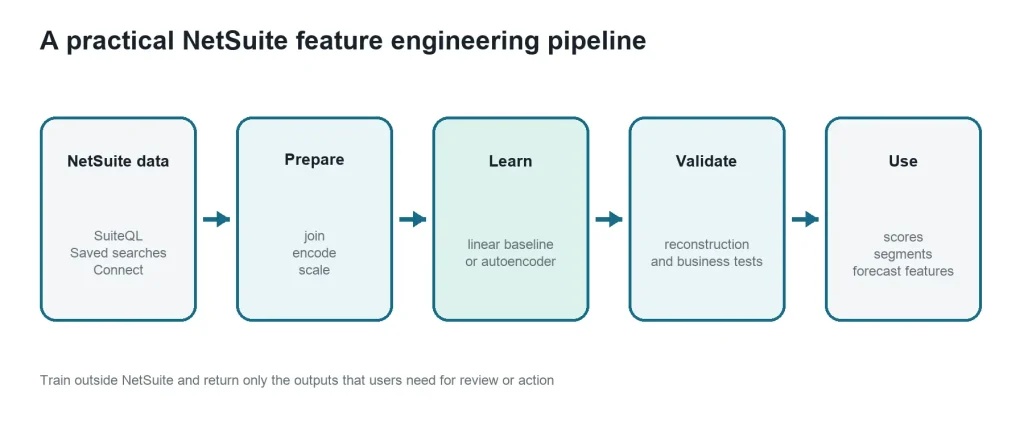
A custom model makes sense when the business question falls outside the native scope, uses custom fields or workflows, or must combine NetSuite data with another approved source. The architecture below keeps NetSuite as the system of record while compute-intensive training and validation run in an external analytics environment. SuiteQL, a NetSuite query language based on Structured Query Language (SQL), is one supported way to extract the inputs.
Why NetSuite data becomes difficult to model
A transaction model can use order value, line count, discount, item mix, customer history, return frequency, subsidiary, location, seasonality, and dozens of other signals. Some fields repeat the same information in different forms. Others are sparse, highly correlated, or useful only in one business context. Adding every available field can increase cost and make a model harder to validate without improving its decisions.
Dimensionality reduction addresses this problem by creating a smaller representation of the data. The reduced features can support anomaly review, customer segmentation, demand forecasting, or other analytics, provided that the result is tested against the business outcome it is meant to improve.
Feature selection and feature extraction for NetSuite data
Feature selection keeps a useful subset of the original fields. Feature extraction creates new features from the original data. Principal Component Analysis (PCA), Kernel Principal Component Analysis (KPCA), Linear Discriminant Analysis (LDA), and autoencoders can create reduced feature spaces, although LDA requires labels. t-distributed Stochastic Neighbor Embedding (t-SNE) is mainly an exploratory visualization method. For a NetSuite project, I would begin with feature selection and PCA, then add a nonlinear method only when the same validation data shows that it improves the result.
| Technique | Plain language explanation | Best role in this workflow |
|---|---|---|
| Feature selection | Keeps the most useful original NetSuite fields and removes unnecessary ones | First step when interpretability matters |
| Principal Component Analysis (PCA) | Combines related numeric fields into fewer linear summary features | Fast and transparent compression baseline |
| Kernel Principal Component Analysis (KPCA) | Extends PCA to represent more complex nonlinear relationships | Alternative to test when PCA misses important structure |
| Linear Discriminant Analysis (LDA) | Uses known categories to find combinations that separate those groups | Labeled classification rather than unsupervised anomaly discovery |
| Autoencoder | Learns a compact representation by rebuilding its own input | Nonlinear feature extraction and reconstruction scoring |
| Relational Autoencoder (RAE) | Adds an objective that tries to preserve relationships while compressing data | Advanced comparison when relationships matter |
| t-distributed Stochastic Neighbor Embedding (t-SNE) | Places similar records near one another on a two-dimensional visual map | Exploration and communication rather than production scoring |
Start with feature selection and PCA
Feature selection keeps original fields, which makes the result easier to explain to finance and operations teams. Remove identifiers that carry no predictive meaning, duplicated measures, unstable fields, and any field that reveals an outcome that would not be known at scoring time.
PCA is usually the first extraction method to test. It converts correlated numeric fields into a smaller set of components. Each component summarizes information from several original fields. PCA is efficient and repeatable, but its components must still be interpreted through their source fields and validated against a business metric.
KPCA applies the same idea to nonlinear patterns. It adds choices such as the kernel type and parameter values, which can increase training cost and make the result more sensitive to tuning. KPCA belongs in a comparison, not as an automatic upgrade from PCA.
Use LDA only when labels already exist
LDA uses known categories to separate groups. It may help when reviewed NetSuite records already have reliable labels, such as confirmed issue types. It is not the default choice when the objective is to discover unusual records without labels.
How an autoencoder finds unusual records
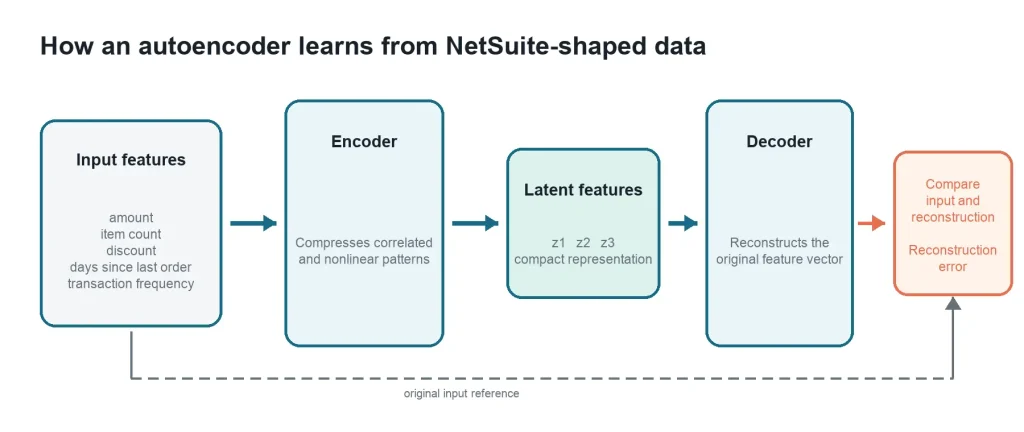
The first decision is the row grain. If one row means a sales order during training, it must still mean a sales order during scoring. Mixing order rows, line rows, and monthly customer summaries in the same model produces a score that is difficult to interpret. After that choice, the encoder compresses each prepared row into a few latent features and the decoder tries to rebuild the inputs.
During training, the network adjusts its weights to reduce the difference between the input and reconstruction. After training, a record with high reconstruction error is one the model finds difficult to reproduce. That error can rank transactions for review.
An RAE extends this approach by trying to preserve relationships in the compressed representation. It may be worth testing when those relationships are central to the problem, but its additional objective also creates more design and tuning choices.
What the score does and does not mean
The small example below makes the score concrete. The model does not prioritize T-1004 merely because one field crosses a fixed rule. Its amount, line count, discount, and customer history form a combination that the model did not reconstruct well. T-1007 stays below the example threshold even though its amount is relatively high. That difference is the reason to test a multivariable model rather than rename a large-amount rule as AI.
| Transaction | Amount | Lines | Discount | Error | Review result |
|---|---|---|---|---|---|
| T-1001 | $1,250 | 5 | 5% | 0.018 | Normal range |
| T-1002 | $1,410 | 6 | 4% | 0.024 | Normal range |
| T-1004 | $18,900 | 1 | 65% | 0.412 | Review first |
| T-1007 | $8,750 | 14 | 8% | 0.085 | Below example threshold |
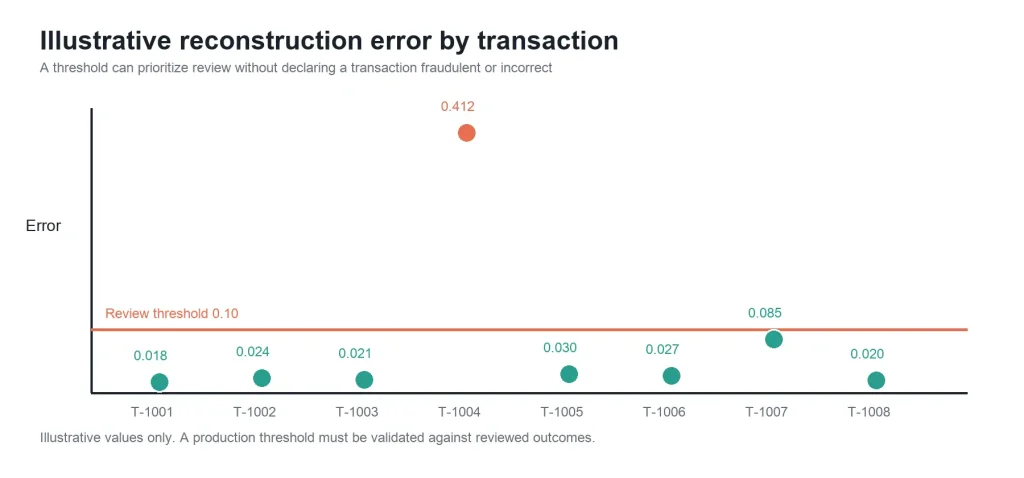
A high score may still represent a legitimate bulk order, a seasonal shift, a new product combination, or incomplete data. Return the score with the original transaction identifier, model version, scoring timestamp, and a place for the reviewer to record the outcome. Those reviewed outcomes are what make later threshold tuning possible.
Where generative AI adds value
An anomaly model and a generative AI assistant solve different parts of the workflow. The model should calculate a reproducible score. A language model can then turn the flagged fields, recent transaction history, and reviewer instructions into a concise investigation summary. It should not invent missing context, declare fraud, or post a correction without an approved control path.
An investigation prompt should receive only the context it needs: the transaction identifier, the fields with the largest reconstruction errors, a small set of comparable historical records, and links back to NetSuite. This gives the reviewer specific evidence to check.
Prepare NetSuite data carefully
- Choose one unit of analysis and use it consistently across training and scoring
- Use a time boundary that prevents future information from appearing in training features
- Treat internal IDs as identifiers rather than numeric values. Encode categories deliberately
- Scale numeric fields using parameters learned from the training period only
- Exclude sensitive data unless it is necessary, authorized, and protected throughout the workflow
- Validate on a later time period when the model will score future activity
A safe NetSuite implementation
NetSuite should remain the system of record. Data preparation, model training, and scoring belong in an external analytics environment. SuiteQL is a NetSuite query language based on SQL. It can be used through Representational State Transfer (REST) Query Services, while larger analytical extracts can use SuiteAnalytics Connect.
Oracle documents a 100,000-result ceiling for SuiteQL queries executed through REST web services; use pagination within that limit or SuiteAnalytics Connect for a larger controlled extract.
| Stage | What happens | Control to keep |
|---|---|---|
| Extract | Retrieve only the approved fields for a defined use case | Role-based access and a documented query version |
| Prepare | Join, aggregate, encode, and scale the data | Stable definitions and saved preprocessing parameters |
| Train | Compare feature selection, PCA, and autoencoder approaches | Time-based validation and a simple baseline |
| Score | Calculate reconstruction error or downstream model outputs | Model version, threshold, and scoring timestamp |
| Return | Write useful results to an approved custom record or integration table | Human review status and audit history |
Do not train a neural network inside SuiteScript. SuiteScript and workflows are better suited to orchestration, display, routing, and controlled actions after an external service returns a score.
Developer implementation example
The example is intentionally small. It is an implementation blueprint: extract approved transaction fields, prepare one sales-order row, split the data by time, train the model, calculate a candidate threshold from later validation data, and produce a review file. Replace the field list, dates, and custom-record identifiers with definitions approved for the implementation.
The sample uses Python with pandas, NumPy, scikit-learn, and TensorFlow Keras. Use a Python version supported by the TensorFlow release in your environment. The code requires pandas 2.0 or later, NumPy 1.24 or later, scikit-learn 1.2 or later, and TensorFlow 2.12 or later. Install the packages in the environment used by Jupyter, Google Colab, or Spyder, and keep NetSuite credentials outside the notebook or script. The example assumes that authentication and REST pagination are already handled by the integration layer.
python -m pip install "pandas>=2.0" "numpy>=1.24" "scikit-learn>=1.2" "tensorflow>=2.12"Extract a focused sales order dataset
SELECT
    t.id, t.trandate, t.entity, header_line.subsidiary,
    t.currency, t.exchangerate,
    header_line.location AS header_location,
    t.foreigntotal, COUNT(detail_line.id) AS line_count
FROM transaction t
JOIN transactionline header_line
  ON header_line.transaction = t.id
 AND header_line.mainline = 'T'
JOIN transactionline detail_line
  ON detail_line.transaction = t.id
 AND detail_line.mainline = 'F'
 AND detail_line.taxline = 'F'
WHERE t.type = 'SalesOrd' AND t.trandate >= TO_DATE('2026-01-01', 'YYYY-MM-DD')
GROUP BY
    t.id, t.trandate, t.entity, header_line.subsidiary,
    t.currency, t.exchangerate, header_line.location, t.foreigntotal
ORDER BY t.id
The query returns one row per sales order. NetSuite requires every sales transaction to contain at least one line item, so a regular JOIN to the filtered detail rows is appropriate here; JOIN and INNER JOIN are equivalent. The main transaction-line row supplies subsidiary and header location, while the second join counts non-main, non-tax lines without changing the sales-order grain. See Oracle’s guidance on adding items to a sales transaction.
Run the statement through the SuiteQL Query Tool or send it as the q value to REST Query Services. The Records Catalog reflects enabled features, customizations, and the active role’s permissions, so confirm the transaction and transactionLine fields and joins in the Records Catalog before use. For SuiteQL, use the Records Catalog rather than the SuiteScript Records Browser because N/query and SuiteQL use the analytics data source. Replace the date as needed. REST requests also require the Prefer: transient header and pagination through limit and offset parameters.
Refine line_count when the metric must exclude shipping, discount, hidden component, or other non-item lines. When transactions use line-level locations, define an explicit aggregation rule instead of treating the header location as the only location. In OneWorld or other multi-currency reporting, normalize the amount with the approved accounting conversion. The example below multiplies foreigntotal by exchangerate to create a base-currency modeling field; verify that definition with finance before training.
| Model field | How to define it |
|---|---|
| id, entity, trandate | Traceability, customer grouping, and time-based validation; not numeric model inputs |
| foreigntotal, exchangerate, base_total | Transaction-currency total, exchange rate, and the approved normalized amount used by the model |
| line_count | Preliminary count of non-main, non-tax lines; apply documented implementation-specific exclusions |
| customer_order_count_90d | Prior orders for the same customer in the preceding 90 days |
| days_since_last_order | Days between this order and the customer’s previous order |
| subsidiary, header_location | Categorical context from the main transaction-line row; define line-level location handling separately when needed |
Prepare the model input
The Python example expects a comma-separated values (CSV) file with one row per sales order and the fields defined above. Discount, sales-channel, item-mix, and other approved fields can be added later, but the first runnable version deliberately uses only fields returned by the sample query. The 2026 dates create consecutive training, validation, and scoring periods; adjust them together when using a different extract.
Load and split the data
import numpy as np
import pandas as pd
from sklearn.compose import ColumnTransformer
from sklearn.impute import SimpleImputer
from sklearn.pipeline import Pipeline
from sklearn.preprocessing import OneHotEncoder, StandardScaler
from tensorflow import keras

keras.utils.set_random_seed(42)

df = pd.read_csv("netsuite_sales_orders.csv")
required = {
    "id", "trandate", "entity", "subsidiary", "currency",
    "exchangerate", "header_location", "foreigntotal", "line_count"
}
missing = sorted(required - set(df.columns))
if missing:
    raise ValueError(f"Missing required columns: {missing}")

df["trandate"] = pd.to_datetime(df["trandate"], errors="raise")
for column in ["foreigntotal", "exchangerate", "line_count"]:
    df[column] = pd.to_numeric(df[column], errors="coerce")
if df[["foreigntotal", "exchangerate"]].isna().any().any():
    raise ValueError(
        "foreigntotal and exchangerate must be numeric and populated. "
        "Resolve missing currency data before training or scoring."
    )
if df[["id", "entity"]].isna().any().any():
    raise ValueError("id and entity must be populated for every sales order.")
df["base_total"] = df["foreigntotal"] * df["exchangerate"]
df = df.sort_values(["entity", "trandate"]).copy()

df["days_since_last_order"] = (
    df.groupby("entity")["trandate"].diff().dt.days
    .fillna(365).clip(lower=0, upper=365)
)
history_count = (
    df.set_index("trandate")
    .groupby("entity", sort=False)["id"]
    .rolling("90D", closed="left").count()
    .reset_index(level=0, drop=True)
)
df["customer_order_count_90d"] = history_count.fillna(0).to_numpy()

numeric = [
    "base_total", "line_count",
    "customer_order_count_90d", "days_since_last_order"
]
categorical = ["subsidiary", "header_location"]
features = numeric + categorical

train_df = df[df["trandate"] < "2026-08-01"].copy()
valid_df = df[(df["trandate"] >= "2026-08-01") &
              (df["trandate"] < "2026-09-01")].copy()
score_df = df[df["trandate"] >= "2026-09-01"].copy()

if train_df.empty or valid_df.empty or score_df.empty:
    raise ValueError(
        "Training, validation, and scoring periods must all contain rows. "
        "Adjust the example dates to match the approved extract."
    )
Encode the features
numeric_pipe = Pipeline([
    ("impute", SimpleImputer(strategy="median")),
    ("scale", StandardScaler())
])
categorical_pipe = Pipeline([
    ("impute", SimpleImputer(strategy="most_frequent")),
    ("encode", OneHotEncoder(
        handle_unknown="ignore", sparse_output=False
    ))
])
prep = ColumnTransformer([
    ("num", numeric_pipe, numeric),
    ("cat", categorical_pipe, categorical)
])

X_train = prep.fit_transform(train_df[features]).astype("float32")
X_valid = prep.transform(valid_df[features]).astype("float32")
X_score = prep.transform(score_df[features]).astype("float32")
feature_names = prep.get_feature_names_out()
Train and score the autoencoder
Train on a period dominated by reviewed, routine activity. Remove confirmed data errors and known exceptional events when feasible. If unusual or incorrect records dominate the training period, the network may learn to reconstruct the very patterns it is supposed to surface.
Build and train the model
The hidden layers use the Rectified Linear Unit (ReLU) activation function. The model is trained with Mean Squared Error (MSE), which penalizes differences between each prepared input and its reconstruction.
input_dim = X_train.shape[1]
if input_dim < 2:
    raise ValueError("The prepared dataset needs at least two feature columns.")

latent_dim = max(1, min(6, input_dim // 2))
hidden_dim = min(64, max(8, input_dim * 2))

inputs = keras.Input(shape=(input_dim,))
x = keras.layers.Dense(hidden_dim, activation="relu")(inputs)
latent = keras.layers.Dense(latent_dim, name="latent")(x)
x = keras.layers.Dense(hidden_dim, activation="relu")(latent)
outputs = keras.layers.Dense(input_dim)(x)

model = keras.Model(inputs, outputs)
model.compile(optimizer="adam", loss="mse")
model.fit(
    X_train, X_train,
    validation_data=(X_valid, X_valid),
    epochs=100,
    batch_size=64,
    callbacks=[keras.callbacks.EarlyStopping(
        patience=8, restore_best_weights=True
    )],
    verbose=0
)

valid_rebuilt = model.predict(X_valid, verbose=0)
valid_error = np.mean((X_valid - valid_rebuilt) ** 2, axis=1)
threshold = np.quantile(valid_error, 0.99)
Score and export the review queue
score_rebuilt = model.predict(X_score, verbose=0)
feature_error = (X_score - score_rebuilt) ** 2
score_error = np.mean(feature_error, axis=1)
top_k = min(3, input_dim)
top_indexes = np.argsort(feature_error, axis=1)[:, -top_k:][:, ::-1]
top_signals = [
    ", ".join(feature_names[i] for i in row)
    for row in top_indexes
]

review = score_df[["id", "trandate"]].copy()
review["anomaly_score"] = score_error
review["needs_review"] = score_error > threshold
review["top_signals"] = top_signals
review.sort_values("anomaly_score", ascending=False).to_csv(
    "netsuite_sales_orders_for_review.csv", index=False
)
Return only the evidence needed for review
A comma-separated values (CSV) file is convenient during validation. For an operational workflow, return a small result to an approved custom record or integration table instead of overwriting the sales order. A useful review record contains the transaction internal identifier, anomaly score, threshold, model version, scoring time, top signals, status, and reviewer outcome. Custom record and field identifiers are set by each implementation, so define the integration contract and test it in a sandbox before any production writeback.
{
  "transactionInternalId": "12345",
  "anomalyScore": 0.412,
  "threshold": 0.100,
  "modelVersion": "sales-order-autoencoder-v1",
  "topSignals": ["base_total", "line_count", "customer_order_count_90d"],
  "status": "Pending review"
}
The example produces an overall anomaly score and up to three transformed feature columns with the largest reconstruction errors. Those columns are investigation clues rather than causal explanations. Validate the code with an approved NetSuite extract and in a sandbox workflow before production use. Fit the preprocessor only on training data, save it with the model, and keep the feature order unchanged.
The 99th percentile is a candidate threshold, not a business decision. Calibrate it against reviewed outcomes and the number of records the team can realistically investigate. Store the preprocessing version, model version, threshold, score timestamp, and review outcome. Monitor missing values, new categories, score distribution, and reviewer acceptance over time. If the model flags every quarter-end bulk order, the pipeline needs better features or segmentation before it needs a larger neural network.
What benchmark testing showed
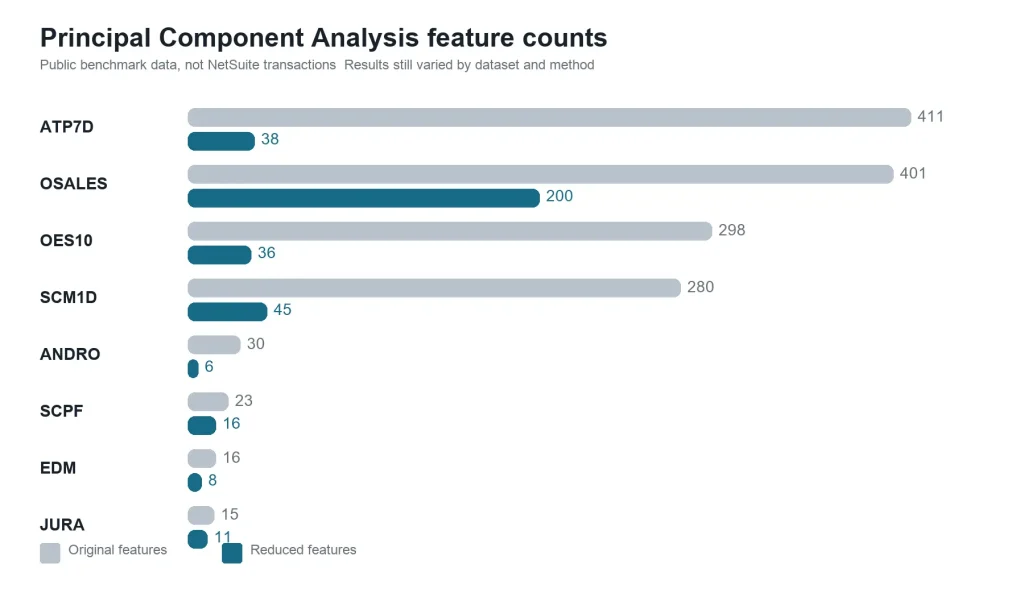
I compared PCA, KPCA, and a six-feature relational autoencoder across eight public multi-target regression datasets using the same 10-fold cross-validation approach. These were benchmark datasets, not NetSuite transactions. The comparison matters here because it tests whether added model complexity improves a measured result.
Three conclusions matter for NetSuite projects
- Compression can be substantial. In one dataset, PCA reduced 411 input features to 38 while retaining 95 percent of the measured variance.
- A smaller representation does not automatically produce a more accurate result. Some model and dataset combinations improved after compression, while others became worse.
- The nonlinear alternatives did not win consistently. The tested KPCA configuration showed no reliable overall advantage, and the relational autoencoder improved only some combinations.
The result is a useful warning against assuming that a neural network must outperform a linear baseline. For NetSuite data, compare each method with the same time window, features, review labels, and business metric. If the autoencoder does not improve that comparison, keep the simpler pipeline.
Use t-SNE for exploration
t-SNE turns high-dimensional records into a two- or three-dimensional map. Similar records often appear near one another, which can help analysts explore transaction groups, possible outliers, and records that need labels.
The figure below is an actual t-SNE projection computed from synthetic eight-dimensional records. Its colors come from the synthetic source groups; t-SNE did not discover or name those groups.
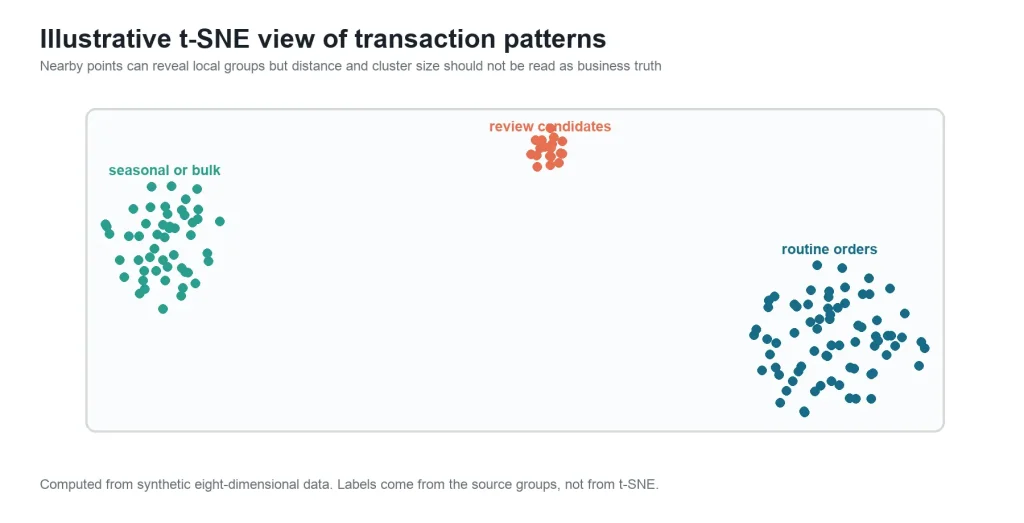
The axes do not represent NetSuite fields, and distances across the whole map can be misleading. The result can also change when its settings or random seed change. Use t-SNE to ask better questions, then verify those questions in the original data. Do not return a t-SNE position to NetSuite as an anomaly score.
Other useful NetSuite applications
| Use case | Example inputs | Possible output |
|---|---|---|
| Customer segmentation | Order frequency, value, recency, channel, geography, and returns | Compact features for clustering and customer analysis |
| Demand and cash forecasting | History, seasonality, item, customer, and subsidiary signals | Reduced inputs for related forecast targets |
| Vendor and item monitoring | Lead time, price, quantity, fulfillment, quality, and change history | Pattern shifts and records for investigation |
Checks before production
- The unit of analysis and scoring schedule are documented
- Every feature has a definition, source, owner, and time boundary
- Training, validation, and scoring use the same feature order and transformations
- The candidate model is compared with a simple baseline on a business metric
- Thresholds are calibrated with reviewed examples and available review capacity
- Scores include the model version and timestamp, and users can record outcomes
- Permissions, retention, credentials, missing-data handling, and drift are monitored
- The team has a rollback path when the data or model changes.
When an autoencoder is not the right choice
Start with a simpler method when the dataset is small, every decision must be explained field by field, a few stable rules already solve the problem, or the team cannot maintain an external model pipeline. Feature selection, ratios, rolling summaries, or PCA may deliver a safer result. The large-scale ADBench anomaly-detection comparison also shows that no single algorithm wins on every tabular dataset, so a baseline comparison is a required engineering step.
Glossary
| Term | Full form or meaning |
|---|---|
| AI | Artificial Intelligence |
| API | Application Programming Interface |
| ERP | Enterprise Resource Planning |
| LLM | Large Language Model |
| MCP | Model Context Protocol |
| PCA | Principal Component Analysis |
| KPCA | Kernel Principal Component Analysis |
| LDA | Linear Discriminant Analysis |
| RAE | Relational Autoencoder |
| t-SNE | t-distributed Stochastic Neighbor Embedding |
| SuiteQL | NetSuite query language based on SQL |
| REST | Representational State Transfer |
Frequently asked questions
Should a team use Exception Management or build a custom model
Evaluate Exception Management first when it is available and its supported accounting exceptions match the requirement. Build a custom pipeline when the use case needs different transaction types, custom fields, external data, a different scoring cadence, or a controlled experiment that the native feature does not support.
Can an autoencoder run inside NetSuite
Training and scoring should normally run in an external service or analytics environment. NetSuite supplies approved inputs and receives the results. SuiteScript can coordinate the workflow, but it is not designed for neural network training.
Does a high reconstruction error mean fraud
No. It means the prepared record differs from patterns learned during training. A reviewer still needs the original transaction context, and the threshold must be tested against confirmed outcomes.
Should PCA always run before an autoencoder
No. PCA is a useful baseline and may reduce noise or cost, but automatically combining both methods can discard useful structure. Compare the alternatives on the same validation period.
Is t-SNE part of the production model
Usually not. It is an exploratory visualization. Stable model scores, segment identifiers, or validated latent features are better candidates for operational use.
How much data is enough
There is no universal row count. It depends on the number of features, seasonality, variation, and network complexity. If validation is unstable or important business states are rare, simplify the model and collect more representative examples.
Conclusion
A production implementation should deliver a short, traceable review queue with the transaction identifier, anomaly score, model version, scoring timestamp, and reviewer outcome. I would start with one transaction type and one business question, then compare feature selection, PCA, and the autoencoder on the same later time period. The production approach should be the simplest one that improves the agreed business metric.
KPCA, LDA, relational autoencoders, and t-SNE are supporting options rather than default steps. Their results should remain tied to an owned review process. Generative AI can summarize the evidence, while the anomaly score, source fields, and final decision remain available for audit.
Related Reads
Explore more practical insights from our NetSuite experts.
Getting Started
- A Complete Setup Guide for NetSuite AI Connector
- A Setup Guide for NetSuite AI Connector with Postman: API Integration Tutorial
- Getting Started with NetSuite SuiteTalk REST API in Postman
- NetSuite MCP OAuth 2.0 Token Generator Tool
- SuiteScript Essentials: A Developer’s Getting Started Guide
- Open Source for Dummies: A Beginner’s Open Source Journey
- SuiteCommerce Development: An Illustrated Guide from Setup to Extension Deployment & Troubleshooting
MCP and Client Integrations
- IDE Integration Guide for NetSuite MCP Tools in Cursor & VS Code
- Connecting MCP with ChatGPT: A Complete Guide
- Connecting MCP Tools with Qwen
- Connecting ChatGPT Business with NetSuite via MCP: The Future of Enterprise AI Integration
- OAuth 2.0 in NetSuite: Complete Setup Guide (Client Credentials Flow)
Advanced and Architecture
- Building Custom Tools for NetSuite AI Connector: Development Guide
- Dual API Integration: Using NetSuite MCP Tools with OpenAI and Anthropic
- NetSuite MCP Challenge: Implementation Case Study & Results
- MCP Input Formats Compared: Token Usage Analysis for NetSuite MCP Tools
- Integrating NetSuite MCP Tools with AI-Powered CLI Tools
- WhatsApp Triggered AI Agent for NetSuite Using n8n and MCP Tools
- Advanced NetSuite PDF and HTML Template Tricks
- NetSuite Scriptable Cart in SuiteCommerce Advanced: 6 Problems Developers Actually Need to Solve
- Prompt Studio: From SuiteQL Rows to a Business Summary
- Yup and Joi Validation Guide: Dynamic Schemas, Conditional Rules And React Hook Form Integration
- NetSuite Map/Reduce Script Guide: Concurrency, Governance, Yielding & Restarts

