Why Map/Reduce gets confusing in production
The first Map/Reduce script is easy. The production surprises come later. Most NetSuite developers first learn Map/Reduce through getInputData(), map(), reduce() and summarize(). That is enough to build a working script. Then production asks different questions: Why does Concurrency 10 sometimes behave like 2? Why can a High-priority job lose its turn after yielding? Why can the same key run again after a restart? And how can a script process a huge input without building a huge JavaScript array first?
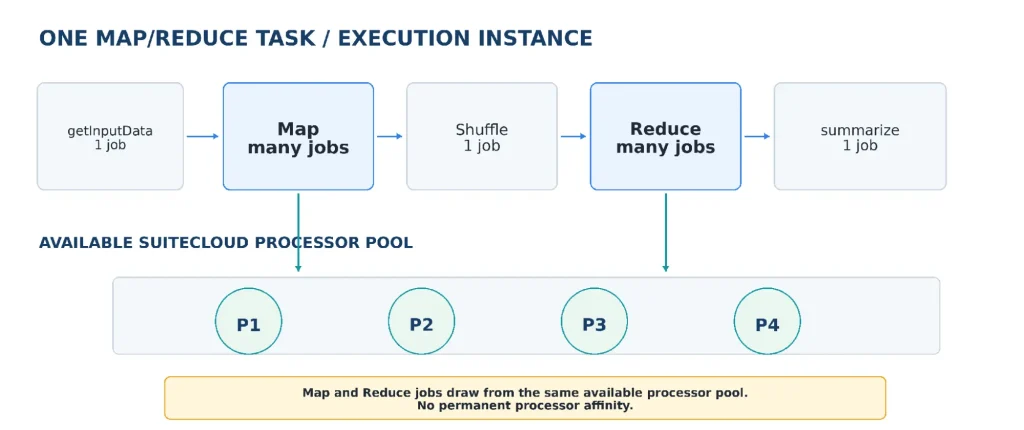
The mental model I use is simple: do not picture Map/Reduce as one long JavaScript process. One submission creates one Map/Reduce task — one execution instance of the deployment. That task moves through stages. A stage creates one or more jobs, and SuiteCloud Processors run those jobs. Once those layers are separated, the deployment settings start making sense instead of feeling like unrelated switches. If you have completed SuiteScript essentials and already know the four entry points, that is enough background to follow the rest of this guide.
The mental model to keep in your head
Execution instance → stages → jobs → SuiteCloud Processors. Concurrency controls how many Map/Reduce jobs may work in parallel; it does not create extra execution instances.
getInputData: define the workload, then get out of the way
getInputData() runs first, before Map begins, so it is not a place where I want to do heavy row-by-row work. If I manually run a huge query here, loop through every result and build a massive array, Map/Reduce has not gained any parallelism yet.
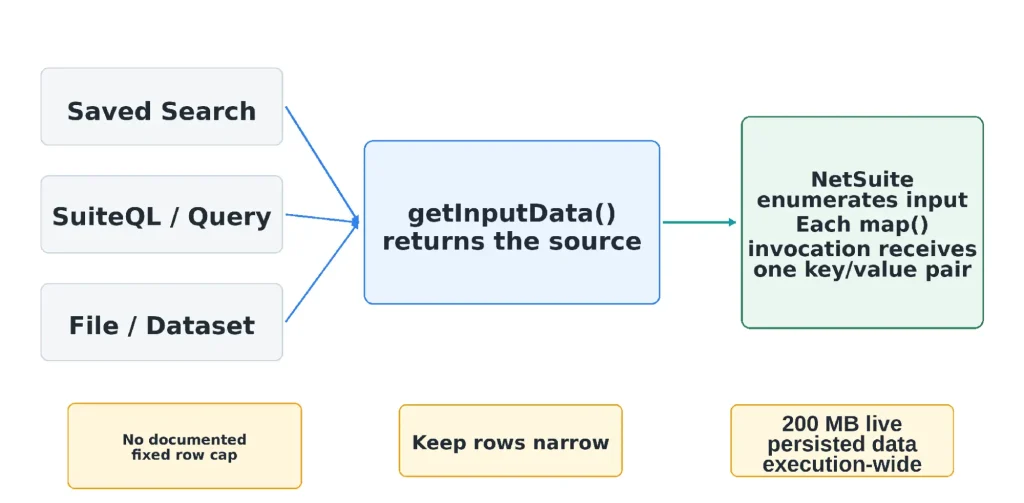
When possible, hand the data source to NetSuite. getInputData() can return an Array or Object, but it can also return a Search, Query/SuiteQL, Dataset or File, including a reference to an existing Saved Search or Query. NetSuite prepares that source for the next stage, and each map() invocation receives one key/value pair from the prepared input.
// Existing Saved Search
return { type: 'search', id: 1234 };

// Inline SuiteQL - no need to run it and build an array first
return {
    type: 'suiteql',
    query: 'SELECT id FROM customrecord_xyz WHERE isinactive = ?',
    params: ['F']
};
A common misconception
Returning SuiteQL from getInputData is not the same as calling runSuiteQL() yourself. When you return the SuiteQL source/reference, the Map/Reduce framework owns the input processing. The same idea applies to Saved Search references. If you execute the query yourself and build an array, normal N/query result/governance limits apply to your getInputData() work.
How many rows can getInputData return?
There is no Oracle-documented fixed row-count such as “100,000 rows” or “1 million rows” for a Search/Query/SuiteQL source handed to the Map/Reduce framework. That does not mean unlimited. The useful question is not only “how many rows?” but also “how much unprocessed data is being held at one time?”
Map starts only after the input stage is prepared. When you return a Search or Query reference, your JavaScript is not personally looping every row, but the framework still has to prepare input for Map. Map/Reduce has a 200 MB execution-wide persisted-data ceiling at any moment, and input search results are part of that calculation. It is not a 200 MB allowance per job or processor. Narrow rows therefore matter. Ten unnecessary columns can hurt more than the row count suggests.
Practical rule for large input
If Map only needs an internal ID, return the ID. A million narrow identifiers are very different from a million rows carrying descriptions, formulas, joined fields and JSON payloads.
A real large-delete pattern
For a one-off cleanup where the only job is “delete this record,” an ID-range sweep can be very effective: start from a known lower ID, try each ID up to the upper boundary, delete when the record exists, and skip gaps. The important part is the gap handling. NetSuite internal IDs should not be treated as a guaranteed gapless sequence or as business ordering.
For a repeatable production process, I usually prefer a narrow query with a checkpoint: select only id, process a small batch where id > lastProcessedId, save the last processed ID, then continue with the next task. The lesson is not “never use Saved Search.” The lesson is to carry only what the job actually needs.
Map, Shuffle and Reduce: your key design decides whether parallelism helps
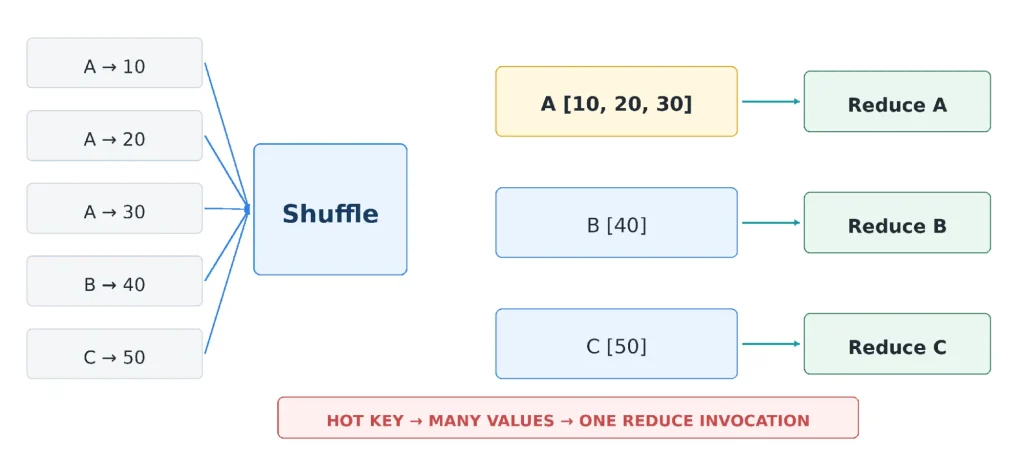
After input is ready, Map runs once per key/value pair. Anything Map writes is then passed through Shuffle. Shuffle is automatic: values written with the same key are grouped together. Reduce runs once per unique key and receives that key’s group of values.
That sounds simple, but it has a big performance consequence. If 80,000 Map outputs use the same customer ID as the key, Shuffle intentionally creates one very large group for that customer. Concurrency cannot split one unique Reduce key across multiple Reduce invocations. One hot key can therefore make an otherwise parallel Reduce stage behave almost serially.
Map-only and Reduce-only designs are both valid. If no grouping is needed, Map can be enough. If Map is omitted, getInputData feeds the input through Shuffle to Reduce. If Reduce is omitted, Map can send its output directly to summarize() when summarize is implemented. In other words, a script needs at least Map or Reduce, but not necessarily both. Do not add a stage simply because every tutorial sample has it.
Data contract between stages
Non-string data is serialized. Keep Map/Reduce keys under 3,000 characters and values written with mapContext.write() / reduceContext.write() under 10 MB. Oversized data can raise KEY_LENGTH_IS_OVER_3000_BYTES or VALUE_LENGTH_IS_OVER_10_MB. Each incoming mapContext.value can be at most 1 MB, and each individual element in reduceContext.values can be at most 1 MB. reduceContext.values is presented in lexicographical order, so do not depend on Map write order. Use the key for identity/grouping and the value for the payload.
Jobs, processors and concurrency: concurrency is a ceiling, not a promise
A Map/Reduce task is handled by several jobs. getInputData, Shuffle and summarize are serial; Map and Reduce can use several jobs in parallel. A SuiteCloud Processor runs a job. Input key/value pairs are workload, not jobs: one million input pairs do not become one million queued Map jobs. A Map job repeatedly flags unfinished pairs, invokes map() sequentially for those pairs, saves progress, then takes more work until it yields or the stage is complete. Do not design around a permanent processor number or a fixed key range.
Concurrency Limit controls the maximum parallel Map/Reduce jobs for that deployment. If the value is 5, NetSuite initially creates five Map jobs and, when Reduce exists, five Reduce jobs. Those jobs can process many Buffer Size groups during their lifetime; finishing one group does not create a new job. If a job yields, the old job ends and a replacement is scheduled for the remaining work. Concurrency 5 still does not mean five processors are reserved for you.
Accounts without SuiteCloud Plus currently have two SuiteCloud Processors. One SuiteCloud Plus license raises the pool to five. On service tiers that allow more than one Plus license, two licenses provide ten processors in total. Now take the practical case of a 10-processor account where nine processors are already busy with other account work. A deployment with Concurrency Limit = 10 can use only the one processor that is free right now. More jobs can start as capacity becomes available, up to the configured limit.
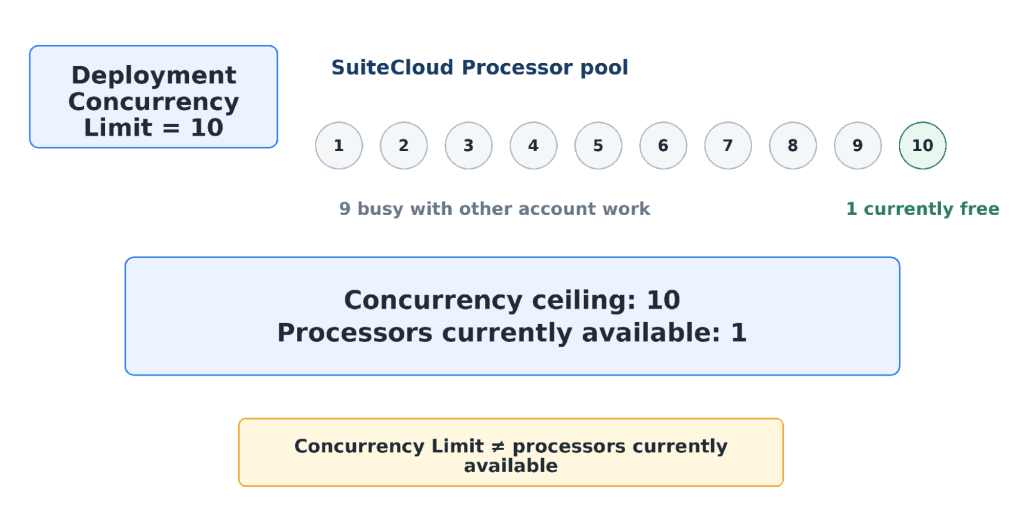
This also explains why summaryContext.concurrency can be lower than the deployment setting. It reports the maximum concurrency actually observed during the execution, not the maximum you configured.
Priority and yielding: why the same High job may not run next
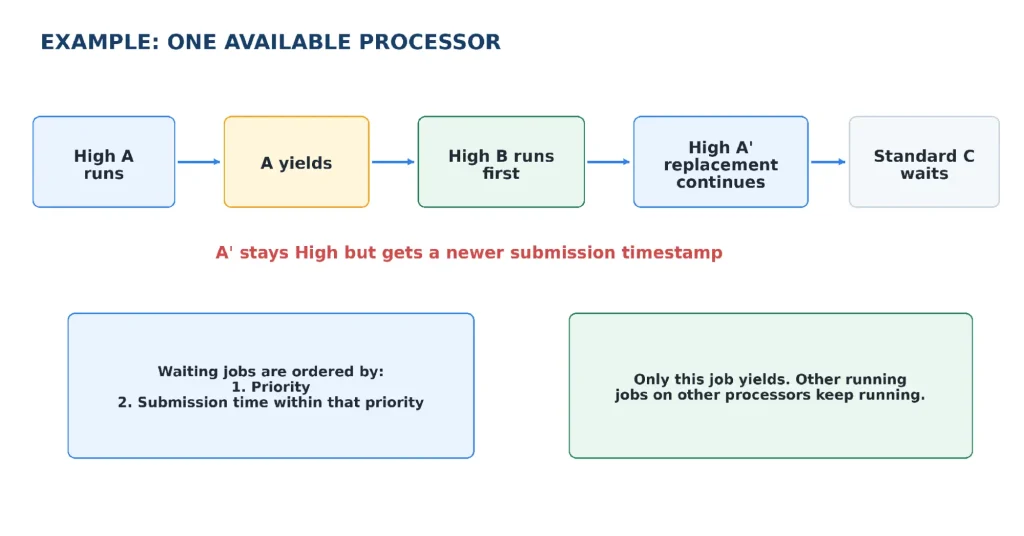
Priority decides which waiting jobs NetSuite prefers when a processor becomes available: High, then Standard, then Low. Within the same priority, older submission time wins. Priority does not normally stop a job that is already running; it decides which waiting job gets sent to the processor pool next.
Map and Reduce jobs can also yield automatically. NetSuite checks the soft job limits after each map() or reduce() invocation finishes. Yield After Minutes defaults to 60 and can be configured from 3 to 60 minutes. If a job has passed that time limit or the 10,000-usage-unit soft job limit, that job ends cleanly and a replacement job continues the remaining work. The replacement keeps the same priority but gets a newer submission timestamp. A soft yield does not replay work that was already completed. The soft counters belong to each job, not to the whole Map or Reduce stage: if Map Job 2 yields, other Map jobs that are already running continue normally.
Two account settings that change the simple picture
Priority Elevation can raise a Standard/Low job after it has waited long enough. Processor Reservation can hold account capacity for High-priority work. These are account-level SuiteCloud Processor settings, not per-deployment concurrency settings.
Governance: know what stops one invocation and what only makes a job yield
“Governance” is easier to understand when we split it into two buckets. Hard limits apply to one function call and can stop that call. Soft limits apply to a Map or Reduce job after it may have processed many keys; crossing a soft limit makes the job yield only after the current function call finishes.
| Entry point | Usage units | Time | Instructions / statements |
| getInputData | 10,000 | 60 min | 1B |
| map | 1,000 | 5 min | 100M |
| reduce | 5,000 | 15 min | 100M |
| summarize | 10,000 | 60 min | 1B |
These are per-invocation limits, not limits for the whole deployment. A Map/Reduce instance can legitimately run for much longer than an hour because Map and Reduce can execute many invocations and many jobs over the life of the task.
Instruction / statement errors are about one invocation doing too much work
A million input rows do not automatically mean one Map invocation executes a million rows. With a framework-managed input, Map normally receives one key/value pair per invocation. The instruction risk appears when one invocation itself does too much JavaScript work: a giant loop in getInputData(), heavy processing for one Map key, or a hot Reduce key with a very large reduceContext.values array.
SuiteScript 1.0/2.0/2.x can report SSS_INSTRUCTION_COUNT_EXCEEDED when one invocation performs too much JavaScript work. SuiteScript 2.1 uses the newer statement metric and reports SSS_STATEMENT_COUNT_EXCEEDED. Do not think of this as “number of source-code lines.” A loop, sort or other statement can cause a large amount of work inside the JavaScript engine.
The other hard limit people forget
The 200 MB ceiling belongs to the entire Map/Reduce execution, not to one job, processor, or Buffer Size group. NetSuite calculates it from keys/values not yet mapped, keys/values not yet reduced, and Reduce results still being held; input search results are included.
It is a live working-set limit, not a lifetime-throughput limit. A task can process far more than 200 MB over time as completed data drops out of the calculation. Even Concurrency = 1 and Buffer Size = 1 can exceed it if the outstanding input is large or wide. After an input pair is mapped, that input stops counting, but new key/value data written by Map can count as outstanding downstream data until it is processed. Exceeding the ceiling raises PERSISTED_DATA_LIMIT_FOR_MAPREDUCE_SCRIPT_EXCEEDED.
- getInputData() hard limit or uncaught error → the input stage ends and execution moves to summarize().
- Map/Reduce hard invocation failure → the current function call ends. The whole Buffer Size batch is not automatically replayed just because one key hit a code/governance error; retry/continue behavior follows the stage and retry settings.
- Persisted data above 200 MB → the current stage exits and execution moves to summarize().
- summarize() hard failure → the script stops.
Buffer Size: it is a replay window, not “job 1 gets keys 1-5”
Buffer Size is easy to misunderstand because it sounds like a normal application batch size. It actually controls how many key/value pairs a Map or Reduce job flags before saving progress. With Buffer Size = 1, the job flags one pair, processes it, saves progress, then repeats. With Buffer Size = 5, the job can flag five pairs, process them sequentially, save progress, then the same job can flag another group. Buffer Size does not mean “five keys per job,” and it does not create a new job after every five keys.
Do not model this as “Map job 1 owns IDs 1-5 and Map job 2 owns IDs 6-10.” Multiple jobs claim unfinished pairs from the framework, and exact key ranges/order are not a contract. The 1-5 example in Figure 6 is only a teaching shortcut.
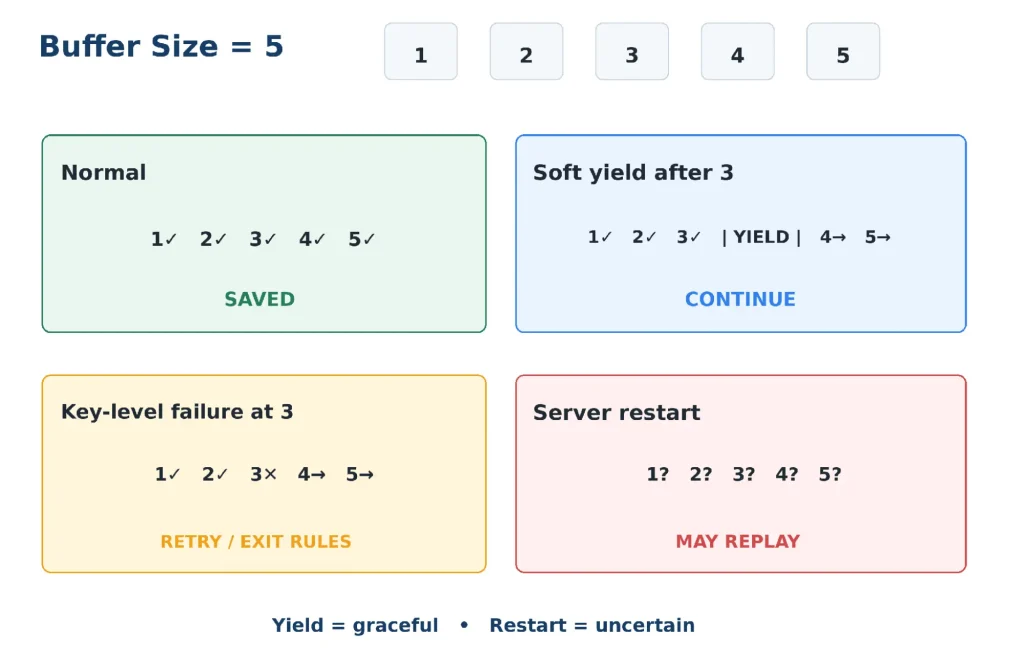
The important split is graceful versus uncertain. A soft yield waits for the current invocation to finish, saves completed progress and lets a replacement job continue. A server interruption is different: NetSuite may not know which flagged pairs were fully completed, so the uncertain flagged group can run again. NetSuite removes partial context.write() output from that interrupted group, but it cannot undo a Sales Order already created, an email already sent, a file already written or an API call that already succeeded.
Why Buffer Size = 1 is the safe default
A larger buffer may save a little progress-write overhead, but it increases the number of pairs that can be replayed. For record-processing scripts, leave it at 1 unless you have measured a reason to change it.
Restarts and retries: assume a key may run again
Restart-safe code is not the same as “skip when context.isRestarted === true.” A restarted flagged group can contain a key whose Map function never actually ran before the interruption. isRestarted tells you that the work belongs to a restart; it does not prove that this exact business operation already completed.
For diagnosis, mapContext and reduceContext also expose executionNo and errors. executionNo tells you whether the current key is on its first or a later attempt, while errors lets you inspect failures from previous attempts. Use these as recovery signals, not as proof that a business side effect already completed.
This is why idempotency matters. In plain language: if the same key runs twice, the final business result should still be correct. A processed flag, deterministic external ID, custom tracking record, or an update that naturally produces the same result each time are common ways to make that safe.
retryCount and exitOnError answer different questions. retryCount (0-3) controls retries for uncertain/failed Map or Reduce key/value work. Without retryCount, an application-server restart retries uncertain flagged pairs by default, while an uncaught code error does not automatically retry the failed pair. exitOnError decides whether the stage stops after retries are exhausted or continues with other keys. One practical detail: if your code catches an exception and does not rethrow or explicitly record it, NetSuite sees that invocation as completed; mapSummary.errors or reduceSummary.errors will not automatically contain that swallowed error.
A small configuration example:
return {
    config: {
        retryCount: 2,
        exitOnError: false
    },
    getInputData,
    map,
    reduce,
    summarize
};
One practical pattern: move one unusually heavy unit from Map to Reduce
Automatic yielding cannot save a single Map invocation that is about to cross Map’s hard 1,000-unit limit. In a real production case, a BOM traversal could be too heavy for one Map call even though the workload still belonged naturally to Map/Reduce.
One workable pattern is to save the business state before Map gets too close to its limit: persist the remaining queue/partial result, write a special “pending work” key, return from Map, and let Reduce resume the same logical unit with Reduce’s larger 5,000-unit allowance. This is an application design pattern, not a manual Map/Reduce yield.
Use this only when it really fits
Reduce is not a generic escape hatch for a heavy Map function. If the logical work can be divided into smaller independent Map keys, that is usually cleaner. The handoff pattern is useful when one business unit genuinely needs more work than Map can safely finish. If the workload fundamentally requires a long, dependent sequence of operations inside one invocation, Map/Reduce may be the wrong fit; another script type, such as a scheduled script, can be cleaner.
Scheduling and chaining: one deployment cannot have two unfinished instances
Concurrency and overlapping executions are different. One execution instance can have many Map/Reduce jobs working in parallel, but the same deployment record cannot have another unfinished execution instance at the same time. NetSuite’s native recurring Map/Reduce schedule can submit a deployment as frequently as every 15 minutes; it is not a one-minute scheduler. If a process truly needs a fixed one-minute recurrence, use an external scheduler or orchestration layer to trigger the NetSuite process programmatically. The scheduled time is still a submission time, not a guaranteed execution start.
If the next scheduled time arrives while the same deployment still has an unfinished instance, NetSuite cannot create a second overlapping instance for that deployment. Do not treat the schedule as a way to stack another copy behind the running one. If true overlap is required, create multiple deployment records for the same script.
Submit All Stages At Once does not make Map and Reduce run together, and it does not reserve processors in advance. When enabled, NetSuite submits the jobs for all stages up front, so the scheduler already knows about later-stage work. Normal stage dependencies still decide when those jobs are eligible to run: Map waits for getInputData() to finish; Reduce waits for Map and Shuffle.
A job that is waiting on a stage dependency does not occupy a processor and does not block other eligible jobs from running. For example, if this deployment is High priority but its Map jobs are still waiting for getInputData(), another eligible High-priority job can use the available processor. Once Map becomes eligible, its jobs compete normally for available SuiteCloud Processors, up to the deployment’s Concurrency Limit, under the usual priority, submission-time, Priority Elevation, Processor Reservation, and account-workload rules. In short: submitted early does not mean processors reserved early. The option is enabled by default, and Oracle generally recommends leaving it enabled.
The N/task detail that is easy to miss
There are two similar-looking submission cases, and this difference is useful when building queue-style processing.
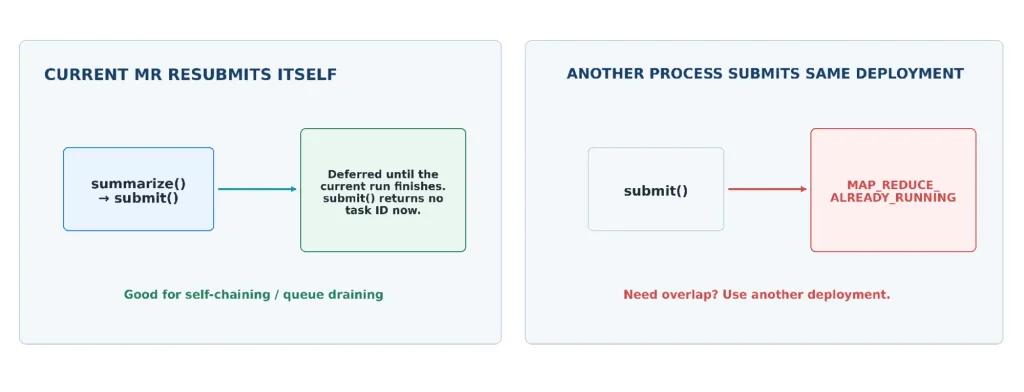
- If the currently running Map/Reduce calls MapReduceScriptTask.submit() to resubmit itself, such as from summarize(), NetSuite delays that self-resubmission until the current execution finishes. In that self-resubmission case, submit() does not return a task ID.
- If a separate submission tries the same script ID + deployment ID while that deployment still has an unfinished instance, NetSuite can throw MAP_REDUCE_ALREADY_RUNNING.
- If you maintain multiple deployments for the same script, you can omit deploymentId and let NetSuite look for an available deployment.
This makes summarize() a natural place to decide what happens next: finish, send a notification, start a dependent process, or continue draining a business queue. If Script B must run only after Script A is finished, chain it explicitly instead of trusting processor order or schedule timing.
What I monitor after the script is live
The deployment record tells me what I asked NetSuite to do. summarize() and the status/processor pages tell me what actually happened. That is where I can separate slow code from a hot key, low processor availability, retries or frequent yielding.
- total elapsed seconds and usage
- number of yields
- maximum observed concurrency
- input, Map and Reduce errors
- restart indicators and failed keys
- whether another task needs to be submitted
For one execution, the Map/Reduce Script Status page shows the jobs inside the task. For the account-wide picture, SuiteCloud Processors Monitor is more useful: processor utilization, wait time by priority, concurrency, elevated priority activity and processor settings.
Practical testing note: the SuiteScript Debugger cannot debug a deployed Map/Reduce execution directly. For real troubleshooting, use focused unit tests, execution logs, the Map/Reduce Script Status page, SuiteCloud Processors Monitor, and the restart/error context described above.
The production checklist I now use
- Is getInputData() returning the data source instead of doing a large search/query loop itself?
- Am I carrying only the columns and payload Map/Reduce actually needs?
- Could one Shuffle key become a hot Reduce key?
- Is Concurrency Limit appropriate for the account instead of simply set to the maximum?
- Can one map() or reduce() invocation stay comfortably inside usage, time and instruction/statement limits?
- Does the workload split cleanly into small independent units, or would another script type fit the dependency chain better?
- Could input or intermediate data push persisted data toward 200 MB?
- Is Buffer Size still 1 unless I have a measured reason to increase it?
- If a key runs twice, will record/file/email/API side effects still be safe?
- Do retryCount and exitOnError match the failure behavior I actually want?
- If another process must follow this one, is the chaining explicit and compatible with the one-unfinished-instance rule?
Closing thought
Map/Reduce becomes much easier once the pieces are connected. getInputData() defines the workload. Map works on individual pairs. Shuffle groups matching keys. Reduce works on those groups. Jobs carry the work, and SuiteCloud Processors run the jobs. Concurrency limits parallel work; priority and submission time order waiting jobs; yielding gives capacity back; restart-safe code makes repeated work safe.
That mental model is more useful than memorizing deployment fields one by one. It explains why Concurrency 10 can behave like 1, why a yielded High-priority job can move behind another High job without becoming Standard, why huge input is more about payload shape than a magic row count, and why Buffer Size and idempotency belong in the same conversation.
If you remember only one line
Design the workload so NetSuite can split it, pause it, retry it and resume it without changing the business result.
Related Reads
Continue building your NetSuite development knowledge with these practical Folio3 guides.
Getting Started
- A Complete Setup Guide for NetSuite AI Connector
- A Setup Guide for NetSuite AI Connector with Postman: API Integration Tutorial
- Getting Started with NetSuite SuiteTalk REST API in Postman
- NetSuite MCP OAuth 2.0 Token Generator Tool
- SuiteScript Essentials: A Developer’s Getting Started Guide
- Open Source for Dummies: A Beginner’s Open Source Journey
- SuiteCommerce Development: An Illustrated Guide from Setup to Extension Deployment & Troubleshooting
MCP and Client Integrations
- IDE Integration Guide for NetSuite MCP Tools in Cursor & VS Code
- Connecting MCP with ChatGPT: A Complete Guide
- Connecting MCP Tools with Qwen
- Connecting ChatGPT Business with NetSuite via MCP: The Future of Enterprise AI Integration
- OAuth 2.0 in NetSuite: Complete Setup Guide (Client Credentials Flow)
Advanced & Architecture
- Building Custom Tools for NetSuite AI Connector: Development Guide
- Dual API Integration: Using NetSuite MCP Tools with OpenAI and Anthropic
- NetSuite MCP Challenge: Implementation Case Study & Results
- MCP Input Formats Compared: Token Usage Analysis for NetSuite MCP Tools
- Integrating NetSuite MCP Tools with AI-Powered CLI Tools
- WhatsApp Triggered AI Agent for NetSuite Using n8n and MCP Tools
- Advanced NetSuite PDF and HTML Template Tricks
- NetSuite Scriptable Cart in SuiteCommerce Advanced: 6 Problems Developers Actually Need to Solve
- Prompt Studio: From SuiteQL Rows to a Business Summary
- Yup and Joi Validation Guide: Dynamic Schemas, Conditional Rules And React Hook Form Integration