
You open Claude Code in a backend with 606 TypeScript files and ask one question: where do reservations get created? The agent greps for reservation, gets a few hits, and opens a long service file to check one of them. Then a controller. Then a helper that turns out to be unrelated. You haven’t asked for a single change yet, and a big slice of your context window is already gone.
Your coding agent reads code as text. Your editor never did.
That gap is what this guide closes. VS Code knows where every function lives before you Ctrl+click it, knows the fields on an object before you type the dot, and underlines a wrong type before you save. We’ll give the agent the same two things: a code graph built from the AST (where things are and what calls what) and the TypeScript language server (exact types, exact references, and errors right after an edit).
Then we test it on a real project: a NestJS property management backend with 606 TypeScript files and 74,456 lines of code. Using the same feature, prompt, and model, token usage dropped from 100.4K to 64.1K, a 36% reduction.
What you’ll get from this guide:
- one setup command that wires a code graph and a language server into Claude Code
- the before and after numbers from our 606-file demo, with screenshots
- the free and paid tools, with claimed vs. measured savings
The Basics
AST (abstract syntax tree). Your code turned into a tree of parts: this file has a class, the class has a method, the method calls another function. It’s the code’s structure without the formatting.
Tree-sitter. A fast parser that builds that tree for 100+ languages, one file at a time, with no compiler and no project setup. It knows a function exists and where it’s called. It doesn’t know types.
LSP (Language Server Protocol). The standard way an editor talks to a language server, a background process that understands your whole project the way the compiler does. For TypeScript, VS Code uses tsserver, while LSP clients can use typescript-language-server. Both provide go to definition, hover types, autocomplete and the red squiggles.
Code graph. The AST data from every file stored as nodes (functions, classes, routes) and edges (calls, imports, extends), so the agent can ask “who calls this?” and get a short answer instead of reading files.
The short version: tree-sitter builds the map, the language server answers the precise questions.
1) The problem: reading files is what costs you
Most agent sessions follow the same loop: search, read, decide, and search again. Search is cheap, but reading files uses up context. The agent often has to read an entire file just to find the relevant 40 lines. Tracing a call chain means opening even more files.
In a large backend, finding one feature can mean opening 20–30 files just to change 3. Since grep matches text, the agent also wastes time reading irrelevant results.
So the real question is: how do we let the agent find the right 40 lines without reading the other 2,000?
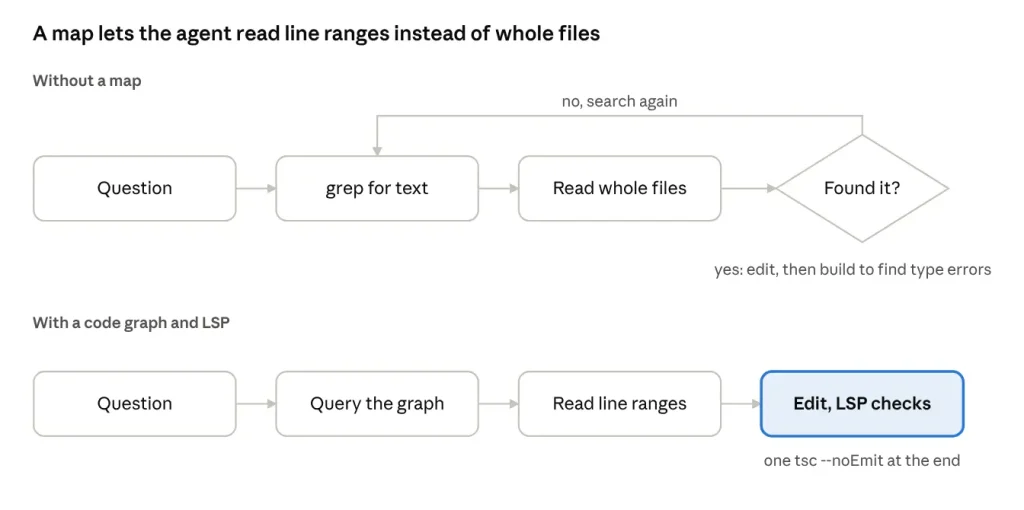
Without a map, every wrong guess costs another search and another full read. With a graph and a language server, the agent goes straight to the lines it needs and checks types as it edits.
2) Why it hurts quality, not only cost
Tokens cost money, but the bigger problem is what a full context does to the model.
Matt Pocock describes every LLM as having a smart zone and a dumb zone: roughly the first 40% of context is where the model is sharp, and past that it starts making mistakes (AI Hero). His AI coding dictionary adds that on frontier models the dumb zone commonly starts around 125K to 150K tokens, a figure he calls debated, and that the zones don’t follow the context window limit. A session can be deep in the dumb zone with most of the window still free.
A 1M-token window doesn’t make the model smarter. It gives you a bigger dumb zone.
That’s why the Ralph loop caught on. Instead of one long session, it runs the agent in a loop where each iteration starts with a fresh context, and progress lives in your files and git history instead of the conversation.
Ralph keeps sessions short. A code graph and a language server keep each short session from burning its budget on exploration. You want both.
3) What VS Code does that your agent doesn’t
When you open a folder in VS Code, you see “Initializing JS/TS language features” in the status bar. What is it building?
A map. When you Ctrl+click a function, VS Code doesn’t search every file. It already knows where the definition is. When you type reservation., it already knows the fields.
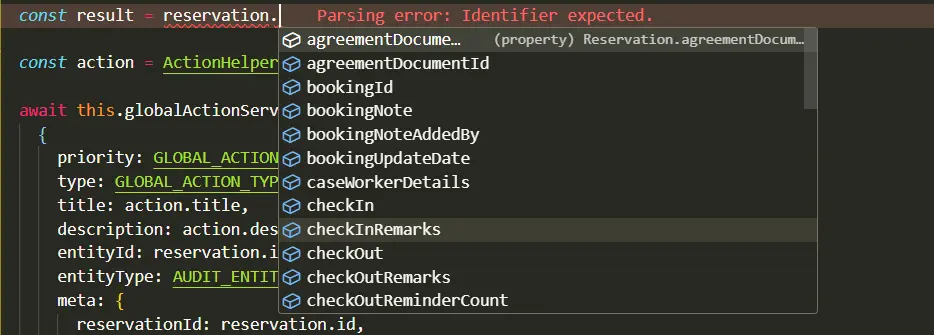
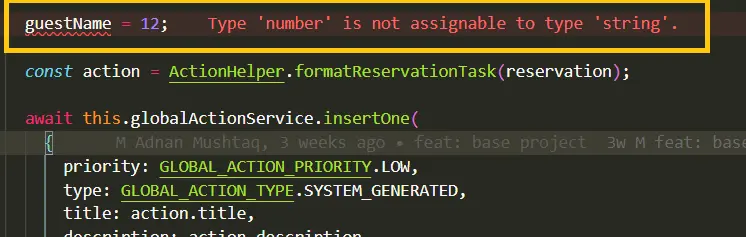
When you pass a string where a number belongs, the red underline shows up before you save.
These separate pieces do this work
| Piece | What it knows | Speed | Used by |
|---|---|---|---|
| Tree-sitter | The syntax tree: functions, classes, calls, imports | Very fast, one file at a time | Neovim, Zed, GitHub code navigation, most agent code-map tools |
| Language server (LSP) | Types, exact definitions, every reference, errors | Slower to start, reads your tsconfig |
VS Code go to definition, hover, diagnostics |
Tree-sitter can parse almost any language without a compiler, but it can’t tell which specific save() method is being called. Only the language server knows the exact type of this.repo.
By default, your agent has neither. It only has grep and a file reader. That’s the gap.
4) Why RAG lost to agentic search, and where grep still costs
Before agents, the standard fix was RAG: split code into chunks, embed them, put them in a vector database, and pull back the closest matches.
Claude Code tried that and dropped it. Boris Cherny, who works on Claude Code, has said early versions used RAG with a local vector database, and the team found fairly quickly that agentic search generally worked better (SmartScope)
Agentic search means the model uses grep, glob and file reads in a loop, like a developer would. It’s always fresh, because it reads the real bytes.
But grep still has the problem from section 1. It finds text, not structure, and every match costs a read to confirm.
The answer isn’t going back to embeddings. It’s a structural index the agent queries the same agentic way: ask a small question, get a short exact answer, then decide what to read.
5) AST graph and LSP: who answers what
A code graph turns your repo into rows. Nodes are symbols (functions, classes, methods, routes). Edges are relationships (calls, imports, extends). “Who calls createReservation?” becomes one query that returns a handful of lines, file and line number each, and the agent reads only the 30 lines around the caller it cares about.
The language server covers what the graph can’t. The graph matches by name, so two save methods look the same to it. The language server knows which one, because it knows the types.
| The agent wants to know | Ask |
|---|---|
Where is ReservationService and what’s in it? |
Code graph |
| Who calls this method? (fast, by name) | Code graph |
| What breaks if I change this? (the shortlist) | Code graph |
Which save is this, exactly? |
Language server |
| Every real reference before a rename | Language server |
| Did my last edit break any types? | Language server |
And this is the second punchline. Without a language server, the agent finds type errors the slow way: edit, run tsc or the build, read a long compiler log, fix, build again. With it attached, the error shows up on the line it just changed, right after the edit, and it fixes it on the spot.
Grep sees text. LSP sees code.
You still run one final tsc --noEmit before you ship, because the language server mostly reports on the files being edited, and a changed signature can break a file nobody opened. The win is one build at the end instead of a build after every change.
6) Set up your agent with one command
One command connects Claude Code to Graft for code navigation, the language server for definitions and diagnostics, and Ponytail for simpler code. It also adds the CLAUDE.md instructions that tell the agent when to use them.
Before you start
Node.js 22.3 or newer with npm. Use a current LTS release.
Git and an existing Git repository for your project.
Claude Code CLI installed and signed in, with the claude plugin commands available.
The command configures Claude Code and needs internet access plus permission to install npm packages globally.
Run the setup
Open a terminal at the root of your project and run:
npx --yes github:m-adnan-mushtaq/codebase-agent-setupChoose 1 for TypeScript or 2 for JavaScript. Both use the same language server. In Windows PowerShell, use npx.cmd if the execution policy blocks npx.ps1.
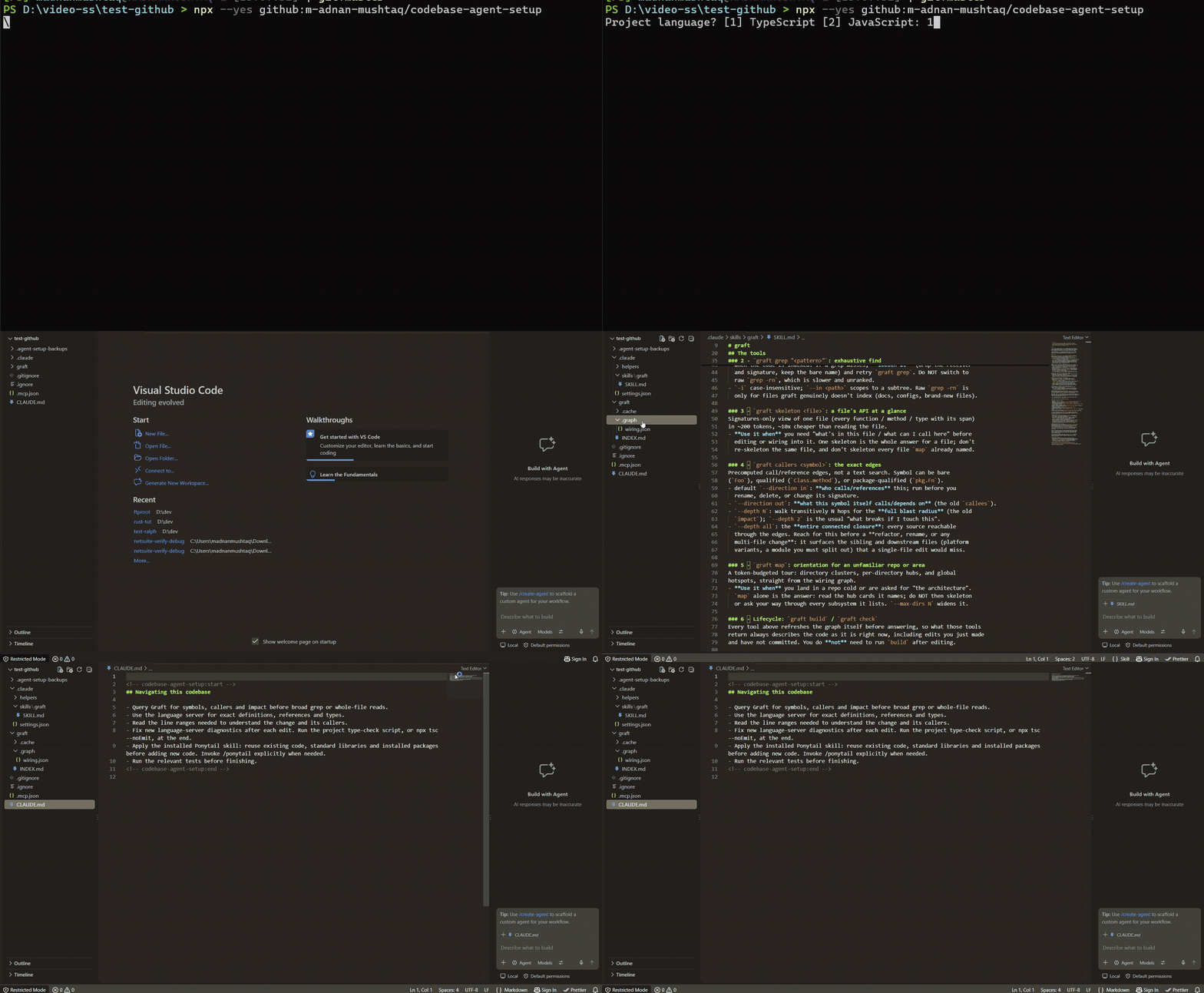
What the command sets up
- Graft builds a local map of your code and connects it to Claude Code.
- The language server and official LSP plugin provide symbol navigation, references, and diagnostics.
- Ponytail is installed as a plugin, and an unchanged copy of its skill is added to
.claude/skills/ponytail/SKILL.md. CLAUDE.mdreceives the navigation instructions automatically. Existing project instructions and JS/TS configs are preserved.
Restart Claude Code in the same project. Check that both plugins appear in /plugin, then ask for the definition of a function you know. You can call /ponytail explicitly when you want to use its skill.
The source and troubleshooting notes are in the GitHub setup repository.
For JavaScript, a new jsconfig.json starts with checkJs disabled. Navigation still works; add // @ts-check to selected files when you are ready to enable checking.
Explore the generated code map
After the build, Graft creates Markdown cards that mirror your source folders. The recording below shows the build output, the folder tree, and a generated card in the editor. On the demo backend, the output reports 3,361 nodes, 8,397 edges, and 606 file cards.

The graph is a local cache kept out of Git. Each teammate runs the same setup to build their own copy. Dependency and build folders are skipped; review generated files already tracked by Git.
7) The demo: 606 files, one feature, two sessions
With Graft and the language server attached, the same feature cost 36% fewer tokens on a NestJS backend.
The project is a multi-tenant property management backend: 606 TypeScript files, 74,456 lines of code, and 40+ modules. Big enough that no agent can hold it in context, and typical of what most of us work in.
The Task
We picked a change that looks small but touches more of the codebase than it seems: a reservation can now be booked by the guest or by someone on their behalf.
Feature: booked on behalf of a guest.

Today a reservation assumes the guest booked it themselves. Add support for someone booking on behalf of the guest:

- Add a flag on each reservation that says whether the guest booked it themselves or someone booked on their behalf.
- When it's booked on behalf, capture the booker's contact details: full name, email, phone, and an optional relationship to the guest (e.g., assistant, family, company).
- Booker details are required when booked on behalf, and must not be accepted when the guest booked it themselves.
- Existing reservations should be treated as booked by the guest themselves (safe migration with a default).
- Create, update, and read endpoints for reservations must handle the new fields, following the existing DTO and validation conventions.
- Anything else in the codebase that creates, copies, or maps reservations must stay correct with the new fields.
- Add tests for the validation rules.

Make sure the project compiles and the relevant tests pass. Then give me a short summary of files changed and the migration name.
Keeping it fair
- Same prompt, word for word, in both sessions.
- Same model: Claude Opus 5.5 at medium effort.
- Same starting commit, a fresh session for each run.
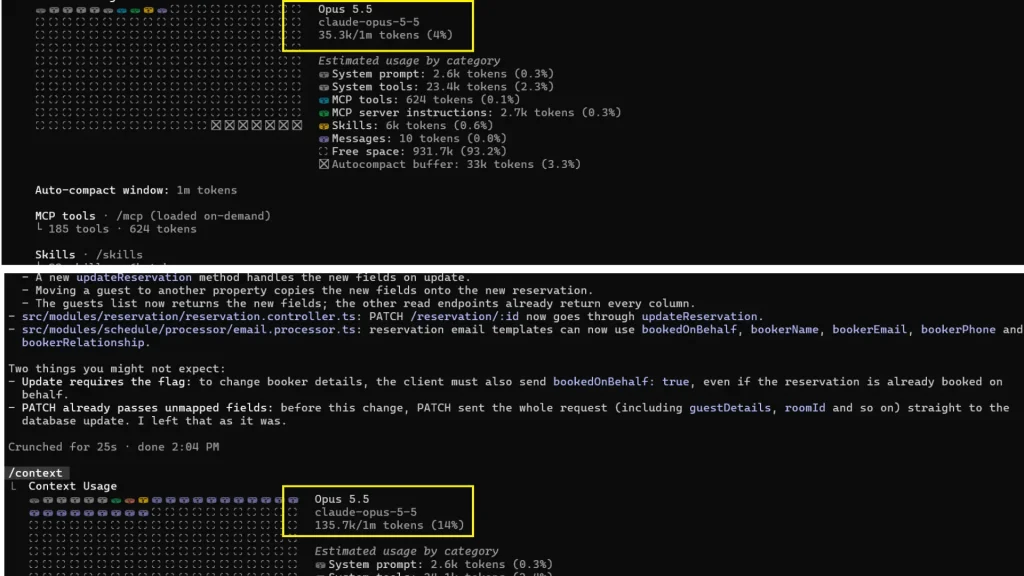
- Session A: stock Claude Code, no code graph, no LSP plugin.
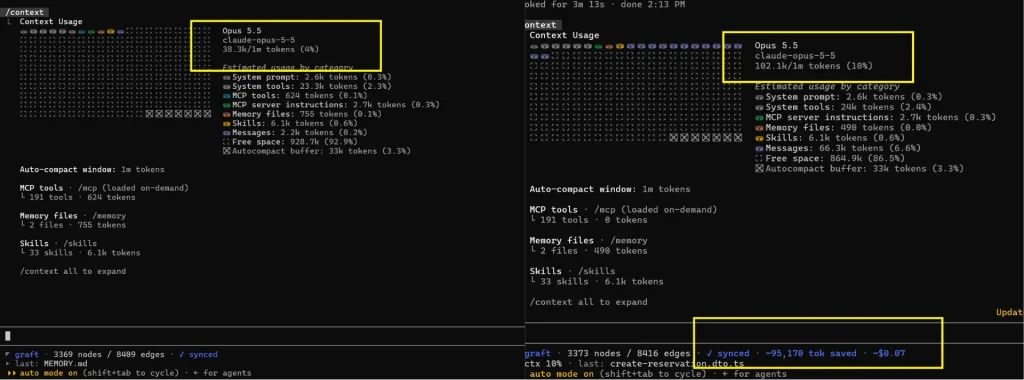
- Session B: Graft and the TypeScript LSP plugin, set up with the command from section 6 (Ponytail left off, so it can’t take credit).
- Token counts read from
/contextat the start and the end of each session.
Session A: Claude usage screen showing /context at the start and after the agent finishes.
Session B: Claude usage screen showing /context at the start and after the agent finishes.
The results
| Session A: no graph, no LSP | Session B: Graft + LSP | |
|---|---|---|
| Context at session start | 35.3K | 38.0K |
| Context at task end | 135.7K | 102.1K |
| Tokens spent on the task | 100.4K | 64.1K |
The fair number is the task-only cost, end minus start: 36.3K fewer tokens, a 36.2% drop. Measured on the full session, including what loads before you type anything, the drop is 24.8%.
The tools aren’t free. Session B started 2.7K tokens higher, because Graft’s skill, hooks and the LSP plugin load into every session. On this task, that cost paid for itself about 13 times over.
Why 36% and not 70x
Tool pages often quote much bigger numbers, and they aren’t lying, they’re measuring something else. A code graph cuts exploration: finding files and tracing calls. It doesn’t cut implementation. Writing the migration, the DTOs, the validation, and the tests costs about the same in both sessions. On a lookup question the savings are huge. On a full feature with real code to write, a third off is what a good result looks like.
8) Popular Options
Graft isn’t the only option. Treat every savings number below as a claim until you test it on your own repo; where we found an independent measurement, it’s next to the claim.
Free and open source
| Tool | How it works | Get it |
|---|---|---|
| Graft | Tree-sitter graph across 20+ languages, MCP server and CLI, impact analysis. Runs locally without embeddings; anonymous usage telemetry can be disabled. | npm install -g @nanonets/graft, then graft init (GitHub) |
| Claude Code LSP plugins | Official plugins, one per language, that connect Claude Code to a language server for diagnostics and code navigation | /plugin install typescript-lsp@claude-plugins-official plus the server binary |
| Serena | Runs the same language servers VS Code uses and exposes them as MCP tools, so it works across Claude Code, Codex, Cursor, and others | claude mcp add --scope user serena -- serena start-mcp-server --context claude-code --project-from-cwd |
| Graphify | Tree-sitter parsing plus a call-graph pass, run locally. Also pulls docs, PDFs, and images into the graph. | /graphify . inside Claude Code |
| Aider repo map | The original idea: tree-sitter plus PageRank to give a coding agent a map of the repo. Many tools here borrow it. | Built into Aider |
| Codebase Memory MCP | Written in C, parses 158 languages with tree-sitter, answers structural queries in under a millisecond | Single binary, MCP server |
Paid
| Tool | How it works | Starting price |
|---|---|---|
| Augment Code | Proprietary Context Engine, a live codebase index, with an MCP server so other agents can query it (pricing) | $20/month |
| Greptile | Builds a knowledge graph of your codebase, mainly for PR review, and ships an MCP server agents can query (pricing) | Free Starter; see current Pro pricing |
| Sourcegraph | Long-running enterprise code search with AI on top (pricing) | Enterprise Starter from $19/user/month |
Prices checked against vendor pricing pages in November 2026
9) Write less code with Ponytail
Reading less is half the bill. The other half is the agent writing more code than the task needs. Ponytail tells the agent to reuse existing helpers, the standard library, and native platform features before adding code. It is already included in the setup above.
In an independent test of 80 paired tasks, JetBrains measured about 15% less code, 10.3% lower cost, and 11% less time with Ponytail. Those results belong to that workload; they are separate from our Graft and LSP demo. Read the English benchmark.
10) What this could save a team of 50
For a team lead, the useful question is how much more work the same AI budget can support. Our demo used 36,300 fewer context tokens for one feature on a 606-file codebase. If that result holds across a team, the difference becomes easier to see in a monthly budget.
Assume 50 developers each complete four comparable AI-assisted tasks per working day, over 22 working days per month. That is 200 tasks a day and 4,400 a month. We apply the same 100,400 versus 64,100 context-token increase from the demo to every task. This is a planning scenario, not a measured team rollout.
| Context growth | Standard setup | Graft and LSP | Difference |
|---|---|---|---|
| Per comparable task | 100,400 tokens | 64,100 tokens | 36,300 fewer |
| 50 people per day | 20.08M tokens | 12.82M tokens | 7.26M fewer |
| 50 people per month | 441.76M tokens | 282.04M tokens | 159.72M fewer |
Turning those tokens into a budget estimate
Context growth is not a bill. Agents can resend context, receive output, use cached input, and compact a session, so the screenshots do not tell us the chargeable token mix. To put the scale in dollars, suppose the reduction translated one-for-one into fewer uncached API input tokens. At the published Claude Opus 5.5 input rate of $4 per million tokens, the input-equivalent estimate is:
| Input equivalent at $4 per million | Standard setup | Graft and LSP | Difference |
|---|---|---|---|
| Team per working day | $80.32 | $51.28 | $29.04 |
| Team per 22 day month | $1,767.04 | $1,128.16 | $638.88 |
The arithmetic is 50 people x 4 tasks x 36,300 tokens = 7.26 million fewer context tokens a day. Multiply by 22 working days and $4 per million to get $638.88 per month in this input-equivalent scenario. At one comparable task per person per day, the monthly estimate is $159.72; at eight, it is $1,277.76.
Caching changes the dollar value substantially. If the same reduction displaced only cache-hit input at $0.20 per million, the four-task scenario would be about $31.94 per month instead. Output is priced separately at $20 per million tokens and is not estimated here. Fixed-price Claude subscriptions also do not automatically become cheaper when context use falls; the practical benefit may be more room within usage limits.
Rates checked in November 2026. Source: Anthropic API pricing.
Treat this as a reason to run a small pilot. Track billed input, cached input, output, task completion, and elapsed time across comparable work before projecting savings for all 50 people. The demo did not measure a team-wide time saving, and Ponytail was disabled, so its separate benchmark result is not added to this estimate.
Wrapping up
Your agent doesn’t need a bigger context window. It needs to stop filling the one it has with files it never needed to read.
A tree-sitter graph tells it where things are and what connects to what, for a few lines of context per question. The language server answers what tree-sitter can’t: exact types, exact references, and whether the last edit broke anything. On our 606-file backend, that pair reduced context growth during a real feature by 36%, keeping the session further from the dumb zone while it worked.
Start with the setup command in section 6, run one task you already know well, and compare /context before and after. Measure actual billed usage separately if you want a dollar saving you can rely on.
Related Reads
Continue building your NetSuite development knowledge with these practical Folio3 guides. They cover API integrations, MCP tools, authentication, development workflows, and real world implementation patterns that complement the code navigation techniques discussed in this guide.
Getting Started
• A Complete Setup Guide for NetSuite AI Connector
• A Setup Guide for NetSuite AI Connector with Postman: API Integration Tutorial
• Getting Started with NetSuite SuiteTalk REST API in Postman
• NetSuite MCP OAuth 2.0 Token Generator Tool
• SuiteScript Essentials: A Developer’s Getting Started Guide
• Open Source for Dummies: A Beginner’s Open Source Journey
• SuiteCommerce Development: An Illustrated Guide from Setup to Extension Deployment & Troubleshooting
MCP and Client Integrations
• Connecting MCP with ChatGPT: A Complete Guide
• IDE Integration Guide for NetSuite MCP Tools in Cursor & VS Code
• Connecting MCP Tools with Qwen
• Connecting ChatGPT Business with NetSuite via MCP: The Future of Enterprise AI Integration
• OAuth 2.0 in NetSuite: Complete Setup Guide (Client Credentials Flow)
Advanced and Architecture
• A Development Guide to Build Custom Tools for NetSuite AI Connector
• Dual API Integration: Using NetSuite MCP Tools with OpenAI and Anthropic
• NetSuite MCP Challenge: Implementation Case Study & Results
• MCP Input Formats Compared: Token Usage Analysis for NetSuite MCP Tools
• Integrating NetSuite MCP Tools with AI-Powered CLI Tools
• WhatsApp Triggered AI Agent for NetSuite Using n8n and MCP Tools
• Advanced NetSuite PDF and HTML Template Tricks
• NetSuite Scriptable Cart in SuiteCommerce Advanced: 6 Problems Developers Actually Need to Solve
• Prompt Studio: From SuiteQL Rows to a Business Summary
• Yup and Joi Validation Guide: Dynamic Schemas, Conditional Rules And React Hook Form Integration
• NetSuite Map/Reduce Script Guide: Concurrency, Governance, Yielding & Restarts
• SuiteCommerce Development: A Complete Practical Guide to SuiteCommerce Extension Development
• NetSuite Transaction Anomaly Detection with Autoencoders
• NetSuite N/llm Under the Microscope: What Worked, What Broke, and What We Learned
• NetSuite Tips and Tricks: Practical Lessons from Real-World Development
• NetSuite SuiteCloud Developer Assistant vs. Claude Code vs. Cursor: A 12-Task Benchmark
